<?xml version="1.0" encoding="utf-8"?>
<feed xmlns="http://www.w3.org/2005/Atom">

  <title><![CDATA[The Future Is Now]]></title>
  <link href="http://mistys-internet.website/blog/atom.xml" rel="self"/>
  <link href="http://mistys-internet.website/blog/"/>
  <updated>2026-10-19T04:58:11+00:00</updated>
  <id>http://mistys-internet.website/blog/</id>
  <author>
    <name><![CDATA[Misty De Meo]]></name>
    
  </author>
  <generator uri="http://octopress.org/">Octopress</generator>

  
  <entry>
    <title type="html"><![CDATA[Performing digital surgery to fix MIDIs for my hardware (and then discovering the entire premise of my post was wrong)]]></title>
    <link href="http://mistys-internet.website/blog/post/2026/08/25/how-i-fixed-an-mt-32-midi-soundtrack-for-the-hardware-i-use/"/>
    <updated>2026-08-25T16:27:25+00:00</updated>
    <id>http://mistys-internet.website/blog/post/2026/08/25/how-i-fixed-an-mt-32-midi-soundtrack-for-the-hardware-i-use</id>
    <content type="html"><![CDATA[<p>Now, I know almost every technical writeup on this blog is obscure, but this is going to be a really weird one. This is about a round of surgery I applied to a set of MIDI files a few years back to get them playing on a device I owned. I started out thinking this was going to be a quick writeup on something I’d already done but, as you’ll see, I encountered a significant plot twist that greatly complicated things. But I get ahead of myself!</p>

<hr />

<p>This will shock no one who’s read my recent posts, but I love retro music technology. One of my personal prize possessions is a <a href="https://en.wikipedia.org/wiki/Roland_MT-32">Roland MT-32</a>, a classic MIDI synthesizer from the 80s, and I’ve got an enormous collection of hundreds of MIDIs I listen to. Yes, my life is exactly like the <a href="https://www.youtube.com/watch?v=UteyS6tUqXk">Cinco MIDI organizer sketch</a>.</p>

<p>I especially love listening to MT-32 songs on original hardware because it’s just such an <em>unusual</em> synth. It’s one of a few devices Roland made using their <a href="https://en.wikipedia.org/wiki/Linear_arithmetic_synthesis">“linear arithmetic synthesis”</a>, which combines traditional synthesis<sup id="fnref:1"><a href="#fn:1" class="footnote" rel="footnote" role="doc-noteref">1</a></sup> with PCM-based samples. The marriage of two very different styles of synthesis gives it an incredibly unique sound unlike pretty much anything else, and I adore hearing what people do with it. On top of its unique style of synthesis, it was completely programmable - unlike pretty much all of the other early PCM-based synthesizers. It allowed musicians to blend its PCM samples in novel ways and to freely program the substractive synthesis portions, which meant that on top of its 128 builtin instruments it was possible to produce an incredibly wide range of different sounds.</p>

<p>There’s a good chance you’ve heard a higher-end version of the sound from the <a href="https://en.wikipedia.org/wiki/Roland_D-50">Roland D-50</a>, the MT-32’s older cousin - for example, the main instrument from the backing track to <a href="https://www.youtube.com/watch?v=LTrk4X9ACtw">Orinoco Flow</a>. Never heard an MT-32? Here’s a recent song by <a href="https://bubblegumoctopus.bandcamp.com">Bubblegum Octopus</a>, who I consider to be the modern-day master of the MT-32’s sound:</p>

<iframe style="border: 0; width: 100%; height: 120px;" src="https://bandcamp.com/EmbeddedPlayer/album=4094980965/size=large/bgcol=ffffff/linkcol=0687f5/tracklist=false/artwork=small/track=3976760464/transparent=true/" seamless=""><a href="https://bubblegumoctopus.bandcamp.com/album/big-battles-ii">Big Battles II by Bubblegum Octopus</a></iframe>
<p></p>

<p>A few years back, I was linked to a set of about 20 MT-32 MIDIs I really wanted to listen to… which, unfortunately, didn’t play back correctly on my hardware. The problem is, MT-32 isn’t really one device but a family of compatible devices. <em>Mostly</em> compatible devices, that is. I have an original-model “old” MT-32, but Roland followed it up with a couple of newer models: a revised model with slightly improved sound quality; and a newer device called the CM-32L, which adds a few extra builtin instruments<sup id="fnref:2"><a href="#fn:2" class="footnote" rel="footnote" role="doc-noteref">2</a></sup>. The “new” MT-32 wasn’t marked as a different device from the old one, but unluckily for me it and the CM-32L have one big compatibility difference from the “old” MT-32 that breaks some music for me.</p>

<p>Since the MT-32 has programmable instruments, it obviously needs to be able to accept commands to program them. And since it’s a pure MIDI device, it needs to be able to take those commands <em>over MIDI</em>. To support things like this, MIDI has a feature called <a href="https://en.wikipedia.org/wiki/MIDI#System_Exclusive_messages">system exclusive commands</a> which allows sending MIDI messages with contents that are specific to a particular set of hardware or a particular manufacturer’s products. You can transfer them separately from music, but since they’re just MIDI messages like actual music commands you can actually embed them right in a MIDI file so they’ll be sent as you play it.</p>

<p>The earliest model of MT-32 has a tiny amount of RAM to serve as a buffer that can easily get overwhelmed by sending too many large MIDI commands too quickly. Many sources will give you strict instructions to include at least 40ms of delay between each command, which was widely ignored - especially since the later models all included a larger buffer that didn’t need you to be nearly as strict about it. If you, like me, have an older model MT-32 you may well find that a lot of music composed for the newer models just won’t play back right without tweaks. (I’m very used to the dreaded “Buffer Overflow” and “Exc. Checksum Error” messages on its builtin LCD.)</p>

<p>There are fixes for this if you’re using emulators or certain other retro software environments; DOSBox has a configuration option to enforce 40ms between messages, for example, which will adjust the timing of data on the fly before sending it off to real hardware. None of that helps me when I’ve just got a set of MIDIs I’m listening to on a normal MIDI player, though. This is a bit too specialized a feature to show up in any normal MIDI player, and I’m not far gone enough to be writing my own yet<sup id="fnref:3"><a href="#fn:3" class="footnote" rel="footnote" role="doc-noteref">3</a></sup>.</p>

<p>I could have just opened the files in a sequencer and done it by hand, but there were 20 songs in this set and I didn’t really want to be doing that much manual editing. Since this keeps happening to me, I’d rather have some kind of solution that I can use for other music in the future instead of needing to do manual surgery every single time. The plan: come up with some way to programmatically open MIDI data; identify the system exclusive commands; adjust the space between them so there’s always at least 40ms; and then shift the actual music data by the total of all the delays I’d introduced so that the rest of the timing still lines up.</p>

<p>While I was looking around for options, <a href="https://nya.social/notes/818cfc2c52d9639c62b4dcde">someone suggested</a> I try out a pair of interesting-looking tools: <a href="https://www.fourmilab.ch/webtools/midicsv/"><code class="language-plaintext highlighter-rouge">midicsv</code> and <code class="language-plaintext highlighter-rouge">csvmidi</code></a>. The former takes a binary MIDI file and transforms it into a plaintext CSV file, and the latter does the opposite. If it worked, this looked like it would be perfect. It would take no time to write up a short script to manipulate the CSV and transform it back into a MIDI, and it should be pretty easy to apply whatever I figured out here to other files in the future. First, though, a test: if I was going to be round-tripping this through CSV and back again, could I convert it from MIDI to CSV to back again and have it be the same?</p>

<div class="language-plaintext highlighter-rouge"><div class="highlight"><pre class="highlight"><code>$ sha2 -256 01.mid
SHA-256 (01.mid) = 617a8e8144c1d7da0c2be712635a61cdccbfa49dd3c2c5e50942247dc26a7a6a
$ midicsv 01.mid 01.csv
$ csvmidi 01.csv 01-roundtripped.mid
SHA-256 (01-roundtripped.mid) = 617a8e8144c1d7da0c2be712635a61cdccbfa49dd3c2c5e50942247dc26a7a6a
</code></pre></div></div>

<p>Yes! The files are byte-identical. I should be able to trust that any changes in the output file are the ones I want.</p>

<p>Now that I know this workflow looks viable, let’s take a look at that CSV output:</p>

<div class="language-plaintext highlighter-rouge"><div class="highlight"><pre class="highlight"><code>0, 0, Header, 0, 1, 384
1, 0, Start_track
1, 0, Tempo, 500000
1, 0, Time_signature, 4, 2, 24, 8
1, 209, Control_c, 1, 10, 64
1, 326, System_exclusive, 12, 65, 0, 22, 64, 6, 0, 0, 0, 64, 0, 58, 247
</code></pre></div></div>

<p>Pretty simple format. As expected, this is raw MIDI data represented in text rather than binary data. MIDI is, essentially, a series of events which occur on a timeline; each of them is a command like, say, “play a certain note on a certain channel”. Each row in this CSV is an individual command, which makes it very easy for us to find exactly what we want to work with. There’s only really two fields that are relevant to us here for what we want to do: the third field is the name of the event, which lets us identify the <code class="language-plaintext highlighter-rouge">System_exclusive</code> messages, while the second field is the absolute time at which this event occurs. Since we don’t need to actually read the <em>content</em> of the system exclusive messages and don’t need to care about any other messages except what timestamp they’re at, this is nearly all the information we need for automated MIDI surgery.</p>

<p>That time field requires a little explanation. Since MIDI is a protocol for <em>sequenced</em> music, not <em>recorded</em> music, it’s not using an absolute time measurement; it’s using a value relative to the song’s time signature. This is measured in <a href="https://en.wikipedia.org/wiki/MIDI_beat_clock">“MIDI clocks”</a>, which are defined as 1/24 of a quarter note. We can turn that into absolute time values using the value defined in the tempo command, which is defined as taking the number of microseconds per quarter note. In this case our <code class="language-plaintext highlighter-rouge">Tempo 500000</code> lets us know that each quarter note is 500,000μs (0.5 seconds) and the song plays at a tempo of 120 beats per minute<sup id="fnref:4"><a href="#fn:4" class="footnote" rel="footnote" role="doc-noteref">4</a></sup>, so we can derive what our 40ms interval is in MIDI clock units from that. Given these numbers we can determine that at 120bpm, one MIDI clock is about 20.83ms, so we need at least two MIDI clocks between each system exclusive message to be safe. Now that we’ve worked that out, let’s take a look at the actual system exclusive messages in this song. This is from the original, unmodified song and represents MIDI messages 29 through 38 in the file.</p>

<div class="language-plaintext highlighter-rouge"><div class="highlight"><pre class="highlight"><code>1, 326, System_exclusive, 12, 65, 0, 22, 64, 6, 0, 0, 0, 64, 0, 58, 247
1, 444, System_exclusive, 255, 65, 16, 22, 66, 5, 0, 0, 0, 0, 24, 50, 12, 0, 1, 0, 0, 1, 24, 50, 12, 0, 1, 0, 0, 2, 24, 50, 12, 0, 1, 0, 0, 3, 24, 50, 12, 0, 1, 0, 0, 4, 24, 50, 12, 0, 1, 0, 0, 5, 24, 50, 12, 0, 1, 0, 0, 6, 24, 50, 12, 0, 1, 0, 0, 7, 24, 50, 12, 0, 1, 0, 0, 8, 24, 50, 12, 0, 1, 0, 0, 9, 24, 50, 12, 0, 1, 0, 0, 10, 24, 50, 12, 0, 1, 0, 0, 11, 24, 50, 12, 0, 1, 0, 0, 12, 24, 50, 12, 0, 1, 0, 0, 13, 24, 50, 12, 0, 1, 0, 2, 6, 24, 50, 12, 0, 1, 0, 0, 15, 24, 50, 12, 0, 1, 0, 0, 16, 24, 50, 12, 0, 1, 0, 0, 17, 24, 50, 12, 0, 1, 0, 0, 18, 24, 50, 12, 0, 1, 0, 0, 19, 24, 50, 12, 0, 1, 0, 0, 20, 24, 50, 12, 0, 1, 0, 0, 21, 24, 50, 12, 0, 1, 0, 0, 22, 24, 50, 12, 0, 1, 0, 0, 23, 24, 50, 12, 0, 1, 0, 0, 24, 24, 50, 12, 0, 1, 0, 0, 25, 24, 50, 12, 0, 1, 0, 0, 26, 24, 50, 12, 0, 1, 0, 0, 27, 24, 50, 12, 0, 1, 0, 0, 28, 24, 50, 12, 0, 1, 0, 0, 29, 24, 50, 12, 0, 1, 0, 0, 30, 24, 50, 12, 0, 1, 0
1, 446, System_exclusive_packet, 10, 0, 31, 24, 50, 12, 0, 1, 0, 49, 247
1, 510, System_exclusive, 255, 65, 16, 22, 66, 5, 2, 0, 0, 32, 24, 50, 12, 0, 1, 0, 0, 33, 24, 50, 12, 0, 1, 0, 0, 34, 24, 50, 12, 0, 1, 0, 0, 35, 24, 50, 12, 0, 1, 0, 0, 36, 24, 50, 12, 0, 1, 0, 0, 37, 24, 50, 12, 0, 1, 0, 0, 38, 24, 50, 12, 0, 1, 0, 0, 39, 24, 50, 12, 0, 1, 0, 0, 40, 24, 50, 12, 0, 1, 0, 0, 41, 24, 50, 12, 0, 1, 0, 0, 42, 24, 50, 12, 0, 1, 0, 0, 43, 24, 50, 12, 0, 1, 0, 0, 44, 24, 50, 12, 0, 1, 0, 0, 45, 24, 50, 12, 0, 1, 0, 0, 46, 24, 50, 12, 0, 1, 0, 0, 47, 24, 50, 12, 0, 1, 0, 0, 48, 24, 50, 12, 0, 1, 0, 0, 49, 24, 50, 12, 0, 1, 0, 0, 50, 24, 50, 12, 0, 1, 0, 0, 51, 24, 50, 12, 0, 1, 0, 2, 5, 24, 50, 12, 0, 1, 0, 2, 18, 24, 50, 12, 0, 1, 0, 0, 54, 24, 50, 12, 0, 1, 0, 0, 55, 24, 50, 12, 0, 1, 0, 0, 56, 24, 50, 12, 0, 1, 0, 0, 57, 24, 50, 12, 0, 1, 0, 0, 58, 24, 50, 12, 0, 1, 0, 0, 59, 24, 50, 12, 0, 1, 0, 0, 60, 24, 50, 12, 0, 1, 0, 0, 61, 24, 50, 12, 0, 1, 0, 0, 62, 24, 50, 12, 0, 1, 0
1, 513, System_exclusive_packet, 10, 0, 63, 24, 50, 12, 0, 1, 0, 119, 247
1, 577, System_exclusive, 255, 65, 16, 22, 66, 5, 4, 0, 1, 0, 24, 50, 12, 0, 1, 0, 1, 1, 24, 50, 12, 0, 1, 0, 1, 2, 24, 50, 12, 0, 1, 0, 1, 3, 24, 50, 12, 0, 1, 0, 1, 4, 24, 50, 12, 0, 1, 0, 1, 5, 24, 50, 12, 0, 1, 0, 1, 6, 24, 50, 12, 0, 1, 0, 1, 7, 24, 50, 12, 0, 1, 0, 1, 8, 24, 50, 12, 0, 1, 0, 1, 9, 24, 50, 12, 0, 1, 0, 1, 10, 24, 50, 12, 0, 1, 0, 1, 11, 24, 50, 12, 0, 1, 0, 1, 12, 24, 50, 12, 0, 1, 0, 1, 13, 24, 50, 12, 0, 1, 0, 1, 14, 24, 50, 12, 0, 1, 0, 1, 15, 24, 50, 12, 0, 1, 0, 1, 16, 24, 50, 12, 0, 1, 0, 1, 17, 24, 50, 12, 0, 1, 0, 1, 18, 24, 50, 12, 0, 1, 0, 1, 19, 24, 50, 12, 0, 1, 0, 1, 20, 24, 50, 12, 0, 1, 0, 1, 21, 24, 50, 12, 0, 1, 0, 1, 22, 24, 50, 12, 0, 1, 0, 1, 23, 24, 50, 12, 0, 1, 0, 1, 24, 24, 50, 12, 0, 1, 0, 1, 25, 24, 50, 12, 0, 1, 0, 1, 26, 24, 50, 12, 0, 1, 0, 1, 27, 24, 50, 12, 0, 1, 0, 1, 28, 24, 50, 12, 0, 1, 0, 1, 29, 24, 50, 12, 0, 1, 0, 1, 30, 24, 50, 12, 0, 1, 0
1, 579, System_exclusive_packet, 10, 1, 31, 24, 50, 12, 0, 1, 0, 7, 247
1, 643, System_exclusive, 255, 65, 16, 22, 66, 5, 6, 0, 1, 32, 24, 50, 12, 0, 1, 0, 1, 33, 24, 50, 12, 0, 1, 0, 1, 34, 24, 50, 12, 0, 1, 0, 1, 35, 24, 50, 12, 0, 1, 0, 2, 19, 24, 50, 12, 0, 1, 0, 1, 37, 24, 50, 12, 0, 1, 0, 1, 38, 24, 50, 12, 0, 1, 0, 1, 39, 24, 50, 12, 0, 1, 0, 1, 40, 24, 50, 12, 0, 1, 0, 2, 17, 24, 50, 12, 0, 1, 0, 1, 42, 24, 50, 12, 0, 1, 0, 2, 11, 24, 50, 12, 0, 1, 0, 1, 44, 24, 50, 12, 0, 1, 0, 1, 45, 24, 50, 12, 0, 1, 0, 1, 46, 24, 50, 12, 0, 1, 0, 1, 47, 24, 50, 12, 0, 1, 0, 2, 9, 24, 50, 12, 0, 1, 0, 1, 49, 24, 50, 12, 0, 1, 0, 1, 50, 24, 50, 12, 0, 1, 0, 1, 51, 24, 50, 12, 0, 1, 0, 1, 52, 24, 50, 12, 0, 1, 0, 1, 53, 24, 50, 12, 0, 1, 0, 1, 54, 24, 50, 12, 0, 1, 0, 2, 13, 24, 50, 12, 0, 1, 0, 2, 10, 24, 50, 12, 0, 0, 0, 2, 12, 24, 50, 12, 0, 1, 0, 2, 16, 24, 50, 12, 0, 1, 0, 2, 4, 24, 50, 12, 0, 1, 0, 2, 8, 24, 50, 12, 0, 1, 0, 2, 2, 24, 50, 12, 0, 1, 0, 2, 7, 24, 50, 12, 0, 1, 0
1, 645, System_exclusive_packet, 10, 2, 1, 12, 50, 12, 0, 0, 0, 64, 247
1, 647, System_exclusive, 5, 65, 16, 22, 69, 247
</code></pre></div></div>

<p>Taking a look at those gaps, this seemed… less problematic than I expected. This shows gaps between system exclusive messages of at most 118 ticks and at least 2. The two-clock gaps are pretty close to the line, but it looks like everything should be at least above our 40ms target. I tried adjusting the timing to push them out by a minimum of three clocks, but in this case I wasn’t seeing the improvements I was hoping for. The MT-32 was still displaying an “Exc. Checksum Error” as it parsed these messages. So if it’s not <em>just</em> the timing, what else could it be?</p>

<p>Let’s take a look at that system exclusive data again. Something jumps out at me from looking at it, but I’ll need to explain a little bit about how system exclusive data is structured for this to make sense.</p>

<p>Each message starts with an <code class="language-plaintext highlighter-rouge">F0</code> (240) byte identifying the message as a system exclusive message, which midicsv has translated into the <code class="language-plaintext highlighter-rouge">System_exclusive</code> header we see here. That’s followed by a byte indicating a count of how many bytes are in the remainder of the message, then the bytes that contain the actual data being sent by the device. It then ends with a checksum byte, which allows the device to validate the integrity of the message, and an <code class="language-plaintext highlighter-rouge">F7</code> (247) byte that indicates that the system exclusive data is finished. The rest of the content between those bytes is specific to a given family of hardware and isn’t relevant to us here.</p>

<p>Now, if we look at that data a little closer, do you notice what’s missing at the end of the <code class="language-plaintext highlighter-rouge">System_exclusive</code> messages? That’s right, <em>all of them are missing the <code class="language-plaintext highlighter-rouge">F7</code> termination byte</em>! But if we look at the <code class="language-plaintext highlighter-rouge">System_exclusive_packet</code> event that follows each <code class="language-plaintext highlighter-rouge">System_exclusive</code>, it’s there instead: we can see that each of those <em>does</em> end with an <code class="language-plaintext highlighter-rouge">F7</code>. We can also see that every <code class="language-plaintext highlighter-rouge">System_exclusive</code> that is followed by a <code class="language-plaintext highlighter-rouge">System_exclusive_packet</code> is stated to be exactly 255 bytes long.</p>

<p>In other words, it looks like what we’re seeing here is a set of system exclusive messages that have been chunked into smaller sizes: each of them has been capped at 256 bytes maximum (255 bytes plus one byte to indicate the length), and if the <em>total size</em> of a single system exclusive message is longer than 255 bytes, then the remaining bytes are sent in a followup message. Looking up documentation online, such as <a href="http://midi.teragonaudio.com/tech/midifile/evts.htm">in this Standard MIDI File Format guide</a>, let me confirm that this is unusual but perfectly valid behaviour and that we should be reading the full thing together as a single message. If we still assume we’re seeing some kind of weird timing error with the MT-32, what if we try joining these messages together into a single system exclusive message? In other words, we take these two messages:</p>

<div class="language-plaintext highlighter-rouge"><div class="highlight"><pre class="highlight"><code>1, 509, System_exclusive, 255, 65, 16, 22, 66, 5, 0, 0, 0, 0, 24, 50, 12, 0, 1, 0, 0, 1, 24, 50, 12, 0, 1, 0, 0, 2, 24, 50, 12, 0, 1, 0, 0, 3, 24, 50, 12, 0, 1, 0, 0, 4, 24, 50, 12, 0, 1, 0, 0, 5, 24, 50, 12, 0, 1, 0, 0, 6, 24, 50, 12, 0, 1, 0, 0, 7, 24, 50, 12, 0, 1, 0, 0, 8, 24, 50, 12, 0, 1, 0, 0, 9, 24, 50, 12, 0, 1, 0, 0, 10, 24, 50, 12, 0, 1, 0, 0, 11, 24, 50, 12, 0, 1, 0, 0, 12, 24, 50, 12, 0, 1, 0, 0, 13, 24, 50, 12, 0, 1, 0, 2, 6, 24, 50, 12, 0, 1, 0, 0, 15, 24, 50, 12, 0, 1, 0, 0, 16, 24, 50, 12, 0, 1, 0, 0, 17, 24, 50, 12, 0, 1, 0, 0, 18, 24, 50, 12, 0, 1, 0, 0, 19, 24, 50, 12, 0, 1, 0, 0, 20, 24, 50, 12, 0, 1, 0, 0, 21, 24, 50, 12, 0, 1, 0, 0, 22, 24, 50, 12, 0, 1, 0, 0, 23, 24, 50, 12, 0, 1, 0, 0, 24, 24, 50, 12, 0, 1, 0, 0, 25, 24, 50, 12, 0, 1, 0, 0, 26, 24, 50, 12, 0, 1, 0, 0, 27, 24, 50, 12, 0, 1, 0, 0, 28, 24, 50, 12, 0, 1, 0, 0, 29, 24, 50, 12, 0, 1, 0, 0, 30, 24, 50, 12, 0, 1, 0
1, 512, System_exclusive_packet, 10, 0, 31, 24, 50, 12, 0, 1, 0, 49, 247
</code></pre></div></div>

<p>And transform them into this:</p>

<div class="language-plaintext highlighter-rouge"><div class="highlight"><pre class="highlight"><code>1, 509, System_exclusive, 265, 65, 16, 22, 66, 5, 0, 0, 0, 0, 24, 50, 12, 0, 1, 0, 0, 1, 24, 50, 12, 0, 1, 0, 0, 2, 24, 50, 12, 0, 1, 0, 0, 3, 24, 50, 12, 0, 1, 0, 0, 4, 24, 50, 12, 0, 1, 0, 0, 5, 24, 50, 12, 0, 1, 0, 0, 6, 24, 50, 12, 0, 1, 0, 0, 7, 24, 50, 12, 0, 1, 0, 0, 8, 24, 50, 12, 0, 1, 0, 0, 9, 24, 50, 12, 0, 1, 0, 0, 10, 24, 50, 12, 0, 1, 0, 0, 11, 24, 50, 12, 0, 1, 0, 0, 12, 24, 50, 12, 0, 1, 0, 0, 13, 24, 50, 12, 0, 1, 0, 2, 6, 24, 50, 12, 0, 1, 0, 0, 15, 24, 50, 12, 0, 1, 0, 0, 16, 24, 50, 12, 0, 1, 0, 0, 17, 24, 50, 12, 0, 1, 0, 0, 18, 24, 50, 12, 0, 1, 0, 0, 19, 24, 50, 12, 0, 1, 0, 0, 20, 24, 50, 12, 0, 1, 0, 0, 21, 24, 50, 12, 0, 1, 0, 0, 22, 24, 50, 12, 0, 1, 0, 0, 23, 24, 50, 12, 0, 1, 0, 0, 24, 24, 50, 12, 0, 1, 0, 0, 25, 24, 50, 12, 0, 1, 0, 0, 26, 24, 50, 12, 0, 1, 0, 0, 27, 24, 50, 12, 0, 1, 0, 0, 28, 24, 50, 12, 0, 1, 0, 0, 29, 24, 50, 12, 0, 1, 0, 0, 30, 24, 50, 12, 0, 1, 0, 0, 31, 24, 50, 12, 0, 1, 0, 49, 247
</code></pre></div></div>

<p>That retains all of the data from the two events except that it strips the length indicator byte from the <code class="language-plaintext highlighter-rouge">System_exclusive_packet</code> before joining the rest of its bytes to the previous message. So I tried playing <em>that</em>, and, lo and behold: no more “Exc. Checksum Error” on the MT-32’s display! The file now plays 100% correctly, with no issues. It seems like we’ve finally gotten to the bottom of it.</p>

<hr />

<p>Meanwhile, as I was finishing up, I started reaching out to people who owned the newer models to get them to test the original, unaltered MIDIs for me. I’d known all along that these files were composed for a CM-32L, but I’d never actually <em>confirmed</em> whether they played back correctly on the newer models. For all I knew, maybe these files had actually been bad on all models all along and the entire first half of this blog post had been resting on a bad assumption. (Which it was, as it turns out, just not the one I was worried about that this point.) Reports from owners of a CM-64 and a CM-32L came back just as I’d have imagined: the original files played back correctly, and the fixed files weren’t necessary to get them working.</p>

<p>Then came an unexpected message. NMIError from the ScummVM Discord also had an original model MT-32, same as me, and tried the unaltered files on that. <em>They worked correctly.</em></p>

<p>I started to dig in to figure out what was different. Other than the fact we were using the same model MT-32, our software and hardware setup was pretty different; they were running Windows 11 with a USB ESI M4U eX MIDI interface and Falcosoft Midi Player, while I’m running macOS with a Yamaha MD-BT01 Bluetooth MIDI interface and Sweet MIDI Player Pro. But it didn’t take us long to work out what was at fault here: I had a hunch that my MIDI player was the bad link in the chain here, and that was it. When they tried Sweet MIDI Player for Windows, they saw the same error as me; when I tried alternate players for Mac, I was able to get it to work<sup id="fnref:5"><a href="#fn:5" class="footnote" rel="footnote" role="doc-noteref">5</a></sup>.</p>

<p>At this point it’s become clear my original premise <em>and</em> my second premise were both wrong, but it seems we’re finally closing in on a <em>real</em> explanation. Checking that <a href="http://midi.teragonaudio.com/tech/midifile/evts.htm">MIDI documentation I linked earlier</a>, we see something that helps explain the error that my MIDI player was exhibiting:</p>

<blockquote>
  <p>The first packet begins with an F0, but it doesn’t end with an F7. The subsequent packets don’t start with an F0 nor end with F7. The last packet doesn’t start with an F0, but does end with the F7. So, between the first packet’s opening F0 and the last packet’s closing F7, there’s 1 SYSEX message there. […] Of course, since a delay is needed inbetween each packet, you need to store each packet as a separate event with its own time in the MTrk. Also, you need some way of knowing which events shouldn’t begin with an F0 (ie, all of them except the first packet). So, the MIDI file redefines a midi status of F7 (normally used as an end mark for SYSEX packets) as a way to indicate an event that doesn’t begin with F0. If such an event follows an F0 event, then it’s assumed that the F7 event is the second “packet” of a series. In this context, it’s referred to as a SYSEX CONTINUATION event.</p>
</blockquote>

<p>Like I mentioned earlier, an <code class="language-plaintext highlighter-rouge">F7</code> byte typically indicates the end of a system exclusive message, but it can <em>also represent the start of a continuation event</em>. Looking at the raw MIDI data in a hex editor, that is indeed what’s happening: the start of the event that midicsv labelled <code class="language-plaintext highlighter-rouge">System_exclusive_packet</code> is an <code class="language-plaintext highlighter-rouge">F7</code> byte. I believe that what’s happening is that the MIDI player I’m using saw that <code class="language-plaintext highlighter-rouge">F7</code> byte and mistook it for the <em>end</em> of a system exclusive message, when in fact it’s the <em>start</em> of the next event in the MIDI file. (We can tell it’s not actually the end of the message because we have a count telling us the length of the packet, and that <code class="language-plaintext highlighter-rouge">F7</code> comes <em>after</em> the end of the first packet, not inside it.) Having made that mistake, the MIDI player sends the first part of the message, ends it with an <code class="language-plaintext highlighter-rouge">F7</code>, and then skips the continuation event completely. That then tells the MT-32 that the system exclusive message is complete, at which point it tries to calculate the checksum and fails because the second last byte it received isn’t a checksum at all! This also explains why merging the messages had fixed it for me. It’s <em>not</em> because it helped with the timing of sending that data, as I thought, but because it avoided the system exclusive message format that the player I was using would misinterpret.</p>

<p>We’ve been through quite a few plot twists just to get here. I started out assuming this was the classic MT-32 delay problem, which I’ve encountered many times before; then I assumed it was the hardware having issues with the chunked message format; before finally figuring out this was a software problem all along. It’s been a journey.</p>

<hr />

<p>Now, at this point, I have to come clean with you. I have something to admit, but you have to promise not to get mad. You see,</p>

<p><em>I didn’t actually do any of that stuff I described above.</em></p>

<p>At least, not at the time. I did all of that research <em>now</em>, while writing up this blog post, so that I could go into this with full technical detail. At the time, I did something much simpler. Since I’d started with opening one of the files in a MIDI sequencer and peeking at their contents after converting them into CSV, I’d noticed two things:</p>

<ol>
  <li>All of the files had the same number of system exclusive messages, which were in the same place in every song; and</li>
  <li>I’d already worked out by hand a small tweak to the timing that would get each of the files playable on my MT-32.</li>
</ol>

<p>So, when I actually did this two years ago, I just wrote a simple script that hardcoded everything: I knew exactly the parts of the MIDI files that needed a delay, and I knew what amount of delay was working, so I could just manually shift everything around.</p>

<p>Of course, as we’ve already established, that wouldn’t have accidentally fixed anything. So why did I think it was fixed? Well, it seems that I fixed it by accident: I did experiment briefly with opening the files in various MIDI-editing tools, and it seems that at least one of them must have automatically merged the system exclusive messages together without telling me. So, for <em>two years</em> I’ve been convinced I fixed these files via csvmidi surgery when it was completely unrelated! I tricked myself this whole time!</p>

<hr />

<p>This was a long journey just to find out that nothing was wrong with the MIDIs in the first place. Now that we’re finally at our destination, let’s listen to some MIDIs, shall we?</p>

<iframe width="560" height="315" src="https://www.youtube.com/embed/wT5SONC3gUU?si=Ecvgjv-LSs334eue" title="YouTube video player" frameborder="0" allow="accelerometer; autoplay; clipboard-write; encrypted-media; gyroscope; picture-in-picture; web-share" referrerpolicy="strict-origin-when-cross-origin" allowfullscreen=""></iframe>

<div class="footnotes" role="doc-endnotes">
  <ol>
    <li id="fn:1">
      <p>It specifically uses <a href="https://en.wikipedia.org/wiki/Subtractive_synthesis">subtractive synthesis</a>. <a href="#fnref:1" class="reversefootnote" role="doc-backlink">&#8617;</a></p>
    </li>
    <li id="fn:2">
      <p>These are largely sound effects rather than instruments, though I’m sure some songs used them anyway. <a href="#fnref:2" class="reversefootnote" role="doc-backlink">&#8617;</a></p>
    </li>
    <li id="fn:3">
      <p>Yet. You never know… <a href="#fnref:3" class="reversefootnote" role="doc-backlink">&#8617;</a></p>
    </li>
    <li id="fn:4">
      <p>As far as I can tell, 120 beats per minute is also considered the default MIDI tempo unless a file specifies otherwise. <a href="#fnref:4" class="reversefootnote" role="doc-backlink">&#8617;</a></p>
    </li>
    <li id="fn:5">
      <p>Little compatibility report: TMIDI Player and Falcosoft Midi Player for Windows and Drumstick MIDI File Player for Mac all played these files back correctly. Sweet MIDI Player Pro for Mac and Windows and PXR MIDI Player for Mac both exhibited the same error I’d been experiencing. I reported the issue to the developers, both of whom have now fixed it. A fixed version of PXR MIDI Player is out now, and I’ve had the chance to test a prerelease of Sweet MIDI Player 1.1.7 which will also fix the issue. <a href="#fnref:5" class="reversefootnote" role="doc-backlink">&#8617;</a></p>
    </li>
  </ol>
</div>
]]></content>
  </entry>
  
  <entry>
    <title type="html"><![CDATA[What's up with that song from the duck game on Amiga CD32 anyway?]]></title>
    <link href="http://mistys-internet.website/blog/post/2026/08/06/whats-up-with-that-song-from-the-duck-game-on-amiga-cd-32-anyway/"/>
    <updated>2026-08-06T20:18:23+00:00</updated>
    <id>http://mistys-internet.website/blog/post/2026/08/06/whats-up-with-that-song-from-the-duck-game-on-amiga-cd-32-anyway</id>
    <content type="html"><![CDATA[<p>If you spend enough time on certain corners of YouTube there’s a good chance you’ve run into “they didn’t have to go this hard” videos where people highlight the kinds of songs they’ve found in obscure places they allege had no reason to be as good as they are. And, should you land on the video game sub-niche of this particular niche, there’s a very good chance the title theme to <em>Donk! The Samurai Duck</em> for Amiga CD32 will eventually show up:</p>

<iframe width="560" height="315" src="https://www.youtube.com/embed/yYIFQkVt2HY" title="YouTube video player" frameborder="0" allow="accelerometer; autoplay; clipboard-write; encrypted-media; gyroscope; picture-in-picture; web-share" referrerpolicy="strict-origin-when-cross-origin" allowfullscreen=""></iframe>

<p>I think a lot of these “they didn’t have to go this hard” posts are overblown, but in this case they have a point. They quite genuinely did not need to go this hard!</p>

<p>Listening to it, I found myself with questions. What exactly did this have to do with a samurai duck? (Nothing.) How did this make it into the game? And who is the eurodance song by?</p>

<p>A quick search online told me I’m not the only person wondering that. I’ve seen quite a few posts by people asking who did that song, but no one seemed to have any answers. Which made me wonder, could I track it down myself?</p>

<p>The game <em>does</em> have credits, which is normally where I’d look to answer this kind of question. Given that it’s still a mystery, you can imagine that it wasn’t too much of a help this time. The game does have a credited composer, Tim Ericson, but the title theme is instead credited just to “Fate!” From context, it’s not clear who Fate! <em>is</em>. Is that a band? A person? The abstract concept?</p>

<p>This Tim Ericson has no other game credits at all, which isn’t <em>rare</em> per se but it’s definitely uncommon. That said, in the early CD game era a number of companies ended up pulling in people with experience in the pop or electronic music world since they were familiar with CD music production. Guessing that might be what was happening here, I went to Discogs where I found a <a href="https://www.discogs.com/artist/334008-Tim-Ericson">plausible looking Tim Ericson</a>. This one started out doing house/pop music production in the mid-90s before moving onto techno, and, well. Just have a listen to this song from two years after <em>Donk</em>:</p>

<iframe width="560" height="315" src="https://www.youtube.com/embed/V6xaQd9IH5g" title="YouTube video player" frameborder="0" allow="accelerometer; autoplay; clipboard-write; encrypted-media; gyroscope; picture-in-picture; web-share" referrerpolicy="strict-origin-when-cross-origin" allowfullscreen=""></iframe>

<p>I’d say that’s a good match for the duck song, wouldn’t you?</p>

<p>So, at this point, I’m pretty sure I know who Tim Ericson is, but who’s Fate!? I have no definitive answers, but I’ve got a reasonable guess. It’s not unheard of for a production like this to put together a little virtual band; grab a few musicians and a singer you know, or even a group you’ve been trying to launch professionally, and record a song with them. There’s a good chance the name was coined one-off for the game with was no intention of ever using the name a second time. It’s certainly a good way to imply they were using a licensed track from a band that you’re meant to recognize.</p>

<p>Wherever that “Fate!” name comes from, it’s almost certainly the same Tim Ericson composing and producing this track just like with the rest of the game. Is it a bit of an anticlimax to say “the credited composer of the game is the person who made the song people are wondering about”? Maybe, but it seems many people asking this question haven’t connected these particular dots. I’d sure love all the details someday though!</p>
]]></content>
  </entry>
  
  <entry>
    <title type="html"><![CDATA[Decoding Magic School Lunar's save game format]]></title>
    <link href="http://mistys-internet.website/blog/post/2026/08/01/decoding-magic-school-lunars-save-game-format/"/>
    <updated>2026-08-01T22:52:41+00:00</updated>
    <id>http://mistys-internet.website/blog/post/2026/08/01/decoding-magic-school-lunars-save-game-format</id>
    <content type="html"><![CDATA[<p>As I’ve mentioned in a <a href="/blog/2026/03/27/forget-spreadsheets/">previous post</a>, I’ve been working on a fan translation for a Sega Saturn game called <em>Magic School Lunar!</em> As I get closer to the end of the process I’ve been doing more playtesting, but since I’m only testing the script at this point I found myself wanting to cut out the parts of the game I don’t really need to be testing right now. This game has an infamously high random battle rate; at least half my time playing the game is just going through battles<sup id="fnref:encounters"><a href="#fn:encounters" class="footnote" rel="footnote" role="doc-noteref">1</a></sup>, and there’s no reason to waste my time with any of that when I just want to check the script in-game.</p>

<p>I already know how to turn the encounter rate off, but that wouldn’t solve boss battles. I’d need to be able to fight those for real, <em>and</em> since I’d be skipping all of the random battles I’d be going into each boss with underpowered level 1 characters.</p>

<p>There are probably other ways to have tackled this, but I decided to go about it by working out the game’s save file format so that I could just start the game giving every character maxed out stats. Being able to edit the save files further down the line might turn out to be handy.</p>

<p>The Saturn, like other CD-based systems, uses a memory card<sup id="fnref:memorycard"><a href="#fn:memorycard" class="footnote" rel="footnote" role="doc-noteref">2</a></sup> format with multiple saves per memory card, so I started by extracting the individual game save<sup id="fnref:bup"><a href="#fn:bup" class="footnote" rel="footnote" role="doc-noteref">3</a></sup> as its own file so that I didn’t need to worry about running into anything unrelated from other saves on the same cards. I made a save game right at the start of the game, noted down my party’s stats, then started digging in the file to see if I could find them.</p>

<p>…but I didn’t, which surprised me. I started out looking for key stats like attack and defense, but none of the primary stats I wanted seemed to be present in the save game except HP and MP. I was a little puzzled, but as I tried searching for other stats I realized what was happening: the only value I could find was the character’s total experience points… and that was also the only thing I <em>needed</em> to find.</p>

<p><em>Magic School Lunar!</em> has no way for your character to raise their stats outside of gaining levels, and no way to gain levels outside of gaining experience. It wasn’t storing the rest of those stats because it <em>didn’t need to</em>: given just your current experience pool, the game can calculate what level you’re at by checking where that puts you on the level curve, and then look up what your stats <em>should</em> be at that level. I wasn’t finding the rest of those stats since they never really exist outside of memory!</p>

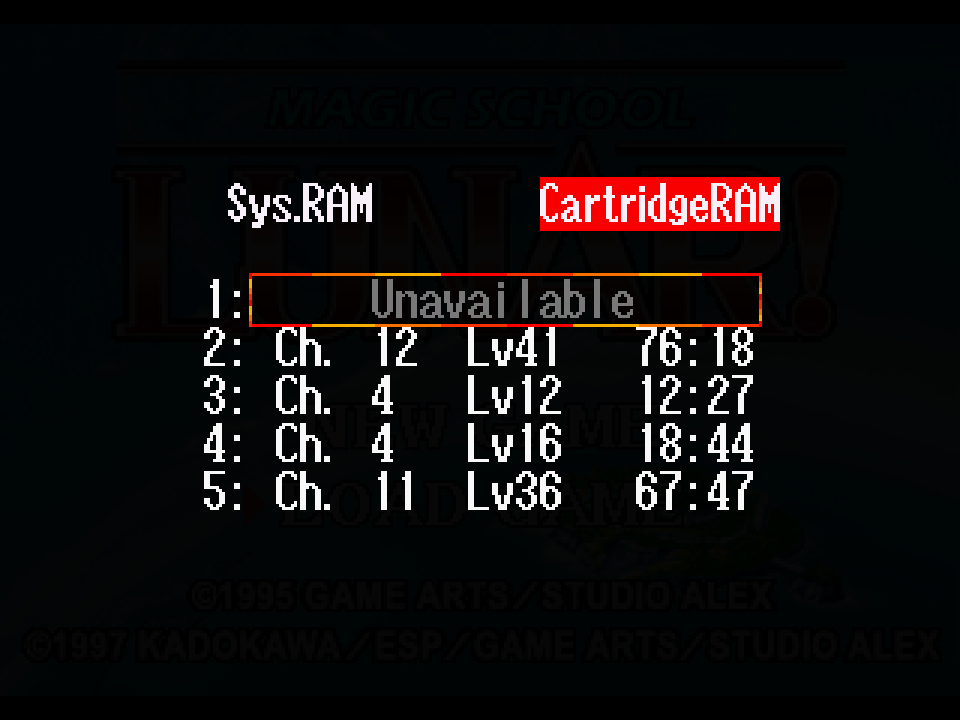
<p>I’d been hoping to just put all my stats up to the maximum, so this wasn’t <em>quite</em> what I was after, but it’s good enough<sup id="fnref:goodenough"><a href="#fn:goodenough" class="footnote" rel="footnote" role="doc-noteref">4</a></sup>. I could just give everyone the maximum experience to bump them up to the highest possible level, and that’ll be plenty<sup id="fnref:maxlevel"><a href="#fn:maxlevel" class="footnote" rel="footnote" role="doc-noteref">5</a></sup>. So I edited one character’s XP, loaded it in the game, and… it didn’t work.</p>

<p><img src="/images/save-editor/unavailable.png" alt="Screenshot of the save game loading screen with a game simply marked &quot;Unavailable&quot;" /></p>

<p>I wasn’t all that surprised, though. Save game formats often have some kind of integrity protection feature, either to protect against cheating or corruption, so I’d been expecting something like that here too. For a game like this it would almost certainly be using a simple checksum, which is usually just handled by literally summing all of the bytes in the data and storing that somewhere in the file. It’s not a terribly secure hashing routine, but for something like this it doesn’t need to be.</p>

<p>So I tried loading the save, sitting for a minute, and then saving again. I figured that changing nothing else, not even moving my characters, should minimize the number of unrelated changes in the file and help me isolate the checksum. Unfortunately, as it turns out, it did that a little <em>too</em> well - the new save only had four bytes different, and I quickly identified those bytes not as a checksum but as a 32-bit integer at the start of the save tracking your playtime in seconds from the start of the game. It’s useful knowing that’s <em>not</em> the data I wanted, I suppose, but why didn’t the checksum change?</p>

<p>So I tried something different. I went out to fight a few battles, letting exactly one of my characters gain a few experience points. I then tried comparing <em>that</em> save to the original one to see what changed. Obviously I had a lot more values to sift through, but I started narrowing it down. I also started producing some values to compare it to. Betting that this is probably a simple checksum format, I tried actually calculating the checksum for a few different possible slices of data and comparing them in 16-bit and 32-bit integer formats<sup id="fnref:imhex"><a href="#fn:imhex" class="footnote" rel="footnote" role="doc-noteref">6</a></sup> to see if any of those values that had changed between the saves resembled them.</p>

<p>This took me a little longer than I’d expected, mostly because I made a bad assumption going in. Given the amount of data being summed here (about 1012 bytes), I presumed we were looking at at least a 16-bit value. Maybe it would reserve a full four bytes, even if it wouldn’t need that much space. But as I started looking at potential hashes for the game, I noticed something. There was <em>one</em> byte that did resemble the checksums I’d found… just one byte.</p>

<p>As it turns out, <em>Magic School Lunar!</em> really has reserved a single byte for the checksum. It calculates a full sum over (most of) the save file, but then clips it down to only the least significant byte. So, for example, if the sum of all bytes is 18279 (<code class="language-plaintext highlighter-rouge">0x4767</code>), then it takes only the last byte of that number (<code class="language-plaintext highlighter-rouge">0x67</code>). The checksum also doesn’t cover the <em>entire</em> file; it seems to exclude the first eight bytes, which act as a sort of header. That header includes the playtime (which I’d already discovered wasn’t checksummed!), the current chapter and average party level<sup id="fnref:header"><a href="#fn:header" class="footnote" rel="footnote" role="doc-noteref">7</a></sup>, and the checksum itself. Once I started checksumming everything <em>past</em> the first eight bytes, I was able to produce a checksum that matched what the game itself did and ensured it would be happy to accept my changes.</p>

<p><img src="/images/save-editor/experience.png" alt="Screenshot of the character stats for a character named Elie, showing that she has 9999999 experience points." /></p>

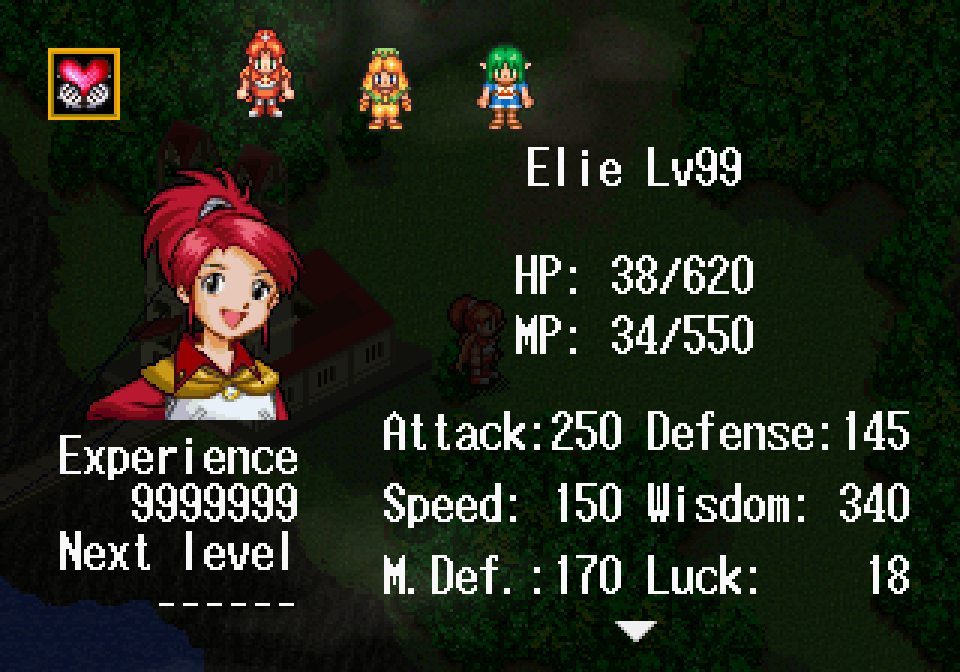
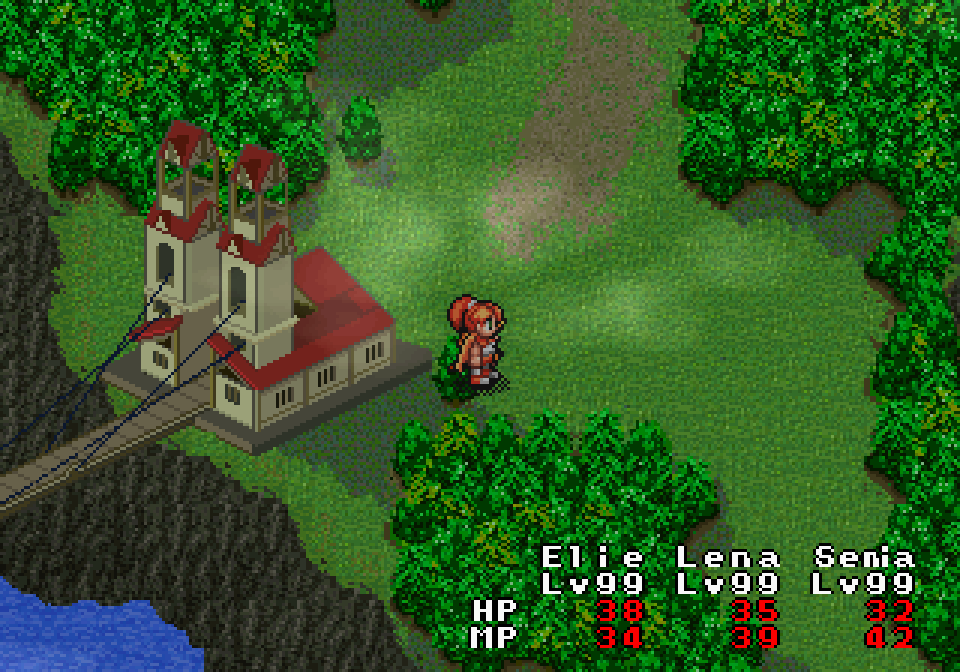
<p>So I tested it out and confirmed that, yes, the game was happy to accept my changes now! As it happens, a single character starts the game with the maximum amount of experience<sup id="fnref:maxxp"><a href="#fn:maxxp" class="footnote" rel="footnote" role="doc-noteref">8</a></sup>, so I even knew the maximum experience I could assign everyone else to max their stats out and make them as powerful as I could.</p>

<p><img src="/images/save-editor/party.png" alt="Screenshot of the world map of an RPG at the beginning of the game, showing the party members are all at level 99." /></p>

<p>To make these tweaks easier on myself, I threw together a quick and dirty save editor in Python. I’ve also typed up my notes on where everything is located in the save file in case anyone else finds that useful in the future. I’ve <a href="https://codeberg.org/mistydemeo/msl-save-editor">put it up on Codeberg</a>, and in the meantime I’m back to testing now that I never have to worry about winning a battle again.</p>

<div class="footnotes" role="doc-endnotes">
  <ol>
    <li id="fn:encounters">
      <p>And that’s <em>after</em> I’ve adjusted the encounter rate from the original game to make it more fun to play! <a href="#fnref:encounters" class="reversefootnote" role="doc-backlink">&#8617;</a></p>
    </li>
    <li id="fn:memorycard">
      <p>The Saturn actually also comes with builtin save memory, which is surprisingly convenient. It’s only 32KB, but for the era that’s spacious enough that I think a lot of Saturn owners never bothered buying an external memory card. <a href="#fnref:memorycard" class="reversefootnote" role="doc-backlink">&#8617;</a></p>
    </li>
    <li id="fn:bup">
      <p>Extracted Saturn saves are usually handled in a format called <a href="https://github.com/slinga-homebrew/Save-Game-BUP-Scripts">BUP</a>, which was created by the Saturn community and which is supported by a number of different tools now. I was working with BUP files, but note that all of my references to offsets in this post assume there’s no BUP header at the start of the file. If you’re reading along with your own save in BUP format and would like to compare, just add 0x40 to any offset I mention. <a href="#fnref:bup" class="reversefootnote" role="doc-backlink">&#8617;</a></p>
    </li>
    <li id="fn:goodenough">
      <p>I suppose I could also have edited the stats table in the game to max out those stats, but I’m trying to avoid making too many code/data changes that are unrelated to the translation just to make sure I don’t confuse bugs from my debug settings for bugs in the translation. <a href="#fnref:goodenough" class="reversefootnote" role="doc-backlink">&#8617;</a></p>
    </li>
    <li id="fn:maxlevel">
      <p>My first testing playthrough, where I left battles on, I finished the game at level 41. Since level 99 is the cap, I should be able to easily stomp every boss at this level without needing to fight a single random battle. <a href="#fnref:maxlevel" class="reversefootnote" role="doc-backlink">&#8617;</a></p>
    </li>
    <li id="fn:imhex">
      <p><a href="https://imhex.werwolv.net">ImHex</a>’s builtin checksum feature was pretty useful for this, since it updates in realtime as you select data in the file. Unfortunately it also seems to be <em>very</em> crash-prone, so it took me a little longer than it might have otherwise. <a href="#fnref:imhex" class="reversefootnote" role="doc-backlink">&#8617;</a></p>
    </li>
    <li id="fn:header">
      <p>The chapter and average party level are just for display in the save loading screen; changing them does nothing else. They’re followed by what looks like a padding byte, since it’s always been 0 in every save I’ve checked. <a href="#fnref:header" class="reversefootnote" role="doc-backlink">&#8617;</a></p>
    </li>
    <li id="fn:maxxp">
      <p>For a brief period, the characters are joined by an extremely powerful sorceror named Glen. He starts the game maxed out at level 99 and easily stomps out any enemy he runs into, just to emphasize how much more powerful he is than anyone else. <a href="#fnref:maxxp" class="reversefootnote" role="doc-backlink">&#8617;</a></p>
    </li>
  </ol>
</div>
]]></content>
  </entry>
  
  <entry>
    <title type="html"><![CDATA[Searching for the broken-down chiptune player of my dreams]]></title>
    <link href="http://mistys-internet.website/blog/post/2026/08/01/searching-for-the-broken-down-chiptune-player-of-my-dreams/"/>
    <updated>2026-08-01T18:04:17+00:00</updated>
    <id>http://mistys-internet.website/blog/post/2026/08/01/searching-for-the-broken-down-chiptune-player-of-my-dreams</id>
    <content type="html"><![CDATA[<p>This is a story from the old days before we had YouTube or the bandwidth to stream audio.</p>

<p>Back then, if you wanted to listen to music from a video game, <em>maybe</em> you could track down an official soundtrack CD—or, if you were a mega nerd like me, you’d download ripped chiptunes and their special players. These files are basically cut-down versions of the original game data, containing the game’s music data and its original player; it’s intended to be paired with a special audio player which is essentially a cut-down emulator for the console which emulates the CPU and sound chip but not the rest of the hardware. Since they stripped out anything the game didn’t need to play the music, they were usually tiny. Entire soundtracks for 8-bit and 16-bit games could easily fit in under 50KB<sup id="fnref:50kb"><a href="#fn:50kb" class="footnote" rel="footnote" role="doc-noteref">1</a></sup>, which made it easy for me to sample stuff on a whim even with a dialup internet connection.</p>

<p>For me, these were a great way to try out the music to games I’d read about but never actually played. It was <em>especially</em> great for those legendary games I’d heard about that used weird hardware and that I’d never have gotten to try on their original systems. There’s one game in particular that fascinated me: Konami’s <a href="https://en.wikipedia.org/wiki/Lagrange_Point_(video_game)"><em>Lagrange Point</em></a>. It was one of a set of NES games that were famous in the early emulation scene for using the “expansion audio” feature of the Famicom, the Japanese version of the system. This allowed game cartridges to include extra audio hardware which games could use simultaneously with the builtin chip for richer and much more complex music. This feature was missing from international versions of the NES, and until emulation most people outside Japan had only heard rumours about what games like <em>Castlevania III</em> had actually sounded like in their original versions.</p>

<p><em>Lagrange Point</em> had an especially mystical reputation for being the only NES game using Konami’s <a href="https://en.wikipedia.org/wiki/Memory_management_controller#VRC7">VRC7 sound chip</a><sup id="fnref:vrc7"><a href="#fn:vrc7" class="footnote" rel="footnote" role="doc-noteref">2</a></sup>, which was much more advanced than anything else on the system. It used a sound chip using entirely different technology from every other NES game; its <a href="https://en.wikipedia.org/wiki/Yamaha_YM2413">Yamaha YM2413</a> is an FM synthesis chip closer to the 16-bit Sega Genesis than anything that anything else used on the NES<sup id="fnref:ym2413"><a href="#fn:ym2413" class="footnote" rel="footnote" role="doc-noteref">3</a></sup>, and I just had to hear what that sounded like for myself. Here, click play and take a listen to the first track for yourself:</p>

<audio controls="" src="/audio/lagrange_point/ao.mp3"></audio>

<p>It’s a nice sound, isn’t it? It’s surreal to me hearing sound like this coming out of an NES game that feels like it should have much more primitive instruments.</p>

<p>That said, when I grabbed an <a href="https://www.nesdev.org/wiki/NSF">.NSF</a> rip of the game and popped it in the first player I could find that did VRC7 audio, that’s not what I heard. What I heard was this:</p>

<audio controls="" src="/audio/lagrange_point/meridian.mp3"></audio>

<p>That’s not really the same at all, is it? Those sound like different instruments entirely, something closer to a “normal” NES instrument sound than the warm smooth instruments the game is meant to use. That scratchiness in particular has always stuck with me; it gives the game a very distinctive broken-down sound with a texture completely unlike the original game’s sound at all. Maybe this is the nostalgia talking, but I liked the sound at the time and I like it now. No one meant for it to sound this way, but I enjoy it all the same.</p>

<p>Fast forward about 25 years. I still use these custom players and ripped game audio today and happened to dig out the <em>Lagrange Point</em> NSF. It didn’t sound anything like the incorrect version I’d imprinted on, so I thought I’d hunt down that old player and take a listen again just to see if it was like I remembered. There was just one problem:</p>

<p><em>I’d forgotten what player it was.</em></p>

<p>I wasn’t going to be able to listen to the broken-down chiptunes of my dreams if I didn’t have the right player! Thus started my desperate hunt to see if I could figure out what it was.</p>

<p>I had the vague memory that it was a player called <a href="https://web.archive.org/web/20031207130331/http://meridian.overclocked.org/oldadvanceweb/">Meridian Advance</a>, which was released back in 2001, but it definitely wasn’t that. It doesn’t have VRC7 support at all, so trying to play it back just got me silence and the very occasional sound it was playing from the regular NES sound chip.</p>

<p>If my one memory was out, what <em>was</em> it? I started digging through every NSF player I could find from the late 90s through the early 00s, hoping <em>one</em> of them would be the right one. <a href="https://web.archive.org/web/20040414050747/http://rocknes.kinox.org/">BNSF</a>? No VRC7 support at all. <a href="http://nezplug.sourceforge.net/">NEZplug</a>? Plays normally. <a href="https://tnse.zophar.net/NSFten.htm">NSFten for Winamp</a>? No VRC7. <a href="http://www.neshq.com/nsf/">NotSo Fatso</a>? Plays normally. <a href="https://web.archive.org/web/20000816014543/http://www4.ncsu.edu/~nscorlet/nsf/">Bleep</a>? NESamp? <a href="https://web.archive.org/web/20001214085200/http://www.unc.edu/~thackett/nose.html">Nosefart</a><sup id="fnref:nosefart"><a href="#fn:nosefart" class="footnote" rel="footnote" role="doc-noteref">4</a></sup>? <a href="http://gigo.retrogames.com/download.html#g-nsf">G-NSF</a>? <a href="https://disch.zophar.net/slicknsf.php">SlickNSF</a>? <a href="https://web.archive.org/web/20010405001217/http://smsoft.zophar.net/">MSP</a>? <a href="https://web.archive.org/web/20031118174453/http://meridian.overclocked.org/">Meridian Prime</a>? No, no, no, no, no, no, and no. It’s a hell of a list, and as I kept failing to find what I was looking for I started to wonder if I’d imagined the whole thing.</p>

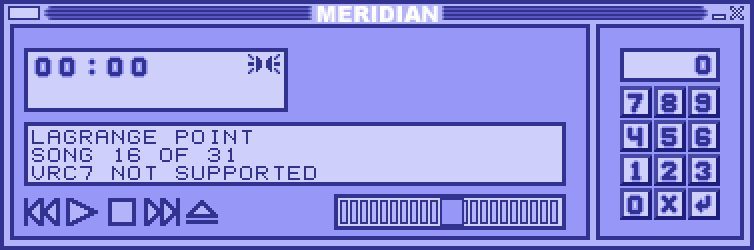
<p>Finally, I thought of something I should probably have considered in the first place. “Meridian Advance” implies it’s the <em>second</em> Meridian, doesn’t it? Just like the Game Boy Advance? Well, yes: Meridian Advance was the second of three Meridian sound players which started development after the developer lost the source code to the original Meridian in a hard drive crash<sup id="fnref:crash"><a href="#fn:crash" class="footnote" rel="footnote" role="doc-noteref">5</a></sup>. I naively assumed that Meridian Advance could do everything the original could do, but that was a bad assumption. <a href="https://web.archive.org/web/20000815235259/http://meridian.overclocked.org/">The original Meridian</a> from 2000 really <em>did</em> have VRC7 support, and it was <em>exactly</em> the broken sound I remembered. Here it is:</p>

<p><img src="/images/lagrange_point/meridian.png" alt="Screenshot of Meridian, a Winamp-styled music player. It's showing the music for &quot;Lagrange Point&quot; as playing, and states &quot;VRC7 not supported&quot;." /></p>

<p>(Yes, cloning Winamp was the most actual thing an audio player could do back then.) It runs fine under Wine so I gave it a shot and it really does sound <em>exactly</em> like I remember it.</p>

<p>Want to hear it yourself? You can download Meridian <a href="/data/Meridian.exe">right here</a>, and the <a href="https://www.zophar.net/music/nintendo-nes-nsf/lagrange-point">Lagrange Point NSF here</a>; should work fine on modern Windows or under Wine for Mac/Linux.</p>

<div class="footnotes" role="doc-endnotes">
  <ol>
    <li id="fn:50kb">
      <p>That’s about half a second of streaming audio on YouTube. <a href="#fnref:50kb" class="reversefootnote" role="doc-backlink">&#8617;</a></p>
    </li>
    <li id="fn:vrc7">
      <p>Yes, yes, I know, that <em>Tiny Toon</em> game uses it too. But it doesn’t use it for <em>sound</em> now does it? <a href="#fnref:vrc7" class="reversefootnote" role="doc-backlink">&#8617;</a></p>
    </li>
    <li id="fn:ym2413">
      <p>To be exact, this is the same chip used in the Japanese Sega Master System and the MSX-Music, so it certainly had a history of being used on 8-bit systems. Outside Japan though, this sound is associated with systems much more advanced than the NES. <a href="#fnref:ym2413" class="reversefootnote" role="doc-backlink">&#8617;</a></p>
    </li>
    <li id="fn:nosefart">
      <p>Yes, really. <a href="#fnref:nosefart" class="reversefootnote" role="doc-backlink">&#8617;</a></p>
    </li>
    <li id="fn:crash">
      <p>Closed source was the default for this stuff back then! This was a pretty common death state for this kind of app. <a href="#fnref:crash" class="reversefootnote" role="doc-backlink">&#8617;</a></p>
    </li>
  </ol>
</div>
]]></content>
  </entry>
  
  <entry>
    <title type="html"><![CDATA[Forget spreadsheets, I wrote my own visual game script editor]]></title>
    <link href="http://mistys-internet.website/blog/post/2026/03/28/forget-spreadsheets/"/>
    <updated>2026-03-28T00:52:46+00:00</updated>
    <id>http://mistys-internet.website/blog/post/2026/03/28/forget-spreadsheets</id>
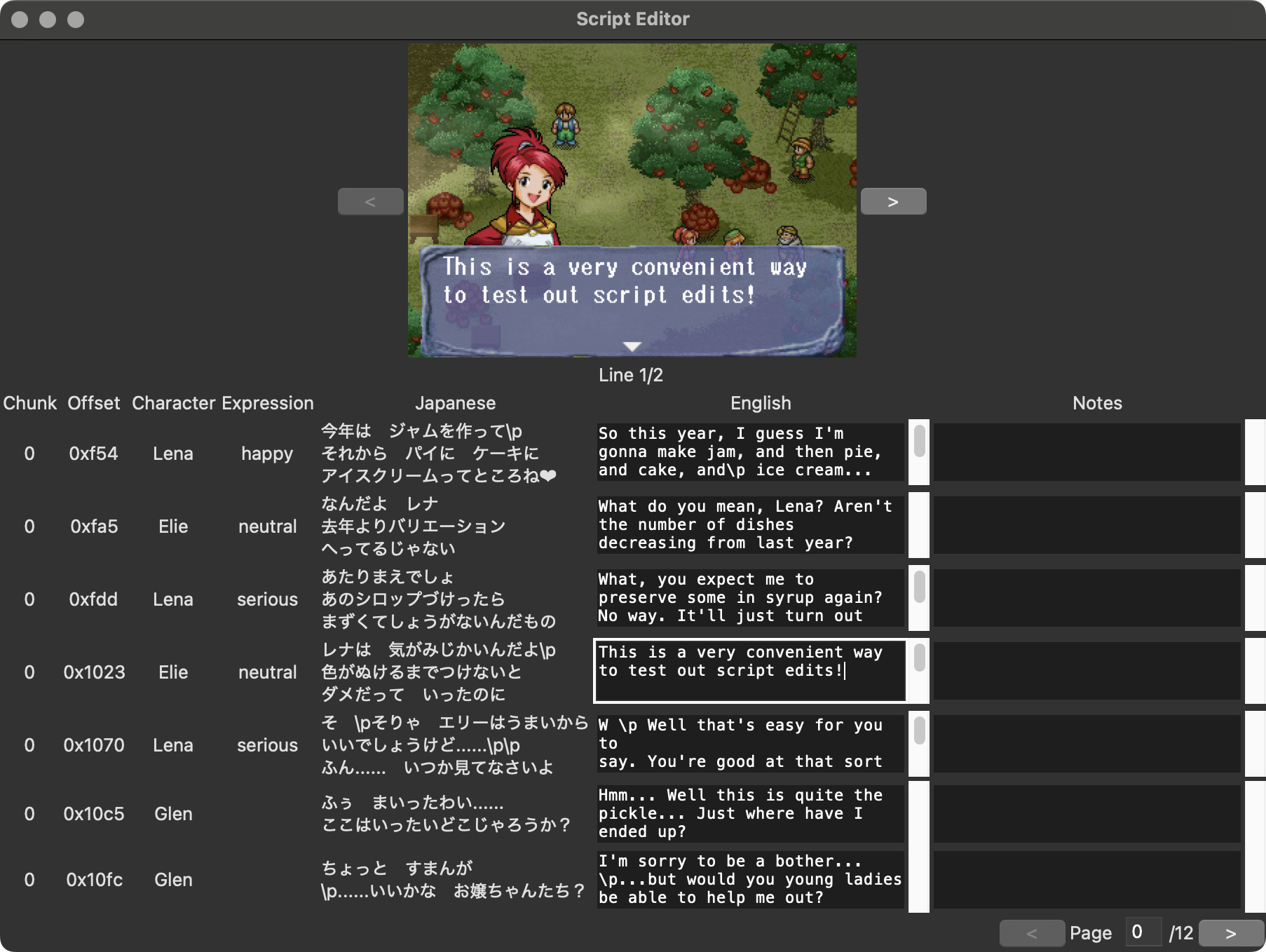
    <content type="html"><![CDATA[<p>People who have been following me on social media may know that, for the past few years, I’ve been working on a fan translation project for a Sega Saturn RPG called <a href="https://en.wikipedia.org/wiki/Lunar:_Sanposuru_Gakuen"><em>Magic School Lunar</em></a>. With technical and initial playtesting work wrapping up, that project is finally entering the late phases and I’m now reaching a point where I’m going to be doing a lot of rewriting of the English text. The traditional approach, in both professional localizations and fan translations, involves working in a spreadsheet with access to the original language and translation side by side. (In fan translations, it’s not even rare to work by editing raw text files.) It’s not the most convenient or <em>fun</em> to be writing entirely within a spreadsheet though, especially when there are technical constaints to be thinking about. This game has a strict character limit per line and a maximum of three lines per text box, and I found myself wishing for a nice way to visualize how text will look in-game so I can ensure what I’m writing will actually look good in-game. A spreadsheet just wasn’t going to cut it. But then, of course, I realized… I <em>am</em> a programmer. Why don’t I just write my own? So I did.</p>

<p><img src="/images/msl/editor.png" alt="Screenshot of the script editor, showing a screenshot at the top and a spreadsheet-like view on bottom. The screenshot at the top features the text that's being typed into the actively-selected text box." /></p>

<p>My work is based around CSV files that contain the script and metadata for every line of text in the game, and between the script itself and metadata such as what character is speaking, I had in principle enough data to mock up what any given line should look like in-game. My basic goal was to reproduce a spreadsheet-like workflow but with added screenshot visualization that updates in realtime as I work. Now that I’ve had the chance to try it out, I can say it definitely works just as well as I’d hoped. It’s much easier to catch mistakes should I find myself overflowing lines, and it’s very useful for making aesthetic decisions about text formatting too.</p>

<p>I decided to write a GUI app rather than a web app, for no particular reason other than because I happen to like desktop apps, and ended up using <a href="https://www.tcl-lang.org">Tk</a> as the windowing toolkit so it would be easy to run it on other platforms if someone needs to run it on something other than macOS. Although I briefly considered using a compiled language<sup id="fnref:compiled"><a href="#fn:compiled" class="footnote" rel="footnote" role="doc-noteref">1</a></sup> I ended up deciding on Python. This was partly because Python happens to have very good bindings for Tk, and partly because I’ve passed my CSVs through Python-based tooling already so I knew that the CSVs I’d output would result in minimal formatting/git repo churn. I’ve looked at Tk apps a few times but I’ve never written one of my own, so I was pleasantly surprised how easy it was to work with. I spent a few hours on this project over the course of a few days, and quite honestly most of that time was just spent picking up the basics of Tk.</p>

<p>I didn’t start out with the GUI though. This was all about the screenshot preview, so I figured I’d handle that first. I’ve done a little work with Python’s <a href="https://pillow.readthedocs.io/en/stable/">Pillow library</a> before, which felt like it’d be right tool for the job, and thankfully it was quite easy to work with. All I needed was basic image compositing, and Pillow handles that very well. There were only really three elements I needed to simulate a proper screenshot:</p>

<ul>
  <li>A scene from the game with no text or character portrait</li>
  <li>The game’s font and positioning data for where text goes</li>
  <li>The portraits used when named characters speak and their positioning data</li>
</ul>

<p>I had the raw images for the font and portraits already from the translation process, and the positioning data wasn’t too hard to find either. <em>Magic School Lunar</em> uses a fixed-width font<sup id="fnref:font"><a href="#fn:font" class="footnote" rel="footnote" role="doc-noteref">2</a></sup>, so there’s no fancy inter-character spacing to reverse-engineer; a given index on a line is always going to go in exactly the right place. I simply grabbed real screenshots of the game and worked out exactly where where the letters belonged, then I rendered new text on top of the existing text to make sure everything was aligned exactly where it belongs. It was easy to handle the portraits as well, which always go in the same place<sup id="fnref:portraits"><a href="#fn:portraits" class="footnote" rel="footnote" role="doc-noteref">3</a></sup>, so it didn’t take me long to add that either. After I was confident I had the positioning completely right, I ran off a build of the game with all the text blanked out so I could grab myself an in-game screenshot of an empty text box with no character speaking.</p>

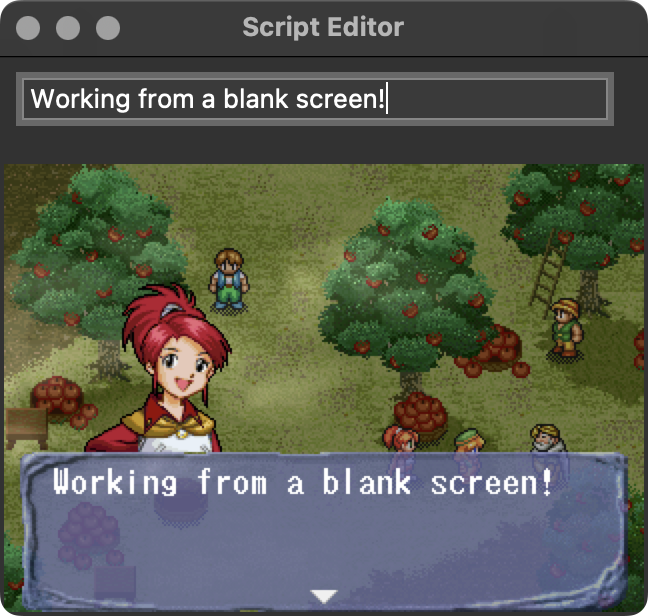
<p><img src="/images/msl/basicui.png" alt="Screenshot of the UI with a single text input box and a screenshot rendered using the text that's been typed there." /></p>

<p>Once I had the actual screenshot generation taken care of, I got to work building out the real UI. I’d been prototyping with a simple MVP that just rendered the screenshot out from a single text input box and which was missing the actual script editor, and I was slightly dreading the work of laying out the real thing. I shouldn’t have worried though, since it turned out to be quite easy. I used Tk’s <a href="https://tkdocs.com/tutorial/grid.html">grid manager</a><sup id="fnref:grid"><a href="#fn:grid" class="footnote" rel="footnote" role="doc-noteref">4</a></sup> to handle the layout. It divides the screen into rows and columns, with each element laid out on a specific column and row. It’s easy to think about, but it also just happens to be a perfect match for laying out a bunch of UI elements in a table—exactly my usecase, in other words.</p>

<p>I was also pleasantly surprised just how easy it was to integrate the generated screenshot into the UI. Tk itself assumes images you’re displaying are coming from some kind of bitmap file, but Tk+Pillow seems to be a popular combination because Pillow has built-in Tk integration and can wrap a Pillow-generated image in a Tk-compatible image class that allows you to put a generated image anywhere that Tk accepts an image.</p>

<p>My only big UI issue came when I started loading larger script files. My original plan had been to populate the full UI with the entirety of a script file and implement a scrolling viewport, much like in a traditional spreadsheet app. Unfortunately, it turns out Tk has big issues rendering huge numbers of elements within a frame and it would spin its wheels for an extended period loading any input file with more than a few hundred rows. If this were an app I was making for other people, I might have chosen to try to optimize this by having it dynamically load and unload elements as you scroll, but I didn’t really need something that fancy for myself; I chose to instead just paginate the data with a limited number of rows onscreen at once along with back/forward buttons to switch pages. It works well enough for my own needs.</p>

<p>All in all, I was very happy how fast this all came together. I’ve already been using this to do little changes, and I know it’s going to come in handy as I get deeper into script editing. If you want to check the source code for yourself, I’ve put it <a href="https://codeberg.org/mistydemeo/msl-script-editor">up on Codeberg</a>.</p>

<div class="footnotes" role="doc-endnotes">
  <ol>
    <li id="fn:compiled">
      <p>I actually considered Swift at one point, but I really didn’t want to limit this to only working on Mac. <a href="#fnref:compiled" class="reversefootnote" role="doc-backlink">&#8617;</a></p>
    </li>
    <li id="fn:font">
      <p>Fun fact: this game uses the exact same font as the two Sega CD <em>Lunar</em> games in Japanese, so the English version is reusing the font from the English versions of those games for that extra nod to series history. <a href="#fnref:font" class="reversefootnote" role="doc-backlink">&#8617;</a></p>
    </li>
    <li id="fn:portraits">
      <p>The real game sometimes puts these on the right instead of the left, but I didn’t bother simulating this since it won’t affect how I’ll be writing. <a href="#fnref:portraits" class="reversefootnote" role="doc-backlink">&#8617;</a></p>
    </li>
    <li id="fn:grid">
      <p>Tk-knowers will probably recognize that despite the grid manager being around since 1996, it’s still the “new” system to a lot of people and most code examples online are still using the older, fiddlier <code class="language-plaintext highlighter-rouge">pack</code> system. I decided to deal with the annoyance of having fewer examples to follow in exchange for getting to use something easier. <a href="#fnref:grid" class="reversefootnote" role="doc-backlink">&#8617;</a></p>
    </li>
  </ol>
</div>
]]></content>
  </entry>
  
  <entry>
    <title type="html"><![CDATA[It's Not Called Watchy; or, Solving a Minor Video Game Mystery]]></title>
    <link href="http://mistys-internet.website/blog/post/2025/12/23/watchy/"/>
    <updated>2025-12-23T03:31:43+00:00</updated>
    <id>http://mistys-internet.website/blog/post/2025/12/23/watchy</id>
    <content type="html"><![CDATA[<p>Flexing the brevity muscle today with a short post to set the record straight on a weird video game history quirk I spotted online.</p>

<p>For reasons that aren’t important<sup id="fnref:1"><a href="#fn:1" class="footnote" rel="footnote" role="doc-noteref">1</a></sup>, I was looking up an extremely obscure 90s PC game called <em>Team 47 GoMan</em>. Absolutely no one has heard of this game before, which doesn’t seem to be fondly (or at all) remembered, which explains why there wasn’t all that much about it online. (“From the creators of <a href="https://obscuritory.com/fighting/creep-clash/">Creep Clash</a>” didn’t sell too many copies.) But I <em>did</em> see something strange. A lot of the search results online had a different title than the one I’d seen. Several of the top results called it <em>Watchy</em>—which I thought was <em>weird</em>, since it didn’t seem to have anything to do with the game at all. Even weirder, though, several of these sites had screenshots and videos of the game, but <em>none</em> of them used that “Watchy” title. So where did it come from?</p>

<p>The Mobygames page gave me a bit of a hint. It used “Watchy” as the primary title, while specifying that “Team 47 GoMan” was the title in other territories. Vaguely plausible, but at the same time not terribly satisfying. Is this US-developed game really so obscure in the US that the only screenshots and footage are of the alleged European/Japanese release?</p>

<!-- ![Box for "Watchy: A Team 17 GoMan Adventure" featuring robot characters.](/images/watchy/61Z109fKk8L._AC_-2.jpg) -->
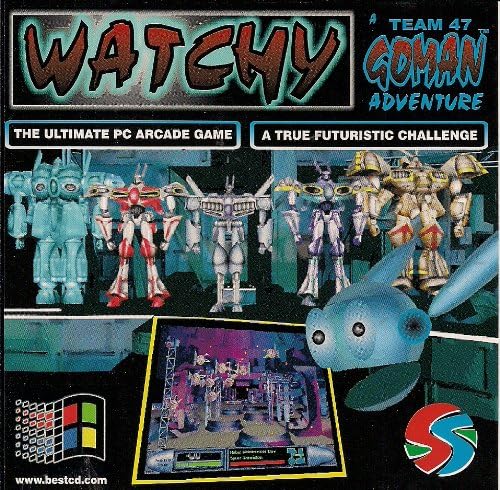
<p><img src="/images/watchy/61Z109fKk8L._AC_-2.jpg" style="width: 50%; float: left; padding-right: 0.5em;" alt="Watchy: A Team 17 GoMan Adventure" /></p>

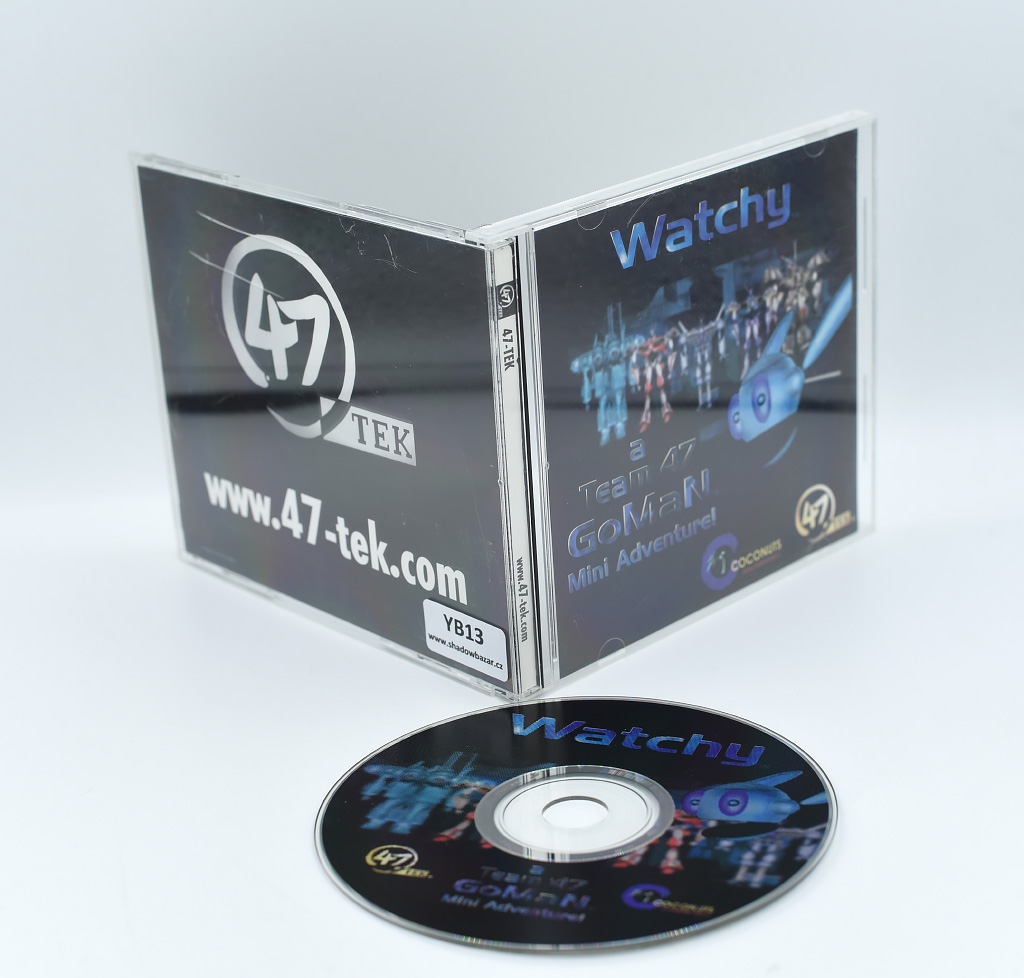
<p>I did some searching under the “Watchy” name to see if I could find any copies for sale, and did run into two copies. One is from a Canadian budget publisher, and one <a href="https://aukro.cz/watchy-a-team-47-goman-mini-adventure-cd-pc-6988977528?tab=course-description">seems to be from Europe</a>. Both of them have the Watchy title and what looks like similar characters, but what really caught my eye is the subtitle. The Canadian one calls itself “A Team 47 GoMan Adventure” - which feels like a weird title if this is meant to <em>be</em> “Team 47 GoMan”, isn’t it? The other box is even more telling though. It reads “A Team 47 GoMan Mini Adventure!”, which makes it read a lot less like an alternate title and more like a spinoff.</p>

<!-- ![Box for "Watchy: A Team 17 GoMan Mini Adventure!" featuring robot characters.](/images/watchy/YB13.jpg) -->
<p><img src="/images/watchy/YB13.jpg" style="width: 50%; float: right; padding-bottom: 0.5em" alt="Watchy: A Team 17 GoMan Mini Adventure!" /></p>

<p>At this point I did what I should have done in the first place and checked the publisher’s archived webpage. Right there, on the <a href="https://web.archive.org/web/19981206050102/http://www.47-tek.com/3pack.htm">homepage from 1998</a>, I had the evidence I needed—a page for their “GoMan(tm) 3 Pack”, which included <em>Team 47 GoMan</em> itself along with a screensaver and, of course, <a href="https://web.archive.org/web/19980129025158/http://www.47-tek.com/watchy.htm"><em>Watchy</em></a>. This, it turns out, is a spinoff like I thought it must have been from the title. It’s described as a 2D arcade action game, and from looking at <a href="https://www.youtube.com/watch?v=1450HriICCM&amp;t=870s">footage</a> that was linked to me when I was <a href="https://bsky.app/profile/maxmantic.bsky.social/post/3m6s3llkvjl2f">talking about it on Bluesky</a> it’s a much simpler game than the actual <em>GoMan</em>.</p>

<p>But <em>why</em> was part of the internet convinced these were the same game? I think this may have accidentally come from Mobygames or another database like it, since many of the pages with the wrong title have text that seems to be copied and pasted from one place. The <a href="https://www.mobygames.com/game/42081/team-47-goman/">Mobygames page was created in 2009</a>, and luckily the Wayback Machine <a href="https://web.archive.org/web/20100503033618/http://www.mobygames.com/game/windows/team-47-goman">has copies going back to 2009-2010</a> that show it using the <em>Team 47 GoMan</em> title. <a href="https://web.archive.org/web/20130430070454/http://www.mobygames.com/game/windows/watchy">By 2013</a> the title had become <em>Watchy</em>, so someone clearly changed the main title somewhere in between.<sup id="fnref:3"><a href="#fn:3" class="footnote" rel="footnote" role="doc-noteref">2</a></sup> Why? I suspect it’s that Canadian box I showed earlier, which <a href="https://www.amazon.com/Watchy-Team-47-GOMAN-Adventure-Canada/dp/B002OCD0V8">comes from the only Amazon.com product listing with “Team 47 GoMan” in it</a>. It sure feels like someone was looking the game up, found the box on Amazon with a different title, and assumed that was the primary game title in the US and so it should be the main game title on Mobygames as well<sup id="fnref:2"><a href="#fn:2" class="footnote" rel="footnote" role="doc-noteref">3</a></sup>.</p>

<p>Even though this is <a href="https://www.mobygames.com/game/42081/team-47-goman/">correct on Mobygames now</a>, I expect the long tail of this particular mixup to take awhile. The other online references to “Watchy” all seem to be copied from Mobygames, which is a common pattern online; a lot of game history is more or less rumour, copied from site to site without actually going back to check with sources. But these pages also don’t tend to update very often once they’ve been created, which means that even if Mobygames has been corrected I expect it to take a long time for the web to correct itself.</p>

<p>Which is why I’m writing this. If someone online finds one of these abandonware sites and wonders why the page is calling the game they just downloaded “Watchy”, at least they might find this post in a search engine telling them that it’s wrong—and why.</p>

<div class="footnotes" role="doc-endnotes">
  <ol>
    <li id="fn:1">
      <p>But that may eventually bear fruit on <a href="https://cdrom.ca">CD-ROM Journal</a>. <a href="#fnref:1" class="reversefootnote" role="doc-backlink">&#8617;</a></p>
    </li>
    <li id="fn:3">
      <p>The observant will notice that the <em>description</em> still reads “Team 47 GoMan”, which should have been a sign that I should have questioned the primary game title sooner. <a href="#fnref:3" class="reversefootnote" role="doc-backlink">&#8617;</a></p>
    </li>
    <li id="fn:2">
      <p>I’m not really a fan of Mobygames’s policy that the US title for a game is always the default title no matter where it’s from or when it came out, but that’s another story… <a href="#fnref:2" class="reversefootnote" role="doc-backlink">&#8617;</a></p>
    </li>
  </ol>
</div>
]]></content>
  </entry>
  
  <entry>
    <title type="html"><![CDATA[dist 0.28.1 is out]]></title>
    <link href="http://mistys-internet.website/blog/post/2025/07/20/dist-0-dot-28-dot-1-is-out/"/>
    <updated>2025-07-20T21:43:27+00:00</updated>
    <id>http://mistys-internet.website/blog/post/2025/07/20/dist-0-dot-28-dot-1-is-out</id>
    <content type="html"><![CDATA[<p>I’m happy to announce that I’ve been granted permission to resume development on <a href="https://axodotdev.github.io/cargo-dist/">dist/cargo-dist</a>, the easy-to-use binary packaging and distribution tool. As someone who uses dist a lot in my own projects, I’ve been hoping to be able to keep the project going and I hope this will be useful for other people as well.</p>

<p>I’ve just released <a href="https://github.com/axodotdev/cargo-dist/releases/tag/v0.28.1">version 0.28.1</a>, a bugfix release based on the last stable version. This fixes the critical issues around GitHub Actions runners and also includes a number of other important bugfixes. Please give it a try and let me know how it goes!</p>

<p>I’m planning an 0.29.0 in the near future containing all of the improvements that originated in Astral’s fork, and longterm I’m planning to keep it going as long as there are people interested in using it. I’d like this to move forward in a community-supported model with members of the community contributing new features they’re interested in.</p>

<p>Got thoughts? Let me know <a href="https://github.com/axodotdev/cargo-dist/issues">on the issue tracker</a> or <a href="https://discord.gg/ry3f3HZXWN">on the official discord</a>.</p>
]]></content>
  </entry>
  
  <entry>
    <title type="html"><![CDATA[The database row that did and didn't exist]]></title>
    <link href="http://mistys-internet.website/blog/post/2025/05/13/the-database-row-that-did-and-didnt-exist/"/>
    <updated>2025-05-13T22:16:48+00:00</updated>
    <id>http://mistys-internet.website/blog/post/2025/05/13/the-database-row-that-did-and-didnt-exist</id>
    <content type="html"><![CDATA[<p>Every now and then, I run into a bug so mystifying on its face I know it’s going to be a journey just from the error message. This is one of those stories.</p>

<p>I work at a Python shop right now, and we were upgrading an app to Django 5. There are a few breaking changes, but nothing too unexpected or out of the ordinary. Everything was working great in our development environment, but once we deployed to our QA environment we noticed something <em>very</em> strange—an <code class="language-plaintext highlighter-rouge">IntegrityError</code> exception telling us that an object couldn’t be saved because the primary key already existed in the database.</p>

<p>My immediate reaction was that, well, <em>that</em> was unusual. I didn’t think we were ever manually assigning an <code class="language-plaintext highlighter-rouge">id</code> and we were always relying on the database’s autoincrement. I double checked the code in the traceback, and indeed, all I saw was something harmless. An anonymized version looks something like this:</p>

<div class="language-plaintext highlighter-rouge"><div class="highlight"><pre class="highlight"><code>object = models.Model.filter(property1=value).get()
object.property2 = method_result()
object.save()
</code></pre></div></div>

<p>Not only were we not assigning it a clashing <code class="language-plaintext highlighter-rouge">id</code>, we weren’t even creating a new row from scratch. This was an existing database record we’d just queried for, then updated a single property on and then saved. We shouldn’t have been trying to insert a new row into the database at all—Django should have been able to know to <code class="language-plaintext highlighter-rouge">UPDATE</code> the existing row it itself had fetched in the first place. I wracked my head trying to figure out what was going on, and started trying everything I could think of to narrow it down:</p>

<ul>
  <li>Did it always happen? (Yes.)</li>
  <li>Did it happen with every record, not just that one? (Yes—or so we thought.)</li>
  <li>Did it happen if I simplified the code to the most basic possible version, to isolate out anything else that could be messing with it? (Yes; just fetching the record and immediately saving it without changes triggered the bug.)</li>
  <li>Did it happen if I forced Django to perform an <code class="language-plaintext highlighter-rouge">UPDATE</code> instead of an <code class="language-plaintext highlighter-rouge">INSERT</code>? (Yes, but with new symptoms; calling <code class="language-plaintext highlighter-rouge">object.save(force_update=True)</code> failed with a message about how it couldn’t do an <code class="language-plaintext highlighter-rouge">UPDATE</code> because the row <em>didn’t</em> exist.)</li>
  <li>Did it happen from a <code class="language-plaintext highlighter-rouge">django-admin</code> shell on the QA server? (Yes.)</li>
  <li>Could I manually query for and update the row from a <code class="language-plaintext highlighter-rouge">psql</code> console? (Yes, so Postgres itself was fine.)</li>
</ul>

<p>By this point several of us were poking at the problem from different angles trying to figure out exactly what was going on. We had a little breakthrough when a coworker idly tried fetching not one of our recent records but the record with <code class="language-plaintext highlighter-rouge">id</code> 1—and Django was perfectly happy to save it back. It was only <em>some</em> of our records that seemed to be cursed, and again only in Django—Postgres itself would happily write to them.</p>

<p>By this point there were three of us poking at the problem, and each of us made a discovery building on the experiments we’d done so far that ended up cracking the problem. First, one person took a look at the queryset that Django used to determine if the primary key existed in the database and discovered that it was completely empty. This determines whether Django thinks the record is newly-created or not, and so—even though the record was fetched from the database—it determined the record was new and should be inserted into the database with an <code class="language-plaintext highlighter-rouge">INSERT</code> instead of using <code class="language-plaintext highlighter-rouge">UPDATE</code> on an existing row.</p>

<p>Well, that was the proximate cause, but that didn’t yet explain <em>why</em> that was happening. The next clue came in the discovery that the Django model definitions and the schema of the actual database had drifted for historical reasons. Specifically, several tables—including this one—were specified as using an <code class="language-plaintext highlighter-rouge">int</code> for their primary key in Django, but used <code class="language-plaintext highlighter-rouge">bigint</code> in the real database. This was true for both our QA server and production, so it wasn’t just a QA-specific drift. We also, at this point, noticed that the records we were having trouble with <em>all had <code class="language-plaintext highlighter-rouge">id</code>s outside the <code class="language-plaintext highlighter-rouge">int</code> range</em>. Until this point, the only small primary key we’d tried was <code class="language-plaintext highlighter-rouge">id=1</code>, but we tried a selection of other small <code class="language-plaintext highlighter-rouge">id</code>s and found that Django would read and write those just fine. It was only once we entered <code class="language-plaintext highlighter-rouge">bigint</code>’s range that the Django problem reared its head.</p>

<p>Which, finally, led me to look back at something I’d previously noticed but not paid much attention to in the Django 5.0 release notes. In the <a href="https://docs.djangoproject.com/en/5.2/releases/5.0/#miscellaneous">Miscellaneous section</a>, it mentions that</p>

<blockquote>
  <p>Filtering querysets against overflowing integer values now always returns an empty queryset. As a consequence, you may need to use ExpressionWrapper() to explicitly wrap arithmetic against integer fields in such cases.</p>
</blockquote>

<p>This took on new meaning with the knowledge we now had about the mismatch of primary key types. We <em>were</em> in fact filtering querysets against overflowing integer values, or rather <em>Django itself</em> was because Django had been given a wrong understanding of what the integer type was. In prior versions, Django had let the “impossible” comparison carry out and it worked by chance; in Django 5, it enforced internal correctness by rejecting a comparison the underlying database would be able to carry out. I certainly can’t call it the wrong decision from a correctness standpoint, but it was a hell of an issue to debug!</p>
]]></content>
  </entry>
  
  <entry>
    <title type="html"><![CDATA[What you might miss when backing up CDs]]></title>
    <link href="http://mistys-internet.website/blog/post/2025/01/24/what-you-might-miss-when-backing-up-cds/"/>
    <updated>2025-01-24T00:39:24+00:00</updated>
    <id>http://mistys-internet.website/blog/post/2025/01/24/what-you-might-miss-when-backing-up-cds</id>
    <content type="html"><![CDATA[<p>I’ve written a bit recently about CD-ROM preservation and some of the more niche, easily-missed parts of the format. I’ve covered the formats themselves, but I felt it might help to provide some concrete examples of the kind of data that can easily be missed and that might not get backed up.</p>

<p>As I mentioned in a <a href="/blog/2024/09/13/the-working-archivists-guide-to-enthusiast-cd-rom-archiving-tools/">previous post</a>, many CD disc image formats don’t include the disc’s subcode data[^1]. Most discs don’t use it for any non-structural data, and in the cases where it’s used for copy protection it’s immediately obvious that it’s needed since the backed up software won’t work. There are cases that are subtler, however, and where actually significant data in the subcode can be missed.</p>

<center><iframe width="560" height="315" src="https://www.youtube.com/embed/videoseries?list=PL8RnW3nRCF9lYNarjMnxlUmWSa8pXGcb1" title="YouTube video player" frameborder="0" allow="accelerometer; autoplay; clipboard-write; encrypted-media; gyroscope; picture-in-picture; web-share" referrerpolicy="strict-origin-when-cross-origin" allowfullscreen=""></iframe></center>

<p><a href="https://en.wikipedia.org/wiki/CD+G">CD+G</a> is an extension to the Compact Disc format that allows displaying simple graphics alongside the audio content of a CD. It comes well before CD-ROM, so it’s designed for CD players that are hooked up to a TV rather than computers. CD+G stores its graphics in the disc’s subcode data, which means that only backups that include that data actually capture the full content of the disc. Back up a CD+G disc in a format that doesn’t include subcode data, like BIN/CUE, and it just turns into a normal audio CD. These graphics can be used for anything; the first CD+G release, Firesign Theatre’s 1985 comedy album (shown above) features illustrations to accompany the audio. It was never widely-used, but it did develop a significant niche in karaoke discs as a way to display lyrics on-screen.</p>

<p>I want to talk a little more about how easy it can be to miss that a disc has significant CD+G data, so let’s take a look at a few practical examples. A simple example is the Firesign Theatre album mentioned above. The packaging, <a href="https://www.discogs.com/release/843915-The-Firesign-Theatre-Eat-Or-Be-Eaten">as seen on Discogs</a>, doesn’t mention the CD+G content at all, aside from a brief reference in the album credits—most owners of this disc would have no idea the CD+G content existed, and would never have owned a player. It’s very likely that most people backing up their disc wouldn’t even know they had skipped some of its content.</p>

<p>That’s a little too simple, though. A little too neat and tidy. Let’s take a look at something more fun.</p>

<p>In the 16-bit era, the first CD-based game consoles all had support for playing music CDs as a bonus feature. Many of these consoles also supported CD+G, and for many families these would have been their only CD+G player. The Victor Wondermega, a high-end all-in-one Sega Mega Drive/Mega CD console released in Japan, leaned into CD+G’s popularity as a karaoke format by making karaoke one of its major features—including two microphone ports built right into the console. The system was bundled with a pack-in CD called <a href="https://segaretro.org/Wondermega_Collection"><em>Wondermega Collection</em></a> that showed off all aspects of its features: it includes several minigames that can be played in Mega CD mode, and two karaoke audio tracks that can be played if the player boots into the system’s CD player instead of the game.</p>

<center style="image-rendering: pixelated;">
<p><img src="/images/subcode/cdg-missing.png" alt="Screenshot of a track from Wondermega Collection with CD+G imagery missing." />
<img src="/images/subcode/cdg-present.png" alt="Screenshot of a track from Wondermega Collection with CD+G imagery present. The UI in the CD player indicates that this is the same track on the disc, with the exact same spot in the track being shown." />&lt;/center&gt;</p>

<p style="text-align: center; font-style: italic;">Screenshots of two disc images of Wondermega Collection running in the same CD player. The screenshot on the left is played without the subcode information, so it's recognized as audio-only. The screenshot on the right is played with the subcode information, so the CD+G content is correctly identified and rendered during playback.</p>

Those karaoke tracks are coded using CD+G[^2], which means that they're only properly backed up if the disc is ripped in a format which supports subcode data. And, because of the complexity of the disc, there are many reasons that it's easy to fail to notice that this data was missed:

* Since the disc contains both Mega CD and audio CD content, the audio CD portion could easily be missed when testing the backup. In this case, it's easy to miss that the audio CD tracks actually had unique content beyond the audio itself.
* Not all Mega CD emulators support subcode data, so it may not be clear how to even test that the disc is complete or incomplete.
* The Redump standard doesn't include subcode data in the set of data it validates[^3], so those backing up their discs to match Redump's database may discard the subcode data without realizing that it's significant.

So what's the lesson here? Well, first of all, it's simply that it's difficult to fully audit all of the content on a disc to confirm that a backup is fully functional. The more kinds of distinct content on a disc, as in our *Wondermega Collection* example, the harder. (This is similar to the example of Mac/Windows hybrid discs I gave in my previous post, where by only testing a backup on one operating system an archivist might miss that they had discarded data for the other.) The second lesson is that it's not always obvious what content even *exists* on a disc, and it's easy to throw something away simply by not knowing it existed in the first place.

My personal recommendation, for those creating raw disc backups of physical CDs, is simply to always store the subcode data&mdash;at only 4% the size of the disc's primary data, it adds very little extra storage burden in exchange for being sure that nothing is being lost. For the truly storage space-starved, it's worth at least doing a full audit to make sure that no CD+G, CD-TEXT or similar data is present before discarding subcode data.

[^1]: Also known as subchannel data.

[^2]: Which, yes, means they do work on any CD player that supports CD+G, including regular karaoke CD players.

[^3]: This isn't out of ignorance&mdash;there are technical limitations that make it difficult to validate the fixity of subcode data. Redump's database only includes data that can be reliably reproduced; omitting subcode data doesn't mean that it's not significant or that it shouldn't be backed up along with the rest of the disc's content, just that it can't be validated in the same way that the disc's main contents can be.

</center>
]]></content>
  </entry>
  
  <entry>
    <title type="html"><![CDATA[Announcing cue2ccd: A Tool to Convert BIN/CUE Disc Images to CloneCD]]></title>
    <link href="http://mistys-internet.website/blog/post/2024/12/15/announcing-cue2ccd-a-tool-to-convert-bin-slash-cue-disc-images-to-clonecd/"/>
    <updated>2024-12-15T22:59:56+00:00</updated>
    <id>http://mistys-internet.website/blog/post/2024/12/15/announcing-cue2ccd-a-tool-to-convert-bin-slash-cue-disc-images-to-clonecd</id>
    <content type="html"><![CDATA[<p>I’m releasing a tool I wrote for myself: <a href="https://www.mistys-internet.website/cue2ccd/"><code class="language-plaintext highlighter-rouge">cue2ccd</code></a>, a commandline tool to convert CD-ROM disc images from the <a href="https://en.wikipedia.org/wiki/Cue_sheet_(computing)">BIN/CUE</a> format to the <a href="https://en.wikipedia.org/wiki/CloneCD">CloneCD</a> format. For as many disc image conversion tools as there are out there, I hadn’t found anything open-source or cross-platform that can handle going between these two specific formats—so I wrote it myself.</p>

<p>This is a very niche tool, but it solves one specific problem I have. I own a <a href="https://gdemu.wordpress.com/about/">Rhea</a> optical drive emulator for the Sega Saturn, a device which replaces the original CD drive in the console and allows it to load media from disc images on an SD card instead of physical CDs. The Rhea’s great in a lot of ways, but it has one specific limitation: it doesn’t load games in the BIN/CUE disc image format<sup id="fnref:bincueonly"><a href="#fn:bincueonly" class="footnote" rel="footnote" role="doc-noteref">1</a></sup>. Since a lot of media online is in that format, I’ve really been wanting a convenient way to convert existing BIN/CUE images I have lying around into something I can use. Given how niche this is I don’t expect many other people to need it, but I hope it’s helpful if there’s anyone else in the same situation.</p>

<p>Usage is as simple as possible: just run <code class="language-plaintext highlighter-rouge">cue2ccd path_to_cuesheet.cue</code> and it’ll produce new <code class="language-plaintext highlighter-rouge">.img</code>, <code class="language-plaintext highlighter-rouge">.ccd</code> and <code class="language-plaintext highlighter-rouge">.sub</code> files in the same directory, ready for use. I’ve set up convenient commandline installers for installing it on Mac, Linux, and Windows, which are available from <a href="https://www.mistys-internet.website/cue2ccd/">the website</a>, and it can be installed using Homebrew by running <code class="language-plaintext highlighter-rouge">brew install mistydemeo/formulae/cue2ccd</code>.</p>

<p>From here, I’d like to take a little dive into the details of what this kind of conversion looks like and what I needed to do. I’m not planning to go into my specific implementation, but rather I’d like to focus on the details of the formats and the problems I ran into when writing cue2ccd. If you don’t care about the technical details, you can skip the rest of the post (but please enjoy the tool, if you use it!). There are three primary things I needed to handle: writing CloneCD control files (<code class="language-plaintext highlighter-rouge">.ccd</code>), writing subcode data (<code class="language-plaintext highlighter-rouge">.sub</code>), and merging multi-track images.</p>

<h2 id="writing-clonecd-control-files">Writing CloneCD control files</h2>

<p>Like I mentioned in a <a href="/blog/2024/09/13/the-working-archivists-guide-to-enthusiast-cd-rom-archiving-tools/">previous post</a>, CloneCD’s table of contents format is lower-level and much more complex than the cue sheets used by BIN/CUE disc images. Here’s a sample cue sheet for a disc image with one data track and two audio tracks:</p>

<div class="language-plaintext highlighter-rouge"><div class="highlight"><pre class="highlight"><code>FILE "disc.bin" BINARY
  TRACK 01 MODE1/2352
    INDEX 01 00:00:00
  TRACK 02 AUDIO
    INDEX 00 00:04:16
    INDEX 01 00:06:16
  TRACK 03 AUDIO
    INDEX 00 00:07:16
    INDEX 01 00:09:16
</code></pre></div></div>

<p>These nine lines capture (most of) the essential parts of a CD, without getting into details: it lists which tracks exist (and which files those tracks are stored in); what type and mode each of those tracks are; and that track’s indices, with their locations on the disc.<sup id="fnref:indices"><a href="#fn:indices" class="footnote" rel="footnote" role="doc-noteref">2</a></sup></p>

<p>The equivalent CloneCD file, meanwhile, is 121 lines long and contains entries that look like this:</p>

<div class="language-plaintext highlighter-rouge"><div class="highlight"><pre class="highlight"><code>[CloneCD]
Version=3

[Disc]
TocEntries=6
Sessions=1
DataTracksScrambled=0
CDTextLength=0

[Session 1]
PreGapMode=1
PreGapSubC=0

[Entry 0]
Session=1
Point=0xa0
ADR=0x01
Control=0x04
TrackNo=0
AMin=0
ASec=0
AFrame=0
ALBA=-150
Zero=0
PMin=1
PSec=0
PFrame=0
PLBA=4350

# and so on
</code></pre></div></div>

<p>And it continues from there—as you can imagine, it’s a much more complex format to generate! At its core, though, they’re both representing roughly the same information: the table of contents of a disc, with the tracks and their definitions. All of the information I need to generate the CloneCD files either exists in the cue sheet or can be derived based on information I have access to. This data fits into three categories, one of which is data shared in common between cue sheets and the CloneCD format:</p>

<ul>
  <li>Data about each track, including its list of indices and start/stop timestamps<sup id="fnref:timestamp"><a href="#fn:timestamp" class="footnote" rel="footnote" role="doc-noteref">3</a></sup></li>
  <li>Overall data about the disc and the session (missing from the cue sheet)</li>
  <li>Data about the disc’s lead-in and lead-out sections (missing from the cue sheet)</li>
</ul>

<h3 id="track-level-metadata">Track-level metadata</h3>

<p>That’s a lot to go over, but this turned out not to be as complex as I thought it might be. I’ll gloss over the disc-level metadata (which is fairly brief); let’s look at what the two formats share in common instead, the track-level metadata. We’ll do direct comparison of the same track from both the cue sheet and the CloneCD file, starting with the cue sheet:</p>

<div class="language-plaintext highlighter-rouge"><div class="highlight"><pre class="highlight"><code>TRACK 01 MODE1/2352
  INDEX 01 00:00:00
</code></pre></div></div>

<p>Despite being fairly short, it encodes a few different bits of information that we’ll be wanting to reproduce.</p>

<ul>
  <li>This is track 1 on the disc;</li>
  <li>It’s a data track, specifically a mode 1 data track.<sup id="fnref:mode"><a href="#fn:mode" class="footnote" rel="footnote" role="doc-noteref">4</a></sup></li>
  <li>That data track is stored in the disc image with “raw” 2352-byte sectors, meaning error correction is included. This field isn’t important for us, since cue2ccd only works with raw disc images.</li>
  <li>This track contains a single index, numbered 1, which begins at the timestamp <code class="language-plaintext highlighter-rouge">00:00:00</code>—that is, at the very beginning of the disc image.</li>
</ul>

<p>It’s all, in other words, pretty core structural metadata about the track and how it’s formed. Now let’s take a look at the CloneCD version:</p>

<div class="language-plaintext highlighter-rouge"><div class="highlight"><pre class="highlight"><code>[Entry 3]
Session=1
Point=0x01
ADR=0x01
Control=0x04
TrackNo=0
AMin=0
ASec=0
AFrame=0
ALBA=-150
Zero=0
PMin=0
PSec=2
PFrame=0
PLBA=0
</code></pre></div></div>

<p>At first glance, it looks pretty overwhelming! It turns out, however, it’s not actually as complex as it seems. The field names may seem difficult to understand at first flance, but the good news is that they’re based directly on the table of contents from the lead-in on a real CD, and so all of them (with the same or similar names) are documented in the <a href="https://ecma-international.org/publications-and-standards/standards/ecma-130/">CD spec</a>.</p>

<ul>
  <li>The <code class="language-plaintext highlighter-rouge">Point</code> (pointer) field is a hex value which means a few different things depending on context. For a standard track, it’s the track number. In this case, we know from the cue sheet that this is track 1, so it’s set to <code class="language-plaintext highlighter-rouge">1</code>.</li>
  <li>The <code class="language-plaintext highlighter-rouge">Control</code> field is a hex value which indicates information about the track type, along with some other metadata that isn’t relevant to us. This is four bits out of a byte in the CD’s binary format, but CloneCD lets us just write a number. There are only two values that matter to us: audio (<code class="language-plaintext highlighter-rouge">0</code>) or data (<code class="language-plaintext highlighter-rouge">4</code>). We’ve got a data track, so this uses <code class="language-plaintext highlighter-rouge">4</code>.</li>
  <li>The track starts at <code class="language-plaintext highlighter-rouge">00:00:00</code>, so we mark the same values here. They’re just in three separate fields, unlike the cue sheet where they’re written as a single timestamp. We get <code class="language-plaintext highlighter-rouge">PMin=0</code>, <code class="language-plaintext highlighter-rouge">PSec=2</code> and <code class="language-plaintext highlighter-rouge">PFrame=0</code>. (If that seems like an off-by-two value to you, well-spotted. The explanation comes later.)</li>
  <li>The <code class="language-plaintext highlighter-rouge">PLBA</code> field contains essentially the same information as in the Min/Sec/Frame fields, but expressed in terms of the number of sectors since the beginning of the disc’s content. In this case, this track begins at the start of the disc, so that’s 0.</li>
  <li>The <code class="language-plaintext highlighter-rouge">AMin</code>, <code class="language-plaintext highlighter-rouge">ASec</code> and <code class="language-plaintext highlighter-rouge">AFrame</code> values mean something in other contexts, but here are left at zero.</li>
  <li>The <code class="language-plaintext highlighter-rouge">Zero</code> field always contains a <code class="language-plaintext highlighter-rouge">0</code>. What a surprise!</li>
  <li>Finally, a few fields aren’t relevant to us and get hardcoded, like <code class="language-plaintext highlighter-rouge">Adr</code> and <code class="language-plaintext highlighter-rouge">TrackNo</code>.</li>
</ul>

<p>Whew! In other words, this is mostly the same data as in the cue sheet, it’s just in a more verbose form and using terms that only make sense after reading the CD-ROM spec. Knowing what these fields mean, it wasn’t too hard to generate these CloneCD tracks given the equivalent information from the cue sheet.</p>

<h3 id="lead-in-and-lead-out">Lead-in and lead-out</h3>

<p>I mentioned earlier that the CloneCD format includes information about the lead-in and lead-out. These are sections at the beginning and end of the disc that aren’t typically stored, in their raw format, in disc images. The lead-in contains the raw, binary table of contents information for the disc while the lead-out contains information about the disc’s duration.</p>

<p>This is missing from the cue sheet format, but we <em>can</em> derive the info we need from what’s in the CloneCD data. These are stored as “entries” in the CloneCD control file alongside the tracks, and actually looks a lot like track data. The fields share names with the ones used for track data, but some of them take on different meanings when used like this.</p>

<p>To give you an idea what this looks like, here’s an abbreviated copy of the first/last track information for this disc with only the fields that differ from regular track data.</p>

<div class="language-plaintext highlighter-rouge"><div class="highlight"><pre class="highlight"><code>[Entry 0]
Point=0xa0
PMin=1
PSec=0
PFrame=0
PLBA=4350

[Entry 1]
Point=0xa1
PMin=3
PSec=0
PFrame=0
PLBA=13350
</code></pre></div></div>

<p>The <code class="language-plaintext highlighter-rouge">Point</code> field is the POINTER field defined in 22.3.4.2 of the CD-ROM spec. Previously, when talking about tracks, we set this to the track number. When set to a value outside the 1-99 track number range, it means something different. Two of those values can be seen above: <code class="language-plaintext highlighter-rouge">0xa0</code> means that this entry contains information about the first track on the disc, while <code class="language-plaintext highlighter-rouge">0xa1</code> means the last track. When set to these values, it changes the meaning of the remaining fields. Instead of containing timing information, the <code class="language-plaintext highlighter-rouge">PMin</code> field is used to specify the <em>track number</em> of the first or last track on the disc, and the other two values are left empty. These two fields tell the player how many tracks to expect when reading the rest of the disc. The PLBA fields are still here, and still calculated based on the Min/Sec/Frame values, but they’re essentially meaningless for these entries since the Min/Sec/Frame aren’t real timestamps.</p>

<p>Finally, we get to the lead-out, which looks like this (relevant fields only):</p>

<div class="language-plaintext highlighter-rouge"><div class="highlight"><pre class="highlight"><code>[Entry 2]
Point=0xa2
PMin=0
PSec=12
PFrame=16
</code></pre></div></div>

<p>A pointer of <code class="language-plaintext highlighter-rouge">0xa2</code> indicates that the remaining values are describing the beginning of the disc’s lead-out—or, in other words, describing the end of data. Here, the Min/Sec/Frame values are a timecode again, but instead of describing the <em>start</em> of a section of data, they describe the timestamp marking the <em>end of the disc</em>. (Yes, 12.21 seconds is accurate; this is a small test image containing three seconds-long tracks.) This is actually pretty critical info: it tells the CD player when it should stop seeking at the end of the CD, and makes it possible to tell how long the disc is as a whole.</p>

<h3 id="parsing-and-oddities">Parsing and oddities</h3>

<p>I went for <a href="https://github.com/lipnitsk/libcue">libcue</a> for parsing cue sheets, since it provides a simple and straightforward track-oriented interface which makes it easy to query all of the track definitions. Writing my own parser in Rust felt out of scope. There are a couple of pure-Rust parsers on crates.io, but they’re oriented around music files like FLAC and are missing a few features I’d need for raw disc images. Instead, I wrote <a href="https://github.com/mistydemeo/libcue.rs">a small crate</a> that acts as a thin binding for libcue while adapting a few bits of its interface to Rust conventions.</p>

<p>One of the more annoying gotchas of the cue sheet format is that it leaves out one important piece of information that’s necessary to render the lead-out entry. Let’s take another peek at the cue sheet, and see if it jumps out at you.</p>

<div class="language-plaintext highlighter-rouge"><div class="highlight"><pre class="highlight"><code>FILE "disc.bin" BINARY
  TRACK 01 MODE1/2352
    INDEX 01 00:00:00
  TRACK 02 AUDIO
    INDEX 00 00:04:16
    INDEX 01 00:06:16
  TRACK 03 AUDIO
    INDEX 00 00:07:16
    INDEX 01 00:09:16
</code></pre></div></div>

<p>It lists where tracks and indices start… but it doesn’t show where they <em>end</em>. libcue calculates track ends for every track except the last by checking where the next index starts, and returns that with the rest of the information that’s in the file, but the duration and endpoint of the final track is left completely ambiguous. The only way to get that information is to check the file size of the actual underlying disc image file and calculate how many sectors long it is. It’s not the end of the world, but it <em>is</em> annoying—and it’s the one and only bit of metadata generation I did that required access to the underlying data files. I would have loved if I could have worked just off of the metadata.</p>

<p>Another interesting gotcha is the timestamps, which have an unusual off-by-150 problem. As I mentioned previously, the lead-in and lead-out sections are usually omitted from the binary content of a disc image. Since the lead-in takes up the first 150 sectors on the disc, this means that standard disc images actually start at index 150 into the disc, not index 0. This gives us an conundrum for absolute timestamps. Although the BIN/CUE images appear at first glance to have absolute timestamps that are comparable with the CloneCD file, its definition is slightly different.</p>

<p>With a single BIN file, a cue sheet’s indices are absolute indices <em>into the BIN file</em>. Since the first index <em>within the BIN file</em> is actually sector 150 on the disc, it means that the timecodes for that BIN file are offset from the real CD by 150. Let’s take another look at some absolute timestamps for the two formats for a practical example:</p>

<div class="language-plaintext highlighter-rouge"><div class="highlight"><pre class="highlight"><code>TRACK 02 AUDIO
  INDEX 01 00:06:16
</code></pre></div></div>

<div class="language-plaintext highlighter-rouge"><div class="highlight"><pre class="highlight"><code>PMin=0
PSec=8
PFrame=16
</code></pre></div></div>

<p>This track on our sample image begins at 00:06:16 into the BIN/CUE… which means that, for CloneCD, it has an absolute timestamp of exactly two seconds more, 00:08:16. In practice, applying an offset when translating timestamps wasn’t actually that hard, but it <em>was</em> a place where where errors seeped in. For a nontrivial part of my tool’s life, I had an off-by-one error from sloppy timestamp conversion.</p>

<h2 id="generating-subcode-data">Generating subcode data</h2>

<p>The second thing I needed to create was <a href="https://en.wikipedia.org/wiki/Compact_Disc_subcode">subcode data</a> (aka subchannel data), a form of builtin metadata used on CD. On physical CDs, each 2352-byte sector is accompanied by 98 bytes of subcode data. The subcode data is necessary when reading a physical CD but not typically needed when mounting or burning a disc image, so a number of disc image formats—including BIN/CUE and plain ISO files—don’t bother reading or saving it at all. The CloneCD format <em>does</em> back it up, however, and the device I’m using requires valid subcode data. I knew I’d need to generate it myself.</p>

<p>Subcode data is a binary format encoding very similar information to the entries we just saw in the text-based CloneCD control format above. Each 98-byte subcode sector contains two bytes of synchronization words, followed by 96 bytes of data divided into eight channels with lettered names from P to W. In the original CD and CD-ROM specs, only the P and Q channels are specified; channels R through W were set aside for later expansion, and most discs never use them. They were used for standards such as <a href="https://en.wikipedia.org/wiki/CD-Text">CD-TEXT</a>, which allowed encoding human-readable track names on a CD; <a href="https://en.wikipedia.org/wiki/CD+G">CD+G</a>, which allowed encoding simple graphics, such as on karaoke CDs; and various copy protection systems. For my usecase, none of those were relevant, so I only needed to generate data for the P and Q channels.</p>

<h3 id="p-channel">P channel</h3>

<p>The P channel was by far the simplest, and took very little work to do. It’s used to indicate the boundaries between tracks for very primitive early players which didn’t keep track of table of contents information. If a sector is within the first 150 sectors of the start of a track, it’s filled with <code class="language-plaintext highlighter-rouge">FF</code> bytes. Otherwise, it contains <code class="language-plaintext highlighter-rouge">00</code> bytes. There’s no other variation, so it was very easy to implement.</p>

<h3 id="q-channel">Q channel</h3>

<p>The Q channel is slightly more complex. Before getting into the details, let’s look at a little sample of what a single Q channel sector looks like. Here’s the raw bytes in hex format:</p>

<div class="language-plaintext highlighter-rouge"><div class="highlight"><pre class="highlight"><code>41010100 00480000 0248F2BB
</code></pre></div></div>

<p>There’s a chance you may be able to put together some of this based on the description of the entries in a CloneCD control file earlier, but don’t worry, we’ll come back to this later.</p>

<p>This channel primarily consists of timing information: it encodes the timestamp of the currently-playing sector, a flag indicating whether this sector is data or audio, and some simple forms of metadata<sup id="fnref:qchannel"><a href="#fn:qchannel" class="footnote" rel="footnote" role="doc-noteref">5</a></sup>. It also contains a 16-bit checksum, allowing the data in the rest of the Q channel to be validated. The metadata in question isn’t relevant to my usecase, so I only needed to worry about the timestamps, the data flag, and the checksum.</p>

<h4 id="control-and-q-mode-fields">Control and q-Mode fields</h4>

<p>The first byte is separated into two four-bit fields. That is, it contains data which is smaller than one byte—an idea that isn’t always familiar to people who aren’t familiar with binary data. Since a byte contains eight bits, it’s possible to fit multiple fields into a single byte if they’re smaller than one byte. In this case, instead of using the full byte for one field, we can split that one byte in half and use it to store two four-bit fields.</p>

<p>The first of these fields, the control field, consists of a few different flags, but only one is relevant here: the data flag. When unset, it indicates that this sector contains audio; when set, it indicates that it contains data. In our case, that means taking the first four bits of our byte and setting them to <code class="language-plaintext highlighter-rouge">0100</code>.</p>

<p>The second field indicates the type of data being encoded in the following bytes. Since I’m ignoring the alternate metadata that could be represented here, I always set it to the value indicating that the bytes to follow will contain timing information. In our case, that means taking the last four bits of our byte and setting it to <code class="language-plaintext highlighter-rouge">0001</code>. Putting it all together, we get a byte with the bits:</p>

<div class="language-plaintext highlighter-rouge"><div class="highlight"><pre class="highlight"><code>01000001
</code></pre></div></div>

<p>Or, read as a single byte:</p>

<div class="language-plaintext highlighter-rouge"><div class="highlight"><pre class="highlight"><code>41
</code></pre></div></div>

<h4 id="timestamps">Timestamps</h4>

<p>As with the CloneCD control file, timestamps are stored as separate minute, second and fraction fields. The Q channel contains two different timestamps and some other timekeeping information:</p>

<ul>
  <li>The track number</li>
  <li>The index number</li>
  <li>The timestamp relative to the current track</li>
  <li>The absolute timestamp</li>
</ul>

<p>All of these values are stored in <a href="https://en.wikipedia.org/wiki/Binary-coded_decimal">binary-coded decimal</a> (BCD) format, which has the side bonus that it makes this data easy to read by eye with a hex editor. I made use of that while debugging.</p>

<p>For the most part, these timestamp fields are straightforward to implement so long as I pass the right data in. There was one fun gotcha, however. CD audio contains gaps between tracks called <a href="https://en.wikipedia.org/wiki/Pregap">“pregaps”</a>; they’re defined as index 0 within a track, with the track itself beginning at index 1. They throw an interesting edge case for calculating relative timestamps. What does it mean to track the timestamp relative to the start of the track for a time that <em>isn’t part of the track</em>? Since this binary-coded digital format doesn’t support negative numbers, the standard uses a slightly strange but appropriate workaround. Within the pregaps, the relative timestamp instead <em>starts</em> at the <em>length</em> of the pregap and then counts down until it hits 0, which marks the beginning of the track, at which point it begins counting up again. Needless to say, this was the source of a few fun off-by-one bugs.</p>

<h4 id="checksum">Checksum</h4>

<p>Finally, it ends with a 16-bit (two-byte) checksum of the remainder of the data. The CRC-16 routine it uses is specified in the CD-ROM spec; I generated a suitable C CRC-16 routine using the Ruby <a href="https://rubygems.org/gems/crc">crc</a> library, then translated it into Rust. I’ve published it standalone as the <a href="https://crates.io/crates/cdrom_crc">cdrom_crc</a> crate.</p>

<h4 id="putting-it-all-together">Putting it all together</h4>

<p>Here’s that raw data again, with each byte annotated:</p>

<div class="language-plaintext highlighter-rouge"><div class="highlight"><pre class="highlight"><code>41 - This one byte is actually two different fields,
     each of which takes up four bits.
     The first four bits are the control field;
     here, 0100 indicates this is a data track.
     The next four bits are are the Q-mode field.
     0001 indicates the remainder of the data is time
     information.
01 - This is the track number - track 01.
01 - This is the current index - index 01.
00 - These next three bytes make up the relative
     position of this sector within the track,
     00:00:48.
00
48
00 - This is the zero field. It's always zero.
00 - These next three bytes make up the absolute
     position of this sector on the disc,
     00:02:48.
02
48
F2 - These last two bytes are the 16-bit checksum.
BB
</code></pre></div></div>

<p>Not actually that <em>much</em> information, and not too hard to make sense of after taking the time to assemble everything, but it certainly took some work to get there.</p>

<p>Luckily for me, the CloneCD representation of subcode data is simplified in a few ways that made things easier. CloneCD ignores the two sync bytes, storing only the 96 data bytes, which saved me the trouble of handling them. It also reorders the data to be easier to reason about. On a physical CD, the subcode for a sector isn’t contiguous. Instead, every 32-byte frame of a data sector is followed by a single byte containing one single bit from each of the eight channels. Assembling a complete byte for the channels requires waiting for eight frames and reordering the bits as they come in. CloneCD, meanwhile, reorders the data into the standard byte order. There may be technical reasons why this is the case when streaming from a CD, but I’m just grateful to get to write bytes like a normal person.</p>

<h2 id="merging-disc-images">Merging disc images</h2>

<p>I actually had a version of cue2ccd ready to release about a year ago, but I had one last feature I really wanted and kept putting off: merging disc images.</p>

<p>More specifically, I wanted to handle disc images containing multiple files. A lot of BIN/CUE disc images use a single BIN file containing all tracks, sort of like how a CD itself is structured, and that’s what the initial version of cue2ccd was written for. In recent years, however, split images have become more common. These are still raw images, but they use separate raw disc image files for every track on the disc. In theory, doing this is easy; the data is the same, you just need to concatenate the files. No work at all. Unfortunately, the metadata is a bit harder. Let’s take a look at the disc from earlier in its original one-file version:</p>

<div class="language-plaintext highlighter-rouge"><div class="highlight"><pre class="highlight"><code>FILE "disc.bin" BINARY
  TRACK 01 MODE1/2352
    INDEX 01 00:00:00
  TRACK 02 AUDIO
    INDEX 00 00:04:16
    INDEX 01 00:06:16
  TRACK 03 AUDIO
    INDEX 00 00:07:16
    INDEX 01 00:09:16
</code></pre></div></div>

<p>Now let’s take a look at the exact same disc, but in a one-file-per-track form:</p>

<div class="language-plaintext highlighter-rouge"><div class="highlight"><pre class="highlight"><code>FILE "disc (Track 01).bin" BINARY
  TRACK 01 MODE1/2352
    INDEX 01 00:00:00
FILE "disc (Track 02).bin" BINARY
  TRACK 02 AUDIO
    INDEX 00 00:00:00
    INDEX 01 00:02:00
FILE "disc (Track 03).bin" BINARY
  TRACK 03 AUDIO
    INDEX 00 00:00:00
    INDEX 01 00:02:00

</code></pre></div></div>

<p>It may strike you that those timestamps aren’t useful. And you wouldn’t be entirely wrong. They’re all the same now! What the heck? What happened?</p>

<p>Well, as I (briefly) mentioned earlier, the timestamps in a cue sheet are timestamps <em>into that file</em>, not absolute timestamps <em>into the disc</em>. For a single-file disc image there’s almost no difference between the two, except the off-by-150 issue I mentioned previously. But if a single binary also contains a single track, it suddenly becomes a lot more obvious that the offsets for each track are specific to each file.</p>

<p>So, in practice, implementing this didn’t <em>just</em> mean concatenating the files. It also meant, for each track, keeping track of the size of the disc up until that point so that I could convert each of these relative timestamps into an absolute one. It’s not necessarily <em>hard</em> work but it’s an easy source of off-by-one errors and other similar mistakes, so I had a few revisions with subtly wrong timing. It also runs into a harsher version of the “no duration of the last track” problem: since every track is its own file, now <em>every</em> track is the last track in its file, so <em>none</em> of them have durations available from the metadata. I was able to apply what I’d already written to calculate the duration based on the filesize, with a fix for a bug that only happened when it wasn’t the last track in a larger file, but I’d certainly have preferred not to have to do it at all.</p>

<h2 id="in-conclusion-cd-is-weird">In conclusion: CD is weird</h2>

<p>Honestly, it’s been fun to get to dig deeper into a format not many people still care about these days. I’d also like to thank a couple of people whose help with previous projects was very useful for this one: the creator of the Rhea, Phoebe and GDEmu hardware, who was gracious in providing support debugging my earliest attempts at generating files compatible with his hardware; and CyberWarriorX, with whom I worked on an earlier CloneCD-generating project.</p>

<div class="footnotes" role="doc-endnotes">
  <ol>
    <li id="fn:bincueonly">
      <p>It also supports a few other formats, such as DiscJuggler and Alcohol 120%, but there aren’t any open-source tools to convert to those either. <a href="#fnref:bincueonly" class="reversefootnote" role="doc-backlink">&#8617;</a></p>
    </li>
    <li id="fn:indices">
      <p>Each track is divided into one or more indices. Index 1 is the actual start of the track, while index 0 defines a gap that comes before the actual track begins, and indices 2 and beyond are rare. The gap between tracks is typically called a “pregap”. On a real CD player, when picking a track by number, the player will start straight from that track’s index 1. When letting the disc play through from a previous track, however, the disc will play the pregap defined in index 0 first before proceeding to index 1. <a href="#fnref:indices" class="reversefootnote" role="doc-backlink">&#8617;</a></p>
    </li>
    <li id="fn:timestamp">
      <p>Since CD was originally designed just for music, all indices to locations on the disc are measured in terms of timestamps instead of a more data-oriented index like an address in bytes. These timestamps are stored in three parts: minutes, seconds, and 1/75 fractions of a second. For example, if a track starts at two seconds into the disc, its timestamp is 00:02:00. libcue translates these into a logical block address, eg a number of sectors, which would mean the previous example is 150. The CloneCD format reproduces the original CD-ROM spec’s timestamps, but additionally stores logical block addresses in some places for convenience. <a href="#fnref:timestamp" class="reversefootnote" role="doc-backlink">&#8617;</a></p>
    </li>
    <li id="fn:mode">
      <p>There are a few different modes of data track which have different data layouts. A data sector is always 2352 bytes with a mixture of data and error correction data. The different modes have different ratios of data to error correction. Mode 1, the original and most common mode, uses 2048 bytes out of every sector for data with the remaining 304 bytes serving as error correction. <a href="#fnref:mode" class="reversefootnote" role="doc-backlink">&#8617;</a></p>
    </li>
    <li id="fn:qchannel">
      <p>It’s also used in the disc’s lead-in and lead-out, but I’m not dealing with those sections of the disc. <a href="#fnref:qchannel" class="reversefootnote" role="doc-backlink">&#8617;</a></p>
    </li>
  </ol>
</div>
]]></content>
  </entry>
  
  <entry>
    <title type="html"><![CDATA[What happened to the Japanese PC platforms?]]></title>
    <link href="http://mistys-internet.website/blog/post/2024/09/21/what-happened-to-the-japanese-pc-platforms/"/>
    <updated>2024-09-21T21:01:19+00:00</updated>
    <id>http://mistys-internet.website/blog/post/2024/09/21/what-happened-to-the-japanese-pc-platforms</id>
    <content type="html"><![CDATA[<p><em>(This was originally posted on a social media site; I’ve revised and updated it for my blog.)</em></p>

<p>The other day <a href="https://nex-3.com">a friend</a> asked me a pretty interesting question: what <em>happened</em> to all those companies who made those Japanese computer platforms that were never released outside Japan? I thought it’d be worth expanding that answer into a full-size post.</p>

<h3 id="a-quick-introduction-the-players">A quick introduction: the players</h3>

<p>It’s hard to remember these days, but there there used to be an incredible amount of variety in the computer space. There were a <em>lot</em> of different computer platforms, pretty much all of them totally incompatible with each other. North America settled on the IBM PC/Mac duopoly pretty early<sup id="fnref:1"><a href="#fn:1" class="footnote" rel="footnote" role="doc-noteref">1</a></sup>, but Europe still had plenty of other computers popular well into the 90s, and Japan had its own computers that essentially didn’t exist anywhere else.</p>

<p>So who were they? By the 16-bit computer era, there’s three I’m going to talk about today<sup id="fnref:2"><a href="#fn:2" class="footnote" rel="footnote" role="doc-noteref">2</a></sup>: NEC’s PC-98, Fujitsu’s FM Towns, and Sharp’s X68000. The PC-98 was far and away the biggest of those platforms, with the other two having a more niche market.</p>

<h3 id="the-pc-98-in-a-time-of-transition">The PC-98 in a time of transition</h3>

<p>First, a quick digression: what is this DOS thing?</p>

<p>The thing about DOS is that it’s a much thinner OS than what we think of in 2024. When you’re writing DOS software of any kind of complexity, you’re talking straight to the hardware, or to drivers that are specific to particular classes of hardware. When we talk about “DOS” in the west, we specifically mean “DOS on IBM compatible PCs”. PC-98 and FM Towns both had DOS-based operating systems, but their hardware was nothing at all like IBM compatible PCs and there was no level of software compatibility between them. The PC-98 was originally a DOS-based computer without a GUI of any kind - just like DOS-based IBM PCs. When we talk about “PC-98” games and software, what we really mean is DOS-based PC-98 software that only runs on that platform.</p>

<p>Windows software is very different from DOS in one important way: Windows incorporates a hardware abstraction layer. Software written for Windows APIs doesn’t need to be specific to particular hardware, and that set the stage for the major transition that was going to come.</p>

<p>NEC and Microsoft teamed up on porting Windows to the PC-98 platform. Both the PC-98 and the IBM PC use the same CPU, even though the rest of their hardware is very different, which made the port technically feasible. The first Windows release for PC-98 came out in 1992, but Windows didn’t really take off in a big way until Windows 95 in the mid-90s. And so, suddenly, for the first time software could run on both IBM PCs running Japanese language Windows <em>and</em> PC-98 running Windows.<sup id="fnref:3"><a href="#fn:3" class="footnote" rel="footnote" role="doc-noteref">3</a></sup> Software developers didn’t have to do anything special to get that compatibility: it happened by default, so long as they were using the standard Windows software features and didn’t talk directly to the hardware.</p>

<p>Around the same time, NEC started making IBM-compatible PCs. As far as I can tell, they made both PC-98s and IBM PCs alongside each other for quite a few years. With Windows software not caring what the underlying hardware was, the distinction between “PC-98” and “PC” got a lot fuzzier. If you were buying a PC, you had no reason to buy a PC-98 unless you wanted to run DOS-based PC-98 software. If you just wanted that shiny new Windows software, why not buy the cheaper IBM PC that NEC would also sell you?</p>

<p>So, for the PC-98, the answer isn’t really that it <em>died</em> - it sort of faded away and merged into what every other system was becoming.</p>

<h3 id="the-fm-towns">The FM Towns</h3>

<p>The FM Towns had a similar transition. While it had a homegrown GUI-based OS called Towns OS, it was relatively primitive compared to Windows 3 and especially Windows 95. The FM Towns also used the same CPU as IBM PCs and the PC-98, which means Microsoft could work with Fujitsu to port their software to the platform. And, just like what happened with the PC-98, the platform became far less relevant and less distinctive when it was just another platform to run Windows software on. If you didn’t care about running the older FM Towns-specific software, why would you care about buying an FM Towns instead of any other IBM PC?</p>

<p>Fujitsu, just like NEC, made the transition to making standard Windows PCs and discontinued the FM Towns a few years later.</p>

<h3 id="the-x68000-loses-out-in-the-cpu-wars">The X68000 loses out in the CPU wars</h3>

<p>Unlike the other two platforms, the X68000 had a different CPU and a distinct homegrown OS. It used the 68000 series of processors from Motorola, which were incredibly popular in the 80s and 90s. The same CPU was used by the Mac until the mid 90s, the Amiga, and a huge number of home consoles and arcade boards. It was a powerful CPU, but when every other platform was looking for a way to merge with the Windows platform, they had a big problem: you simply couldn’t port Windows to the platform and get it to run regular Windows software because they didn’t use the same CPUs. Sharp were locked out. While they also switched to making Windows PCs in the 90s, they had no way to bring their existing users with them by giving them a transition path.</p>

<h3 id="the-lure-of-multitasking">The lure of multitasking</h3>

<p>Why did Windows win out, though? In the west we often credit Microsoft Office as the killer app, but it wasn’t a major player in Japan where Japanese language-specific word processors were huge in the market for years. I’d argue instead that multitasking was the killer feature.</p>

<p>In the DOS era, you ran one program at a time. You might have a lot of software you used, but you’d pick one program to use at a time. If you wanted to switch to something else, you’d have to save whatever you’re doing, quit, and open a completely different full-screen app. While competing platforms like the Mac<sup id="fnref:4"><a href="#fn:4" class="footnote" rel="footnote" role="doc-noteref">4</a></sup> had multitasking via their GUIs for years, Windows and especially Windows 3 is what brought it to the wider market.</p>

<p>If you’re going to be using more than one program at the same time, having a wider amount of software <em>that’s inter-compatible</em> becomes more important. I’d argue that multitasking is what nudged market consolidation onto a smaller number of computers. Windows, and especially Windows 95, became <em>very</em> hard for other platforms to compete with because its base of software was just so large. It made far more sense for NEC and Fujitsu to bring Windows to their users even if it meant losing the lock-in that their unique OSs and platform-specific software had gotten them.</p>

<h3 id="shifts-in-the-gaming-market">Shifts in the gaming market</h3>

<p>In the 16-bit era, the FM Towns and X68000 were doing great in the computer gaming niche. They had powerful 2D gaming hardware and a lot of very sophisticated action games. Their original games and ports of arcade games compared extremely well against what 16-bit consoles could do, giving them a reputation of being the real gamers’ platforms. By 1994 though, they had a problem: the 32-bit consoles were out, which could do 2D games just as well as the FM Towns and X68000, and the consoles could also do 3D that blew away anything those computers could handle. Fujitsu and Sharp, meanwhile, just weren’t releasing new hardware that could keep up. The PC gaming niche had already been shrinking and moving towards consoles for a few years, and this killed off a lot of what was left.</p>

<p>I also suspect that Sony’s marketing for the PlayStation changed things significantly. Home computers had older players than the 16-bit consoles did, but Sony was marketing the PS1 towards those same older audiences. It probably made it easy for computer players to look at the new consoles and decide to move on.</p>

<h3 id="what-about-the-8-bit-platforms">What about the 8-bit platforms?</h3>

<p>Japan had a variety of 8-bit computer platforms, some of which (like the MSX) were also well-known in western countries. While in Europe the 8-bit micros held on right into the 90s, and many users upgraded straight from 8-bit micros to Windows PCs, in Japan the 8-bit computers had already been supplanted by native 16-bit computing platforms before the Windows era. In some cases, these were 16-bit computers by the same manufacturers - both Sharp and NEC had been major players in the 8-bit computing era too. The MSX, meanwhile, had failed to produce either a 16-bit evolution of the platform or a 16-bit successor and so many of its users had already moved on by the time Windows 95 came out.</p>

<h3 id="so-in-conclusion">So, in conclusion</h3>

<p>None of the 16-bit Japanese computer makers acutally died off - they just switched to making standard Windows PCs that were interchangeable with anything else out there. Microsoft took over that market just like they did everywhere else in the world, but at least the companies themselves survived better than the Commodores and Ataris of the world.</p>

<div class="footnotes" role="doc-endnotes">
  <ol>
    <li id="fn:1">
      <p>Some of the 16-bit competitors, like Amiga and Atari ST, had <em>some</em> market penetration in North America, but they were pretty niche compared to Europe. <a href="#fnref:1" class="reversefootnote" role="doc-backlink">&#8617;</a></p>
    </li>
    <li id="fn:2">
      <p>There were some others too, like Sony NEWS, but they mostly settled into the “professional workstation market” that was its own weird thing. Just like the international SGI, Sun and NeXT workstations, they had their own reasons for fading away. <a href="#fnref:2" class="reversefootnote" role="doc-backlink">&#8617;</a></p>
    </li>
    <li id="fn:3">
      <p>A lot of the earlier Japanese Windows games I have list their system requirements in terms of both PC-98 and IBM PC, even though they’re not using anything specific to either platform. <a href="#fnref:3" class="reversefootnote" role="doc-backlink">&#8617;</a></p>
    </li>
    <li id="fn:4">
      <p>Outside Japan the Amiga and many others also had high-quality multitasking GUIs for years, but I’m focusing specifically on Japan here. <a href="#fnref:4" class="reversefootnote" role="doc-backlink">&#8617;</a></p>
    </li>
  </ol>
</div>
]]></content>
  </entry>
  
  <entry>
    <title type="html"><![CDATA[The Working Archivist's Guide to Enthusiast CD-ROM Archiving Tools]]></title>
    <link href="http://mistys-internet.website/blog/post/2024/09/13/the-working-archivists-guide-to-enthusiast-cd-rom-archiving-tools/"/>
    <updated>2024-09-13T23:32:48+00:00</updated>
    <id>http://mistys-internet.website/blog/post/2024/09/13/the-working-archivists-guide-to-enthusiast-cd-rom-archiving-tools</id>
    <content type="html"><![CDATA[<p>I’ve seen a lot of professional archivists who use flux disc image archiving techniques for their collections—a technique in which a specialized floppy controller captures the raw signal coming from the floppy drive so that it can be preserved and decoded in software. I haven’t, however, seen many archivists using enthusiast-developed low-level reading techniques for CD-ROM. I’ve personally been making use of these techniques and I find them very helpful; I know that many other archivists and institutions could make great use of them. However, I know that information about enthusiast-developed tools are usually deeply embedded in those communities and can be hard to find for others. As someone with a foot in both worlds, I want to try to bridge the gap and make this information available a bit more widely. This post will summarize why archivists might be interested in these tools, what they can do, and how to make use of them.</p>

<h2 id="redump">Redump</h2>

<p>People who are familiar with emulation may think of Redump as collections of disc images online, but they’re really a <em>metadata</em> database for CD-ROM preservation focused primarily on games. It collects metadata of transfers of disc images but also, crucially for us, it <em>sets standards</em> on how disc images should be created in order to ensure accuracy. Those standards are publicly available and are easy enough to follow by anyone—not just people looking to submit to Redump’s database.</p>

<p>Because Redump’s disc imaging standards are of sufficiently high quality, and their software and guides are freely available, I highly recommend them to all people looking to preserve CD-ROMs.</p>

<h2 id="what-does-dumping-to-redumps-standards-do-that-typical-dumping-doesnt">What does dumping to Redump’s standards do that typical dumping doesn’t?</h2>

<p>Although the <em>end product</em> of Redump’s dumping process is a disc image in the common BIN/CUE format, the actual <em>process</em> is different in some key ways.</p>

<p>Typically, when reading a CD-ROM, the data the computer receives has been processed and transformed by the drive’s firmware. Data on a CD-ROM is stored in a scrambled<sup id="fnref:1"><a href="#fn:1" class="footnote" rel="footnote" role="doc-noteref">1</a></sup> (encoded) format, which the drive’s firmware descrambles into the standard format before the computer receives it. The firmware also performs checksum comparison using CD-ROM’s builtin fixity format and automatically corrects any errors it finds. (The next section will describe the format of CD-ROM in more detail.)</p>

<p>By comparison, analogous to how a raw flux read performs a low level image of a floppy<sup id="fnref:2"><a href="#fn:2" class="footnote" rel="footnote" role="doc-noteref">2</a></sup> and then processes it using software, Redump’s standards makes use of raw reading functions that are available on a certain set of CD drives. These raw reading functions completely disable the processing the firmware would normally apply to data tracks: the data is read in its original scrambled form, with error correction disabled, so that data is returned in as close to its original form as possible. The software then performs descrambling and error correction after it’s read. (For those interested in a more detailed technical summary of exactly what’s being done here, <a href="https://github.com/superg/redumper?tab=readme-ov-file#good-drives-technical">the redumper README</a> goes into extensive detail.)</p>

<p>The primary benefit to performing rips this way is metadata: it’s possible to log better, more legible information about the descrambling and integrity check processes when it’s performed in software like this. The other benefit is that it becomes easier to reason about discs with unusual formats, disc with mastering errors from when they were produced, and discs with complex copy protection formats. Strangely-mastered or mis-mastered discs are surprisingly common, and this has been helpful for me in the past with a few discs that would otherwise have been difficult to reason about. Here are two recent examples:</p>

<ul>
  <li>One disc contains a mastering error which corrupted the fixity data for a single 2048-byte sector. Using a typical read, this would manifest as a read error and it would be difficult to tell from the logs that this was the result of a mastering error and not disc damage. With a raw read, it became easier to separate out the reading process from the decoding process and thus to get a better understanding of what had happened.</li>
  <li>One disc contains a mastering error which places 75 sectors (150KB) of data at the start of an audio track. This would otherwise have been very easy to miss, and may not have been properly decoded by the drive’s firmware.</li>
</ul>

<h2 id="but-why-aka-why-is-cd-rom-so-weird">But Why? (aka, why is CD-ROM so weird?)</h2>

<p>The CD-ROM format is very complex, and not all software or all disc image formats support its full set of features.</p>

<ul>
  <li>CD-ROM’s relationship to the audio disc format means discs can have a complex structure.</li>
  <li>“ISO” files can only represent the most simple kinds of discs.</li>
  <li>CD has a builtin metadata format which most disc image formats don’t support.</li>
  <li>The same CD-ROM disc can have different data when viewed on different operating systems. OS-specific imaging tools may discard data for other OSs.</li>
</ul>

<h3 id="cd-rom-cd-audio-and-multi-track-support">CD-ROM, CD audio, and multi track support</h3>

<p>The CD format wasn’t originally designed for data at all—the original CD standard was purely designed around digital <em>audio</em>. The CD-ROM standard was only finalized later, and it acts as an extension to the CD audio format. The interaction between these two formats is the reason behind much of CD-ROM’s complexity.</p>

<p>CD audio isn’t a file-based format, and instead uses a series of unnamed, numbered <em>tracks</em>. CD-ROM extends this by making it possible for a <em>track</em> on a disc to contain data and a filesystem instead of audio. Since CD-ROM extends CD audio, the two formats aren’t mutually exclusive: a CD-ROM disc can still contain multiple tracks, and it can even contain more than one data track or a mixture of data and audio tracks.</p>

<p>The most commonly used disc image file format, the ISO, doesn’t support any of this advanced structure. An ISO represents a <em>data track</em>, not necessarily a full disc. Producing an ISO from a disc containing multiple tracks means that the rest of the disc is ignored, and only a single data track has been backed up.</p>

<p>The other unique feature of the ISO format compared to other disc image formats is that it omits fixity information. CD contains a builtin form of integrity protection, intended to protect against physical damage to a disc; up to a certain level of read error can be recovered using information in the error correction data. Typical data discs have sectors which are 2352 bytes long, of which 2048 bytes are data and 304 are error correction<sup id="fnref:3"><a href="#fn:3" class="footnote" rel="footnote" role="doc-noteref">3</a></sup>. ISOs use a “cooked” format which strips the error correction component of each sector, leaving just the data. This data is less critical for a disc after it’s been transferred to a disc image, but it does mean that it serves as a less accurate representation of the physical structure of the original disc.</p>

<h3 id="subcode---cds-builtin-metadata-format">Subcode - CD’s builtin metadata format</h3>

<p>CD defines a sidecar metadata format called the “subcode” or “subchannel”. It allows for small amounts of data to be stored alongside the audio or data on a disc. In most cases, it doesn’t contain anything significant and so most CD disc image formats omit it entirely. However, it’s possible for it to contain interesting or unique data that would be lost if it’s not transferred along with a disc. Examples include <a href="https://en.wikipedia.org/wiki/CD-Text">CD-Text</a> (track names for CD audio discs); <a href="https://en.wikipedia.org/wiki/CD%2BG">CD graphics</a> (usually used for karaoke graphics on otherwise normal audio discs); and copy protection data for commercial software.</p>

<p>Other builtin metadata that’s not typically preserved is contained in the disc’s leadin and leadout segments. The leadin contains the disc’s table of contents; typically, this information is preserved in a processed form via the drive’s firmware, but not in the raw format direct from the disc. Likewise, the leadout contains finalizing metadata that isn’t otherwise preserved when a CD is backed up.</p>

<h3 id="multiple-filesystems-in-a-single-track">Multiple filesystems in a single track</h3>

<p>The CD-ROM format doesn’t dictate which filesystem is used on a disc, and it’s possible for a single track on a disc to contain more than one filesystem. This also means that the same disc can display drastically different content depending on whether it’s inserted into a Windows, Mac or Linux PC. I’ve personally witnessed a hybrid Mac/PC disc which had completely different contents on both systems, without a single shared file between them. This means that simply backing up a disc by copying the files off the disc is unsafe: you may be missing data from one of the other filesystems. This also means that filesystem-specific backup tools can be unsafe.</p>

<p>I’ve seen some archivists use HFS Explorer to back up Mac CDs, for example, but this tool backs up individual <em>filesystems</em> from a disc—using it for a disc like this one would mean that the Windows contents would be completely lost. Even in the case that a disc is only for Mac, HFS Explorer doesn’t necessarily preserve structural filesystem content in the same format as it was stored on disc.</p>

<h3 id="cd-disc-image-formats">CD disc image formats</h3>

<p>There are a wide variety of disc image formats, many of which are specific to the vendor of a particular disc image reading program, and which can represent differing levels of a CD’s features. A few common examples:</p>

<ul>
  <li>ISO, as mentioned above, represents a <em>single data track</em> at the start of a disc, and isn’t able to represent the remainder of a disc. It’s stored in a “cooked” format with error correction data removed, and omits subcode data.</li>
  <li>BIN/CUE, which can represent a full multi-track disc. Stored in a “raw” format, with error correction data retained. Modern versions of the format can include subcode data and can represent complex disc structures. It uses a human-readable metadata format called the “<a href="https://en.wikipedia.org/wiki/Cue_sheet_(computing\)">cue sheet</a>”. The software I’ll be talking about later in this post use the modern extended versions of BIN/CUE.</li>
  <li>CloneCD, which was originally created to properly back up discs with complex copy protection schemes. It supports the same complex disc structures as BIN/CUE, and preserves subcode information, but differs in that its metadata format is lower level and not intended to be human-readable.</li>
</ul>

<h3 id="in-summary">In summary</h3>

<p>CD-ROM is a complex format with a wide number of variations, and many disc image formats support only some of the kinds of discs which exist in the real world. Capturing in a complex format ensures nothing is lost while still leaving the flexibility to convert into a simpler format in the future.</p>

<h2 id="the-hardware">The Hardware</h2>

<p>Unlike floppy disk image flux archiving, there’s no special enthusiast equipment needed here. Backing up CDs using these techniques uses certain models of standard off the shelf drives manufactured by Plextor. While these drives are no longer manufactured, they’re readily available secondhand from eBay or computer recycling stores. They can be frequently purchased in good working condition for $40 or less. A full list of compatible drives can be found on the Redump wiki: https://wiki.redump.info/index.php?title=Optical_Disc_Drive_Compatibility</p>

<p>This list contains a mixture of internal drives and USB-based external drives. Interal drives can also be converted into external drives using a cheap USB adapter.</p>

<h2 id="the-software">The Software</h2>

<p>There are a number of different tools available; this post will focus on the most popular ones and the ones with which I have personal experience. <a href="https://wiki.redump.info/index.php?title=Dumping_Guides">Redump’s wiki</a> provides step-by-step usage guides for all of the tools I recommend.</p>

<h3 id="media-preservation-frontend-windows-only">Media Preservation Frontend (Windows only)</h3>

<p>For users who prefer GUI tools to commandline tools, <a href="https://github.com/SabreTools/MPF">Media Preservation Frontend</a> (MPF) provides a graphical interface to the redumper, DiscImageCreator and Aaru tools. (This blog post won’t be discussing Aaru.) Unfortunately, it’s only available for Windows at this time.</p>

<p>It exposes each underlying tool’s feature set to the fullest extent it can, and captures the appropriate metadata. Because it’s oriented around submissions to the Redump database it also contains some data entry fields specific to Redump, but they’re not mandatory and can be easily ignored.</p>

<h3 id="redumper">redumper</h3>

<p><a href="https://github.com/superg/redumper">redumper</a> is a relatively new commandline disc archiving program which has quickly emerged as the Redump community’s new preferred disc backup tool. For archivists interested in using a commandline tool, redumper is my current recommendation.</p>

<p>Its feature set is relatively restricted compared to DiscImageCreator, but its opinionated defaults ensure it just does the right thing without extra configuration. Its focus on simplicity and reliability also extends to its metadata files: while it provides the same metadata as other options, it produces a smaller number of more organized files which I find easier to reason about. It also provides some additional metadata that I find useful.</p>

<h3 id="discimagecreator">DiscImageCreator</h3>

<p><a href="https://github.com/saramibreak/DiscImageCreator">DiscImageCreator</a> was formerly the tool Redump recommended, but its standards no longer recommend it. Compared to redumper, whose focus is reliability and simplicity, DiscImageCreator features a vast suite of options but is comparably less reliable. Its metadata is also less organized and harder to read.</p>

<p>Its large feature set does mean that there are times when DiscImageCreator can come in handy for something specialized, but at the moment I don’t recommend it as a primary tool.</p>

<h2 id="converting-from-more-complex-formats-to-simpler-ones">Converting from more complex formats to simpler ones</h2>

<p>After capturing in the formats produced by redumper and DiscImageCreator, it’s possible to convert into simpler formats for access. This provides a useful tradeoff: the more complex formats are kept for longterm preservation, while copies in other formats can be temporarily produced for access and compatibility with software that needs plain ISO images.</p>

<p>On Mac and Linux, <a href="http://he.fi/bchunk/">bchunk</a> is an open source program which can convert BIN/CUE disc images into plain ISO files. For audio CDs or mixed-mode CDs which contain audio tracks, it can also convert audio tracks to WAV files. On Windows, <a href="https://www.isobuster.com">IsoBuster</a> can similarly convert disc images from one format to another.</p>

<p>Both redumper and DiscImageCreator produce their BIN/CUE images in a split format with one BIN file per track. For those who need a unified image with a single BIN for the same disc, <a href="https://github.com/putnam/binmerge">binmerge</a> (cross-platform, written in Python) and <a href="https://docs.mamedev.org/tools/chdman.html">chdman</a> (cross-platform, written in C) can perform the conversion.</p>

<h2 id="useful-metadata">Useful metadata</h2>

<p>In addition to backing up discs, both redumper and DiscImageCreator produce some very useful metadata after the read is complete. This information isn’t necessarily unique to this dumping technique—other software could do the same things after dumping a disc—but it’s very useful to have this automatically performed for every disc.</p>

<p>Both redumper and DiscImageCreator produce machine-readable XML metadata containing metadata about each track on the disc: its size, and hashes in several formats. DiscImageCreator places it in a file named <code class="language-plaintext highlighter-rouge">.dat</code>, while Redumper places it in the <code class="language-plaintext highlighter-rouge">dat:</code> section of its log file.</p>

<div class="language-plaintext highlighter-rouge"><div class="highlight"><pre class="highlight"><code>&lt;rom name="moonlight (Track 1).bin" size="658917504" crc="ec48aea4" md5="ed350360b8f40c9c5fc4a8ce1bc41c99" sha1="8b0022a6b14842678f0beee961720103d6ca5431" /&gt;
&lt;rom name="moonlight (Track 2).bin" size="21226800" crc="06284fb2" md5="e97b60b95764212ba4788911e236c349" sha1="8a112d2f60693f6c767d60514c9a35d3855c55b1" /&gt;
&lt;rom name="moonlight (Track 3).bin" size="50189328" crc="2358ba07" md5="191b3f4132b862b8f9239cbe0ad22dd9" sha1="cfbb15b6782a482305a90dea00b1bf4288e617b3" /&gt;
&lt;rom name="moonlight (Track 4).bin" size="25371024" crc="31a7d363" md5="1a5a08d9c4c4084e1a390ad5b32454bf" sha1="710ee4cb7a85d627ec9bc9c29deb0620a3d67cba" /&gt;
</code></pre></div></div>

<p>For ISO 9660/PC format discs, both programs also extract mastering date information. This comes from the primary volume descriptor (PVD) information, and contains date information pertaining to the disc’s creation. For example, from the logs for the same disc as the one above:</p>

<div class="language-plaintext highlighter-rouge"><div class="highlight"><pre class="highlight"><code>ISO9660 [moonlight (Track 1).bin]:
  volume identifier: CAFFE
  PVD:
0320 : 20 20 20 20 20 20 20 20  20 20 20 20 20 31 39 39                199
0330 : 36 30 36 30 37 31 34 32  39 31 36 30 30 00 31 39   6060714291600.19
0340 : 39 36 30 36 30 37 31 34  32 39 31 36 30 30 00 30   96060714291600.0
0350 : 30 30 30 30 30 30 30 30  30 30 30 30 30 30 30 00   000000000000000.
0360 : 30 30 30 30 30 30 30 30  30 30 30 30 30 30 30 30   0000000000000000
0370 : 00 01 00 00 00 00 00 00  00 00 00 00 00 00 00 00   ................
</code></pre></div></div>

<p>This shows that the disc has the title <code class="language-plaintext highlighter-rouge">CAFFE</code>, and four embedded timestamps representing the disc’s creation:</p>

<ul>
  <li>Volume creation date and time - <code class="language-plaintext highlighter-rouge">1996060714291600</code>, aka June 7, 1996, at 14:29:16 (UTC)</li>
  <li>Volume moditification date - identical to the above</li>
  <li>Volume expiration date - date the disc should be considered obsolete; often left with null values, as it is here</li>
  <li>Volume effective date - date the disc should be used starting from; also often left null</li>
</ul>

<p>Redumper also produces a full file listing for ISO 9660 discs, along with calculating their hashes. An abbreviated example from the same disc:</p>

<div class="language-plaintext highlighter-rouge"><div class="highlight"><pre class="highlight"><code>*** SKELETON (time check: 3s)

excluded areas hashes (SHA-1):
1a7334e9350d06a69f5dbf1e8ec8ca9c98ad89da SYSTEM_AREA
edcae21603e3564acfea07e81c205031101976ea /SAVER/OPENING.MOV
1d73c3b2f53d251a56b61e0b75c6b5184600c4ae /SAVER/TOKIMEKI.MOV
4f89fe21c61e44e1b9dedc85e09b2c1390055f9b /SAVER/ENDING.MOV
091492f54a3a182921d5255ae3560f26d4dc4d11 /SAVER/CAFFES.MOV
c1589aa3e8f55b86d0be614e835127d254eabb54 /README.TXT
</code></pre></div></div>

<h2 id="what-do-all-these-files-mean">What do all these files mean?</h2>

<p>Both redumper and DiscImageCreator produce a large number of files, which can be overwhelming at first; this list provides a little guide as to what those files mean, and which ones are most important to retain for longterm preservation.</p>

<h3 id="redumper-1">redumper</h3>

<p>A list of files can also be found on the <a href="http://wiki.redump.info/index.php?title=redumper#Output_Files">Redump wiki</a>.</p>

<ul>
  <li>All <code class="language-plaintext highlighter-rouge">.bin</code> files - The disc’s data and audio tracks, one file per track.</li>
  <li><code class="language-plaintext highlighter-rouge">discname.log</code> - The full set of logs and metadata from the read process.</li>
  <li><code class="language-plaintext highlighter-rouge">discname.cue</code> - The disc’s table of contents (list of tracks) in a human-readable cuesheet format.</li>
  <li><code class="language-plaintext highlighter-rouge">discname.toc</code> and <code class="language-plaintext highlighter-rouge">discname.fulltoc</code> - The disc’s table of contents, in its original, low-level binary format.</li>
  <li><code class="language-plaintext highlighter-rouge">discname.state</code> - The disc’s original fixity information, in a binary format.</li>
  <li><code class="language-plaintext highlighter-rouge">discname.subcode</code> - The subcode metadata, in its original binary format, as stored on the disc.</li>
  <li><code class="language-plaintext highlighter-rouge">discname.scram</code> - The scrambled version of the disc, as a single file. While this is generally no longer needed after the reading process is complete and the data has been decoded, it contains the leadin and leadout data that is normally omitted when reading a disc; some people may elect to preserve it for that reason.</li>
</ul>

<h3 id="discimagecreator-1">DiscImageCreator</h3>

<ul>
  <li>All <code class="language-plaintext highlighter-rouge">.bin</code> files - The disc’s data and audio tracks, one file per track.</li>
  <li>All <code class="language-plaintext highlighter-rouge">.txt</code> files - The full set of logs and metadata from the read process. Unlike redumper, these are stored as a large number of separate files.</li>
  <li><code class="language-plaintext highlighter-rouge">discname.sub</code> - The subcode metadata, in a processed binary format which reorders the data in order to be easier to read.</li>
  <li><code class="language-plaintext highlighter-rouge">discname.cue</code> - The disc’s table of contents (list of tracks) in a human-readable cuesheet format.</li>
  <li><code class="language-plaintext highlighter-rouge">discname.ccd</code> - The disc’s table of contents (list of tracks) in the CloneCD format, which is more complex and not designed to be read by humans.</li>
  <li><code class="language-plaintext highlighter-rouge">discname.toc</code> - The disc’s table of contents, in its original, low-level binary format.</li>
  <li><code class="language-plaintext highlighter-rouge">discname.dat</code> - XML-format metadata for each track, containing file sizes and hashes/checksums in several formats. The same data is contained in the <code class="language-plaintext highlighter-rouge">.log</code> file from redumper.</li>
  <li><code class="language-plaintext highlighter-rouge">discname.c2</code> - The disc’s original fixity information, in a binary format.</li>
  <li>Filenames containing <code class="language-plaintext highlighter-rouge">Track 0</code> and <code class="language-plaintext highlighter-rouge">Track AA</code> - The leadin and leadout sections of the disc.</li>
  <li><code class="language-plaintext highlighter-rouge">discname.img</code> - A single-file copy of the disc’s data. This duplicates exactly the contents of the <code class="language-plaintext highlighter-rouge">.bin</code> files, and can be easily recreated by concatenating them in the future, so it’s not important to keep.</li>
  <li><code class="language-plaintext highlighter-rouge">discname_img.cue</code> - A copy of the cuesheet adjusted for the above file.</li>
</ul>

<h2 id="obtaining-the-tools">Obtaining the tools</h2>

<p>All of these tools are open source and can be downloaded from GitHub.</p>

<ul>
  <li>MPF: https://github.com/SabreTools/MPF/releases</li>
  <li>redumper: https://github.com/superg/redumper/releases</li>
  <li>DiscImageCreator: https://github.com/saramibreak/DiscImageCreator/releases</li>
</ul>

<p>In addition, for Mac users, I package redumper and DiscImageCreator in Homebrew. While my packages aren’t always 100% up to date, I try to ensure that they work. They can be installed via:</p>

<ul>
  <li>redumper: <code class="language-plaintext highlighter-rouge">brew install mistydemeo/digipres/redumper</code></li>
  <li>DiscImageCreator: <code class="language-plaintext highlighter-rouge">brew install mistydemeo/digipres/disc-image-creator</code></li>
</ul>

<h2 id="limitations">Limitations</h2>

<p>Certain especially complex types of copy protection are still not fully supported by these tools, although the situation is improving. While Redumper recently added support for the SafeDisc protection format, for example, there are still discs it’s not able to handle properly; closed-source tools such as CloneCD are still needed to handle these discs.</p>

<p>Redumper has plans to add support for ring-based copy protection such as Ring Protech in the future, but it’s poorly-supported at the moment; again, closed-source tools such as Alcohol 120% are necessary to handle these discs.</p>

<h2 id="conclusion">Conclusion</h2>

<p>I hope this guide has been helpful for those who are interested. If readers have any questions or need any other information, please feel free to reach out to me <a href="https://digipres.club/@misty">on Mastodon</a> or <a href="https://bsky.app/profile/cdrom.ca">Bluesky</a>.</p>

<div class="footnotes" role="doc-endnotes">
  <ol>
    <li id="fn:1">
      <p>Amazingly, this is actually the technical term - see <a href="https://ecma-international.org/publications-and-standards/standards/ecma-130/">ECMA-130</a> Annex B. <a href="#fnref:1" class="reversefootnote" role="doc-backlink">&#8617;</a></p>
    </li>
    <li id="fn:2">
      <p>It’s not quite analogous: a Redump-style disc rip isn’t operating on <em>as</em> low a level as a raw flux read is, but it’s lower-level than standard disc reading software. While the <a href="https://www.domesday86.com">Domesday86 project</a> exists to perform truly low-level raw laser dumps of laserdisc and LD-ROM discs, there isn’t a mature project to apply the same technique to CD. <a href="#fnref:2" class="reversefootnote" role="doc-backlink">&#8617;</a></p>
    </li>
    <li id="fn:3">
      <p>There are a few alternate sector formats which divide up the 2352 bytes differently; they devote more space to data and less space to error correction, at the risk of making a disc more susceptible to physical damage. <a href="#fnref:3" class="reversefootnote" role="doc-backlink">&#8617;</a></p>
    </li>
  </ol>
</div>
]]></content>
  </entry>
  
  <entry>
    <title type="html"><![CDATA["GitHub" is Starting To Feel Like Legacy Software]]></title>
    <link href="http://mistys-internet.website/blog/post/2024/07/12/github-is-starting-to-feel-like-legacy-software/"/>
    <updated>2024-07-12T19:58:54+00:00</updated>
    <id>http://mistys-internet.website/blog/post/2024/07/12/github-is-starting-to-feel-like-legacy-software</id>
    <content type="html"><![CDATA[<p>I’ve used a lot of tools over the years, which means I’ve seen a lot of tools hit a plateau. That’s not always a problem; sometimes something is just “done” and won’t need any changes. Often, though, it’s a sign of what’s coming. Every now and then, something will pull back out of it and start improving again, but it’s often an early sign of long-term decline. I can’t always tell if something’s just coasting along or if it’s actually started to get worse; it’s easy to be the boiling frog. That changes for me when something that <em>really</em> matters to me breaks.</p>

<p>To me, one of GitHub’s killer power user features is its <code class="language-plaintext highlighter-rouge">blame</code> view. <code class="language-plaintext highlighter-rouge">git blame</code> on the commandline is useful but hard to read; it’s not the interface I reach for every day. GitHub’s web UI is not only convenient, but the ease by which I can click through to older versions of the blame view on a line by line basis is uniquely powerful. It’s one of those features that anchors me to a product: I stopped using offline graphical git clients because it was just that much nicer.</p>

<p>The other day though, I tried to use the blame view on a large file and ran into an issue I don’t remember seeing before: I just <em>couldn’t find</em> the line of code I was searching for. I threw various keywords from that line into the browser’s command+F search box, and nothing came up. I was stumped until a moment later, while I was idly scrolling the page while doing the search again, and it finally found the line I was looking for. I realized what must have happened.</p>

<p>I’d heard rumblings that GitHub’s in the middle of shipping a frontend rewrite in React, and I realized this must be it. The problem wasn’t that the line I wanted wasn’t on the page—it’s that the whole document wasn’t being rendered at once, so my browser’s builtin search bar just <em>couldn’t find it</em>. On a hunch, I tried disabling JavaScript entirely in the browser, and suddenly it started working again. GitHub is <em>able</em> to send a fully server-side rendered version of the page, which actually works like it should, but doesn’t do so unless JavaScript is completely unavailable.</p>

<p>I’m hardly anti-JavaScript, and I’m not anti-React either. Any tool’s perfectly fine when used in the right place. The problem: this <em>isn’t the right place</em>, and what is to me personally a key feature suddenly doesn’t work right all the time anymore. This isn’t the only GitHub feature that’s felt subtly worse in the past few years—the once-industry-leading status page no longer reports minor availability issues in an even vaguely timely manner; Actions runs randomly drop network connections to GitHub’s own APIs; hitting the merge button sometimes scrolls the page to the wrong position—but this is the first moment where it really hit me that GitHub’s probably not going to get better again from here.</p>

<p>The corporate branding, the new “AI-powered developer platform” slogan, makes it clear that what I think of as “GitHub”—the traditional website, what are to me the core features—simply isn’t Microsoft’s priority at this point in time. I know many talented people at GitHub who care, but the company’s priorities just don’t seem to value what I value about the service. This isn’t an anti-AI statement so much as a recognition that the tool I still need to use every day is past its prime. Copilot isn’t navigating the website for me, replacing my need to the website as it exists today. I’ve had tools hit this phase of decline and turn it around, but I’m not optimistic. It’s still plenty usable now, and probably will be for some years to come, but I’ll want to know what other options I have <em>now</em> rather than when things get worse than this.</p>

<p>And in the meantime, well… I still need to use GitHub everyday, but maybe it’s time to start exploring new platforms—and find a good local <code class="language-plaintext highlighter-rouge">blame</code> tool that works as well as the GitHub web interface used to. (Got a fave? Send it to me at <a href="https://digipres.club/@misty">misty@digipres.club</a> / <a href="https://bsky.app/profile/cdrom.ca">@cdrom.ca</a>. Please!)</p>
]]></content>
  </entry>
  
  <entry>
    <title type="html"><![CDATA[Unlocking Puyo Puyo Fever for Mac's English Mode]]></title>
    <link href="http://mistys-internet.website/blog/post/2024/04/08/unlocking-puyo-puyo-fever-for-macs-english-mode/"/>
    <updated>2024-04-08T05:31:23+00:00</updated>
    <id>http://mistys-internet.website/blog/post/2024/04/08/unlocking-puyo-puyo-fever-for-macs-english-mode</id>
    <content type="html"><![CDATA[<p><em>The short, no-clickbait version: to switch the Mac version of Puyo Puyo Fever to English, edit <code class="language-plaintext highlighter-rouge">~/Library/Preferences/PuyoPuyo Fever/PUYOF.BIN</code> and set the byte at <code class="language-plaintext highlighter-rouge">0x266</code> to <code class="language-plaintext highlighter-rouge">0x01</code>—or just download <a href="/data/puyofever/PUYOF.BIN">this pre-patched save game</a> and place it in that directory.</em></p>

<p><img src="/images/puyofever/story.png" title="English Puyo Pop Fever in-game story mode screen" /></p>

<p>I’ve been a Mac user since 2005, and one of the very first Mac games I bought was the Mac port of Sega’s <a href="https://en.wikipedia.org/wiki/Puyo_Pop_Fever">Puyo Puyo Fever</a>. I’ve always been a Sega fangirl and I’ve always loved puzzle games (even if I’m not that good at Puyo Puyo), so when they actually released a Puyo Puyo game for Mac I knew I had to get it. This was back in the days when very, very few companies released games for Mac, so there weren’t many options. Even Sega usually ignored Mac users; Puyo Puyo Fever only came out as part of a marketing gimmick that saw Sega release a new port every month for most of a year, leading them to target more niche platforms like Mac, Palm Pilot and Pocket PC.</p>

<p>A few of the console versions came out in English, but the Mac port was exclusive to Japan. I didn’t read any Japanese at the time, so I just muddled my way through the menus while wishing I could play it in English. I’d thought that maybe I could try to transplant English game data from the console versions, but I didn’t own any of them so I just resigned myself to playing the game in Japanese.</p>

<p>Recently, though, I came across some information that made me realize there might be more to it. First, I finally got to try the Japan-exclusive Dreamcast port from 2004… and discovered that it was fully bilingual, with an option in the menu to switch between Japanese or English text and voices. I might have just thought that Dreamcast players were lucky and I was still out of luck until I ran into the <a href="https://puyonexus.com/wiki/Guide:PPF_PC_Translation">English Puyo Puyo fan community</a>’s mod to enable English support in the Windows version. Their technique, which was discovered by community members Yoshi and nmn around 2009, involves modifying not the game itself but a flag in the save game—the same flag used by the Dreamcast version, which it’s still programmed to respect despite the menu option having been removed.</p>

<p>I wasn’t able to use the <a href="https://puyonexus.com/forum/viewtopic.php?f=7&amp;t=1097">Windows save modding tool</a> produced by Puyo Puyo fan community member NickW for a couple of reasons:</p>

<p>a. It’s hardcoded to open the save file from the Windows save location, <code class="language-plaintext highlighter-rouge">%AppData%\SEGA\PuyoF\PUYOF.BIN</code>, and can’t just be given a save file at some other path, and
b. The Windows version uses compressed save data, while the Mac version always uses uncompressed saves, and so the editor won’t try to open uncompressed saves.</p>

<p>I could have updated the editor to work around this but, knowing that that the save was uncompressed and I only had to change a single byte, it seemed like overkill. One byte is easy enough to edit without a specialized tool, so I just pulled out a hex editor. The Windows save editor is source-available, so I didn’t have to reverse engineer the locations of the key flags in the save file myself. I guessed that the language flag offset wouldn’t be different between the uncompressed Windows saves and the Mac saves, so after reading that it’s stored at byte <code class="language-plaintext highlighter-rouge">0x288</code>, I tried changing it from <code class="language-plaintext highlighter-rouge">0x00</code> to <code class="language-plaintext highlighter-rouge">0x01</code> and started up the game.</p>

<p><img src="/images/puyofever/title.png" title="English Puyo Pop Fever title screen" /></p>

<p>…and it just worked! Without any changes, the entire game swapped over to English—menus, dialogue, and even the title screen logo. After 20 years, suddenly I was playing Puyo Puyo Fever for Mac in English.</p>

<p>According to the Windows save editor, the next byte (<code class="language-plaintext highlighter-rouge">0x289</code>) controls the voice language. Neither the Windows nor the Mac versions actually shipped with English voices on the disc, however, so setting this value just ends up silencing the game instead. The fan community prepared an <a href="https://puyonexus.com/wiki/Guide:PPF_PC_Translation">English voice pack</a> taken from the other versions, but I didn’t bother trying it on Mac since proper timing data for the English voices is missing.</p>

<p>At this point I figured I’d discovered everything I was going to find until I noticed something at the start of the save data in the hex editor:</p>

<p><img src="/images/puyofever/hexeditor.png" width="300" title="Screenshot of a hex editor showing an image-like pattern" /></p>

<p>I’d only been paying attention to data later in the file, so I’d overlooked the very beginning until now. But now that I looked at it, it was a <em>very</em> regular pattern. It looks suspiciously like an image; uncompressed bitmaps are usually recognizable to the naked eye in a hex editor, and I wondered if that could be what this was. So I dug out the Dreamcast version again, and lo and behold:</p>

<p><img src="/images/puyofever/PUYOFEVERSYS.png" title="A square pixel art image of a sign with the Japanese hiragana symbol &#34;pu&#34;" alt="A square pixel art image of a sign with the Japanese hiragana symbol &#34;pu&#34;" /></p>

<p>It’s the Dreamcast version’s save icon, displayed in the Dreamcast save menu and on the portable VMU save device. The Mac version doesn’t have any reason to need this, and has nowhere to display it, but it’s there anyway. Looking at the start of the header made me realize the default save file name from the Dreamcast port is there too—the very first bytes read 「システムファイル」, or “System File”. Grabbing an original Dreamcast save file, I was able to confirm that the Mac save is <em>completely identical</em> to the Dreamcast version, except for rendering multi-byte fields in big-endian format<sup id="fnref:1"><a href="#fn:1" class="footnote" rel="footnote" role="doc-noteref">1</a></sup>. I guess by 2004 there was no reason to spend time rewriting the save data format just to save a few hundred bytes, so all the Dreamcast-specific features come along for the ride on Mac and Windows.</p>

<p>Now, you might, ask, why would I spend so much time on a Mac port that doesn’t even run on modern computers? (Though I’d be happy to fix that - Sega, <a href="mailto:mistydemeo+puyopuyo@gmail.com">email me!</a>) Part of it is just that I love digging into older games like this to find out what makes them tick; it’s as much a hobby as actually playing them. The other part, of course, is that I’ll actually play it. As you might be able to guess from the <a href="https://github.com/mistydemeo/tigerbrew">PowerPC Mac package manager</a> I maintain, I still keep my old Macs around and every now and then I break out the PowerMac G4 for a few rounds of Puyo Puyo Fever. The next time I do, I’ll be able to play it in English.</p>

<div class="footnotes" role="doc-endnotes">
  <ol>
    <li id="fn:1">
      <p>The <a href="https://en.wikipedia.org/wiki/Endianness">byte order</a>, or endianness, of multi-byte data types is different between different kinds of CPUs. The PowerPC processors used by that era of Macs use the big endian format. <a href="#fnref:1" class="reversefootnote" role="doc-backlink">&#8617;</a></p>
    </li>
  </ol>
</div>
]]></content>
  </entry>
  
  <entry>
    <title type="html"><![CDATA[That time I accidentally deleted a game from MAME]]></title>
    <link href="http://mistys-internet.website/blog/post/2024/03/01/that-time-i-accidentally-deleted-a-game-from-mame/"/>
    <updated>2024-03-01T11:25:45+00:00</updated>
    <id>http://mistys-internet.website/blog/post/2024/03/01/that-time-i-accidentally-deleted-a-game-from-mame</id>
    <content type="html"><![CDATA[<p>Awhile back, I had the chance to <a href="https://www.mistys-internet.website/blog/blog/2022/10/27/how-i-dumped-an-arcade-game-for-mame/">dump a game for MAME</a>. I told myself that if the chance ever came up again, I’d contribute again. Luckily, it turns out I didn’t have to wait too long—but the story didn’t end like I expected it to.</p>

<p><img src="/images/martmasttw/0013.big.png" alt="In-game screenshot of Martial Masters" /></p>

<p>When I bought my PGM arcade motherboard, the #1 game I wanted to own was a one-on-one fighting game called <a href="https://wiki.supercombo.gg/w/Martial_Masters">Martial Masters</a>. It’s a deeply underrated, gorgeous game—and judging from the price it goes for these days, I’m not the only one after it. It took quite a bit of hunting until I found a copy within my price range but my usual PGM game dealer in China finally tracked down a copy to sell me a few months ago. I was excited to finally play it on the original hardware, but also to see if I had another chance to contribute a game to MAME.</p>

<p>When it arrived, even before I had the chance to check the version number, I was surprised to see it was a Taiwanese region game. All    of IGS’s games have simplified Chinese region variants for sale in China; it’s unusual to see a traditional Chinese version from Taiwan show up over there. It could just be a sign that the game was so popular they brought over extra cartridges from Taiwan when there weren’t enough for local arcades. Once I booted the game and made note of its version numbers, I checked MAME and saw that there was a matching game in its database: <code class="language-plaintext highlighter-rouge">martmasttw</code>, or a special Taiwanese version of revision 1.02. That also surprised me—IGS typically didn’t produce entirely separate builds for different regions. Instead, each of their games contains the data for every language and region in its ROMs, and the region code in its copy protection chip determines what region it boots up as.</p>

<p><img src="/images/martmasttw/0000.big.png" alt="Screenshot of Martial Masters crashing" /></p>

<p>The other thing I noticed about MAME’s <code class="language-plaintext highlighter-rouge">martmasttw</code> was a comment in the source code noting that it might be a bad dump—that is, an invalid read that produced corrupted data. This isn’t that uncommon when dumping these sorts of games. Whether it’s due to dying chips or hardware issues with the reading process, sometimes a read just goes wrong and it gets missed. Once I booted it up in MAME, I confirmed it looked like a bad dump. It instantly crashes with an illegal instruction error, a clear sign of corrupted program code. Now that I owned the game, I had a chance to dump the correct ROMs and fix MAME’s database.</p>

<p><img src="/images/martmasttw/gamechip.jpeg" alt="Photo of a game chip being held" /></p>

<p>As soon as I opened the cartridge, I noticed something interesting: these weren’t the chips I was expected. Like with The Gladiator, I only needed to remove and dump two socketed chips, but these were a completely different model. Other PGM games using the same hardware typically use 27C322 (4MB) and 27C160 (2MB) chips, which were common EPROMs in their time period. Here, though, I saw something much more exotic: an OKI 27C3202 soldered into a custom adapter. The game board itself is essentially the same one that’s in The Gladiator, so it was clear that the adapter was presenting them as 4MB 27C322 chips.</p>

<p>I haven’t been able to figure out why it was designed this way. It can’t have been cheap to design and manufacture these custom adapters, and other PGM games that were made both before and after this one all use the more common chips without any adapters. I’ve only seen a single other game built this way. Was there a 27C322 shortage at the time this specific game was being made? Were they experimenting with new designs and ended up abandoning this approach? It’s hard to tell.</p>

<p><img src="/images/martmasttw/reader.jpeg" alt="Photo of a game chip being dumped in an EPROM reader" /></p>

<p>I only have an EPROM reader adapter for chips in the 27C322 family, so I hoped it would would be able to handle reading them just fine. On my first attempt, it rejected it; as far as I can tell, it was trying to perform “smart” verification of the chip, which failed since the underlying chip underneath IGS’s adapter isn’t actually the chip it’s trying to query. I ultimately tricked it by inserting a real 27C322 first and reading that before swapping over to the chip I actually wanted to read. Once the reader’s recognized at least one chip, it seems happy to stick in 27C322 mode persistently.</p>

<p>My first read seemed fine, and the dumped data did have a different hash from what MAME recognized. Success! …or so I thought, until I tried actually booting the game, where it crashed again. I went back to the EPROM reader to make sure the chip was seated correctly before doing a new test read. From the physical design of the adapters, I knew that getting it seated might be a challenge.</p>

<p>The reader uses a <a href="https://en.wikipedia.org/wiki/Zero_insertion_force">ZIF socket</a> which usually makes it easy to insert and remove chips. This time, though, there was an interesting complication. Because of how it’s constructed, the socket has a “lip” at the end past the final set of pins. With a normal 27C322, that’s not a problem; the chip ends right at the final set of pins, so nothing hangs over the end of the chip. This adapter has a very different shape from a real 27C322 chip, however—there’s a dangling “head” that contains the actual chip, as seen in the photo above showing the underside of the adapter. On the real board it hangs harmlessly over the end of the socket, but on a ZIF socket it ends up actually making contact with the end of the socket and keeps the pins from being able to sit as deeply as it would normally sit. I haven’t spoken to the person who originally dumped this revision, but I suspect that this is the issue behind the bad dump.</p>

<p>I ended up holding the apdater with one hand to stabilize it and keep all of the pins as even as I could while I locked the ZIF socket’s lever a second time; this time, it seemed as though I’d been able to get it sitting as even as possible. I then performed several more reads and, before trying to boot it again, compared them against each other. This time, I saw that these new reads were different from the first attempt—<em>and</em> that they were byte-for-byte identical to each other.</p>

<p><img src="/images/martmasttw/0003.big.png" alt="Screenshot of Martial Masters's title screen" /></p>

<p>Once I had what seemed like good dump of both chips, I booted them up in MAME to see if it would work. Unlike MAME’s ROMs, it booted right away without issues and worked perfectly. After I played a few rounds without a single crash or unexpected behaviour, I was satisfied that my new dumps were fine. As I was getting ready to submit a pull request to MAME to update the hashes in its database, however, I happened to grep the source for them and noticed something funny—they were already there. In another version of Martial Masters.</p>

<p>I mentioned earlier that I was surprised that MAME had labelled the Taiwanese 1.02 version of Martial Masters as a separate revision from the Chinese 1.02. Well, as it turns out, once the ROMs are dumped correctly it’s <em>not</em> a separate revision. The ROMs are actually byte-for-byte identical; it’s only the bad dump that had made MAME consider <code class="language-plaintext highlighter-rouge">martmasttw</code> a separate revision this whole time.</p>

<p>This is the point where I’d intended to open a pull request to MAME just updating a few hashes for the correct dump, but with everything I’d learned the <a href="https://github.com/mamedev/mame/pull/11883">final pull request</a> deleted <code class="language-plaintext highlighter-rouge">martmasttw</code> entirely. I had set out to fix a revision of the game in MAME, and make one more verison of it playable. Instead, I’d proven <em>it didn’t exist in the first place</em>. This wasn’t where I expected to end up, but it does teach an important lesson: corrupted data can go unnoticed for years if it’s not double and triple checked.</p>

<p>And, more than that, it’s a reminder that <em>databases are an eternal work in progress</em>. MAME’s list of ROMs is also as close as there is to a global catalogue of arcade games and their revisions, but it’s still fallible. Databases grow and, sometimes, they shrink; proving a work <em>doesn’t</em> exist can be just as important as uncovering new works.</p>
]]></content>
  </entry>
  
  <entry>
    <title type="html"><![CDATA[Fixing Classical Cats; or, how I got tricked by 28-year-old defensive programming]]></title>
    <link href="http://mistys-internet.website/blog/post/2023/12/11/fixing-classical-cats-or/"/>
    <updated>2023-12-11T05:49:36+00:00</updated>
    <id>http://mistys-internet.website/blog/post/2023/12/11/fixing-classical-cats-or</id>
    <content type="html"><![CDATA[<p>Every now and then, when working on ScummVM’s Director engine, I run across a disc that charms me so much I just have to get it working right away. That happened when I ran into Classical Cats, a digital art gallery focused on the work of Japanese artist and classical musician Mitsuhiro Amada. I <a href="https://cdrom.ca/games/2023/12/06/classical-cats.html">wrote about the disc’s contents</a> in more detail at my <a href="https://cdrom.ca">CD-ROM blog</a>, but needless to say I was charmed—I wanted to share this with more people.</p>

<p><img src="/images/classicalcats/scummvm-classicalcats-mac-ja-00004.png" alt="Screenshot of a cat playing piano next to a cat playing a violin and a cat playing cello" /></p>

<p>I first found out about Classical Cats when fellow ScummVM developer einstein95 pointed me at it because its music wasn’t working. Like a lot of early Director discs, Classical Cats <em>mostly</em> just worked on the first try. At this point in ScummVM’s development, I’m often more surprised if a disc made in Director 3 or 4 fails to boot right away. The one thing that didn’t work was the music.</p>

<p>Classical Cats uses CD audio for its music, and I’d already written code to support this in early releases of <a href="https://www.mobygames.com/game/2059/alice-an-interactive-museum/">Alice: An Interactive Museum</a> for Mac. I’d optimistically hoped that Classical Cats might be as easy, but it turned out to present some extra technical complexity. Regardless, for a disc called “Classical” Cats, I knew that getting music working would be important. I could tell that I wasn’t having the full experience.</p>

<p>While many CD-ROMs streamed their music from files on the disc, some discs used CD audio tracks for music instead. (If you’re already familiar with CD audio and mixed-mode CDs, you can skip to the next paragraph.) CD audio is the same format used in audio CDs; these tracks aren’t files in a directory and don’t have names, but are simply numbered tracks like you’d see in a CD player. Data on a CD is actually contained within a track on the disc, just like audio; data tracks are just skipped over by CD players. A <em>mixed mode</em> CD is one that contains a mixture of one or more data tracks and one or more audio tracks on the same disc. This was often used by games and multimedia discs as a simple and convenient way to store their audio.</p>

<p>Director software is written in its own programming language called Lingo; I’ve written about it <a href="https://www.mistys-internet.website/blog/blog/2022/01/06/do-you-speak-the-lingo/">a few</a> <a href="https://www.mistys-internet.website/blog/blog/2023/05/29/untangling-another-lingo-parser-edge-case/">times</a> before. In addition to writing logic in Lingo, developers are able to write modules called XObjects; these can be implemented in another language like C, but expose an interface to Lingo code. It works very similarly to C extensions in languages like Ruby or Python.</p>

<p>While ScummVM is able to run Lingo code directly, it doesn’t emulate the original XObjects. Instead, it contains new clean-room reimplementations embedded into ScummVM that expose the same interfaces as the originals. If a disc tries to call an unimplemented XObject, ScummVM just logs a warning and is able to continue. I’d already implemented one of Director’s builtin audio CD XObjects earlier, which was how I fixed Alice’s music earlier.</p>

<p>ScummVM has builtin support for playing emulated audio CDs by replacing the audio tracks with MP3 or FLAC files. For Alice, I <a href="https://github.com/scummvm/scummvm/pull/4231">wrote</a> an implementation of Director’s builtin Apple Audio CD XObject. That version was straightforward and easy to implement; it has a minimal API that allows an app to request playback of a CD via track number, which maps perfectly onto ScummVM’s virtual CD backend.</p>

<p>I already knew Classical Cats uses a different XObject, and so I’d have to write a new implementation for it, it turns out the API was very different from Alice’s. Alice, along with many other Director games I’ve looked at, uses a fairly high-level, track-oriented API that was simple to implement. ScummVM’s builtin CD audio infrastructure is great at handling requests like “play track 5”, or “play the first 30 seconds of track 7”. What it’s not at all prepared for is requests like “play from position 12:00:42 on the disc”.</p>

<p>You can probably guess what Classical Cats does! Instead of working with tracks, it starts and stops playback based on absolute positions on a disc. This may sound strange, but it’s how the disc itself is set up. On a real CD, tracks themselves are just indices into where tracks start and stop on a disc, and a regular CD player looks up those indices to decide where to seek to when you ask it to play a particular track. In theory, it’s pretty similar to dropping a record player needle on a specific spot on the disc.</p>

<p>This might not sound too complex to manage, but there’s actually something that makes it a lot harder: translating requests to play an absolute timecode to an audio file on disc. ScummVM isn’t (usually) playing games from a real CD, but emulating a drive using the game data and FLAC or MP3 files replacing the CD audio tracks. ScummVM generally plays games using the data extracted from the CD into a folder on the hard drive, which causes a problem: the data track on a mixed mode CD is usually the first track, which means that the timing of every other track on the disc is offset by the length of the data track. We can’t guess where anything else is stored without knowing exactly how long the data track is. If we’ve extracted the data from the CD, we no longer know how big that track is, and we can’t guess at the layout of the rest of the disc.</p>

<p>“Knowing the disc layout” is a common problem with CD ripping and authoring, and a number of standards exist already. Single-disc data CDs can easily be represented as an ISO file, but anything more complex requires an actual table of contents. When thinking about how to solve this problem for ScummVM, I immediately thought of <a href="https://en.wikipedia.org/wiki/Cue_sheet_(computing)">cuesheets</a>—one of the most popular table of contents formats for CD ripping, and one that’s probably familiar to gamers who have used BIN/CUE rips of 32-bit era video games. Among all the formats available for documenting a disc’s table of contents, cuesheets were attractive for a few reasons: I’ve worked with it before, so I’m already familiar with it; it’s human-readable, so it’s easy to validate that it’s being used properly; and it provides a simple, high-level interface that abstracts away irrelevant details that I wouldn’t need to implement this feature. A sample cuesheet for a mixed mode CD looks something like this:</p>

<div class="language-plaintext highlighter-rouge"><div class="highlight"><pre class="highlight"><code>FILE "CLSSCATS.BIN" BINARY
  TRACK 01 MODE1/2352
    INDEX 01 00:00:00
  TRACK 02 AUDIO
    PREGAP 00:02:00
    INDEX 01 17:41:36
  TRACK 03 AUDIO
    INDEX 01 19:20:46
  TRACK 04 AUDIO
    INDEX 01 22:09:17
</code></pre></div></div>

<p>Once you understand the format, it’s straightforward to read and makes it clear exactly where every track is located on the disc.</p>

<p>The main blocker here was simply that ScummVM didn’t have a cuesheet parser yet, and I wasn’t eager to write one myself. Just when I was on the verge of switching to another solution, however, ScummVM project lead Eugene Sandulenko offered to write a new one integrated into ScummVM itself. As soon as that was ready, I was able to get to work.</p>

<p>The XObject Classical Cats uses has a fairly complicated interface that’s meant to support not just CDs, but also media like video cassettes. To keep things simple, I decided to limit myself to implementing just the API that this disc uses and ignore methods it never calls. It’s hard to make sure my implementation’s compatible if I don’t actually see parts of it in use, after all. By watching to see which method stubs are called, I could see that I mainly had to deal with a limit set of methods. Aside from being able to see which methods are called and the arguments passed to them, I was able to consult the official documentation in the Director 4.0 manual.<sup id="fnref:1"><a href="#fn:1" class="footnote" rel="footnote" role="doc-noteref">1</a></sup></p>

<p>Two of the most fundamental methods I began with were <code class="language-plaintext highlighter-rouge">mSetInPoint</code> and <code class="language-plaintext highlighter-rouge">mSetOutPoint</code>, whose names were pretty self-explanatory. Rather than have a single method to begin playback with start/stop positions, this library uses a cue system. Callers first call <code class="language-plaintext highlighter-rouge">mSetInPoint</code> to define the start playback position and <code class="language-plaintext highlighter-rouge">mSetOutPoint</code> to set a stop position. These positions are tracked in <em>frames</em>, a unit representing 1/75th of a second.</p>

<p>On a real drive, they can then call <code class="language-plaintext highlighter-rouge">mPlayCue</code> to seek to the start of the position so that the drive is ready. Given the slow seek times of early CD-ROM drives, this separation forced developers to consider that the device might not actually be able to start playback as soon as they request it and take that into account with their app’s interactive features. After starting the seek operation, the developer was meant to repeatedly call <code class="language-plaintext highlighter-rouge">mService</code> to retrieve a status code and find out whether the drive was still seeking, had finished seeking, or encountered an error. Since ScummVM is usually acting on an emulated drive without actual seek times, I simplified this. <code class="language-plaintext highlighter-rouge">mSetInPoint</code> and <code class="language-plaintext highlighter-rouge">mSetOutPoint</code> simply assign instance variables with the appropriate values, and <code class="language-plaintext highlighter-rouge">mService</code> always immediately returns the “drive ready” code.</p>

<p>At this point, I did what I should have done in the first place and checked the source code. As I mentioned in a <a href="https://www.mistys-internet.website/blog/blog/2022/01/06/do-you-speak-the-lingo/">previous post</a>, early Director software includes the source code as a part of the binary, and luckily that’s true for Classical Cats. As I checked its CD-ROM helper library, I stumbled on the method that made me realize exactly where I’d gone wrong:</p>

<div class="language-plaintext highlighter-rouge"><div class="highlight"><pre class="highlight"><code>on mGetFirstFrame me, aTrack
  put the pXObj of me into myXObj
  if myXObj(mRespondsTo, "mGetFirstFrame") = 0 then
    return 0
  else
    return  myXObj(mGetFirstFrame, aTrack)
  end if
end
</code></pre></div></div>

<p>This code might be familiar to Rubyists, since Ruby has a very similar construct. This class wraps the AppleCD SC XObject, instantiated in the instance variable <code class="language-plaintext highlighter-rouge">myXObj</code>, and calls methods on it. But it’s written defensively: before calling a number of methods, it calls <code class="language-plaintext highlighter-rouge">mRespondsTo</code> first to see if <code class="language-plaintext highlighter-rouge">myXObj</code> has the requested method. If it doesn’t, it just stubs it out instead of erroring. Since ScummVM implements <code class="language-plaintext highlighter-rouge">mRespondsTo</code> correctly, it means this code was doing what the original authors intended: seeing that my implementation of AppleCD SC didn’t have an <code class="language-plaintext highlighter-rouge">mGetFirstFrame</code> method, and just returning a stub value. Unfortunately for me, I was being lazy and had chosen which methods to implement based on seeing the disc try to use them—so I let myself be tricked into thinking those methods were never used.</p>

<p>As it turns out, they were actually key to getting the right timing data. Classical Cats was trying to ask the CD drive about timing information for tracks, and storing that to use to actually play the songs. With these methods missing, it was stuck without knowing where the songs were and how to play them.</p>

<p>And here I realized the great irony of what I was doing. Internally, Classical Cats thinks about its audio in terms of tracks, and asks the XObject for absolute timing data for each track. It then passes that data back into the XObject to play the songs, where ScummVM intercepts it and translates it back into track-oriented timing so its CD drive emulation knows how to play them. It’s a lot of engineering work just to take it all full circle.</p>

<p>At the end of the day, though, what’s important is it <em>does</em> work. Before I finished writing this, it was difficult to play Classical Cats on any modern computer; now, anyone with version 2.8.0 or later of ScummVM can give it a try. Now that it’s more accessible, I hope other people are able to discover it too.</p>

<p>Note: CD audio support for this disc is available in nightly builds of ScummVM, and will be available in a future stable release.</p>

<div class="footnotes" role="doc-endnotes">
  <ol>
    <li id="fn:1">
      <p>Schmitz, J., &amp; Essex, J. (1994). Basic device control. In <em>Using Lingo: Director Version 4</em> (pp. 300–307). Macromedia, Inc. <a href="#fnref:1" class="reversefootnote" role="doc-backlink">&#8617;</a></p>
    </li>
  </ol>
</div>
]]></content>
  </entry>
  
  <entry>
    <title type="html"><![CDATA[cargo-dist: System dependencies are hard (so we made them easier)]]></title>
    <link href="http://mistys-internet.website/blog/post/2023/10/25/cargo-dist-system-dependencies-are-hard-so-we-made-them-easier/"/>
    <updated>2023-10-25T21:26:42+00:00</updated>
    <id>http://mistys-internet.website/blog/post/2023/10/25/cargo-dist-system-dependencies-are-hard-so-we-made-them-easier</id>
    <content type="html"><![CDATA[<p>My latest blog post is over at my employer’s blog post and talks about the work I’ve done to get system dependency management integrated into <a href="https://opensource.axo.dev/cargo-dist/"><code class="language-plaintext highlighter-rouge">cargo-dist</code></a>, an open source release management tool for Rust. The new release lets users specify non-Rust dependencies in <code class="language-plaintext highlighter-rouge">Cargo.toml</code> using a Cargo-like syntax and also provides a detailed report on the resulting binary’s dynamic linkage. Here’s a sample of the dependency syntax:</p>

<div class="language-plaintext highlighter-rouge"><div class="highlight"><pre class="highlight"><code>[workspace.metadata.dist.dependencies.homebrew]
cmake = { targets = ["x86_64-apple-darwin"] }
libcue = { version = "2.2.1", targets = ["x86_64-apple-darwin"] }

[workspace.metadata.dist.dependencies.apt]
cmake = '*'
libcue-dev = { version = "2.2.1-2" }

[workspace.metadata.dist.dependencies.chocolatey]
lftp = '*'
cmake = '3.27.6'
</code></pre></div></div>

<p>Go <a href="https://blog.axo.dev/2023/10/dependencies">read the blog post</a> to find out more!</p>
]]></content>
  </entry>
  
  <entry>
    <title type="html"><![CDATA[Untangling Another Lingo Parser Edge Case]]></title>
    <link href="http://mistys-internet.website/blog/post/2023/05/29/untangling-another-lingo-parser-edge-case/"/>
    <updated>2023-05-29T22:53:18+00:00</updated>
    <id>http://mistys-internet.website/blog/post/2023/05/29/untangling-another-lingo-parser-edge-case</id>
    <content type="html"><![CDATA[<p>I was testing out a new Macromedia Director CD in ScummVM, and I noticed a non-fatal error at startup:</p>

<div class="language-plaintext highlighter-rouge"><div class="highlight"><pre class="highlight"><code>WARNING: ######################  LINGO: syntax error, unexpected tSTRING: expected ')' at line 2 col 70 in ScoreScript id: 2!
WARNING: #   2: set DiskChk = FileIO(mnew,"read"¬"The Source:Put Contents on Hard Drive:Journey to the Source:YZ.DATA")!
WARNING: #                                                                            ^ about here!
</code></pre></div></div>

<p>It may have been non-fatal, but seeing an error like that makes me uneasy anyway—I’m never sure when it’ll turn out to have ramifications down the line. This comes from the parser for Director’s custom programming language, Lingo, so I opened up the code in question<sup id="fnref:1"><a href="#fn:1" class="footnote" rel="footnote" role="doc-noteref">1</a></sup> to take a look. The whole script turned out to be only three straightforward lines. The part ScummVM complained about came right at the start of the file, and at first glance it looked pretty innocuous.</p>

<div class="language-plaintext highlighter-rouge"><div class="highlight"><pre class="highlight"><code>set DiskChk = FileIO(mnew,"read"¬
"The Source:Put Contents on Hard Drive:Journey to the Source:YZ.DATA")
IF DiskChk = -35 THEN GO TO "No CD"
</code></pre></div></div>

<p>The symbol at the end of that first line is a continuation marker, which you might remember from a <a href="https://www.mistys-internet.website/blog/blog/2022/01/06/do-you-speak-the-lingo/">previous blog post</a> where I debugged a different issue with them. The continuation marker is a special kind of escape character with one specific purpose: it escapes newlines to allow statements to extend across more than one line of code, and nothing else.</p>

<p>At first I thought maybe the issue was with the continuation marker itself being misparsed, like in the error I documented in that older blog post; maybe it was failing to be recognized and wasn’t being replaced with whitespace? To figure that out, I started digging around in ScummVM’s Lingo preprocessor. Spoiler: it turned out <em>not</em> to be an issue with the continuation marker, but it pointed me in the right direction anyway.</p>

<p>ScummVM handles the continuation marker in two phases. In a preprocessor phase, it <a href="https://github.com/scummvm/scummvm/blob/6823514318a29fe9ec34956a97085117514a60dc/engines/director/lingo/lingo-preprocessor.cpp#L69-L73">removes the newline after the marker</a> in order to simplify parsing later. Afterwards, in the lexer, it <a href="https://github.com/scummvm/scummvm/blob/6823514318a29fe9ec34956a97085117514a60dc/engines/director/lingo/lingo-lex.l#L92">replaces the marker with a space</a> to produce a single normal line of code. The error message above contains a version of the line between those two steps: the preprocessor has combined the two lines of code into one, but the continuation marker hasn’t been replaced with a space yet.</p>

<p>If we do the work of the preprocessor/lexer ourselves, we get this copy of the line:</p>

<div class="language-plaintext highlighter-rouge"><div class="highlight"><pre class="highlight"><code>set DiskChk = FileIO(mnew,"read" "The Source:Put Contents on Hard Drive:Journey to the Source:YZ.DATA")
</code></pre></div></div>

<p>In this form, the error is a bit more obvious than when it was spread across multiple lines. The problem is with how the arguments are passed to <code class="language-plaintext highlighter-rouge">FileIO</code>: the first two arguments are separated by a comma, but the second and third aren’t. The newline between the second and third arguments makes it easy to miss, but as soon as we put it all together it becomes obvious.</p>

<p>In the last case I looked at, described in the previous blog post, this was an ambiguous parse case: the same line of code was valid if you added the missing comma or not, but it was interpreted two totally different ways. This time is different. If you add the missing comma, this is a normal, valid line of code; if you don’t, it’s invalid syntax and you get the error we’re seeing at the top.</p>

<p>As far as I can tell, the original Director runtime actually accepts this without throwing an error even though this isn’t documented as correct syntax. The official Director programming manual tells the user to use commas to separate arguments, but it’s tolerant enough to support when they’re forgotten like they are here<sup id="fnref:2"><a href="#fn:2" class="footnote" rel="footnote" role="doc-noteref">2</a></sup>. ScummVM doesn’t get that same luxury. As I mentioned in the previous blog post, later Director versions tightened up these ambiguous parse cases, and supporting the weird case in Director 3 would significantly complicate the parser. Since this is only the second case of this issue, though, it’s not really <em>necessary</em> to support it either. ScummVM has builtin support for patching a specific disc’s Lingo source code, so I was able to simply fix this by patching the code to the properly-formatted version.</p>

<p>The disc in question still doesn’t fully work, but I’m putting some time into it. I’m planning on writing a followup on the other fixes necessary to get it running as expected. And for today’s lesson? Old software is weird. Just like new software.</p>

<div class="footnotes" role="doc-endnotes">
  <ol>
    <li id="fn:1">
      <p>Before version 4, Director software was interpreted from source code at runtime—so, conveniently, that means that you can peek at the source code to any early Director software. <a href="#fnref:1" class="reversefootnote" role="doc-backlink">&#8617;</a></p>
    </li>
    <li id="fn:2">
      <p><em>MacroMind Director Version 3.0: Interactivity Manual</em>. (1991). MacroMind, Inc. Page 64. <a href="#fnref:2" class="reversefootnote" role="doc-backlink">&#8617;</a></p>
    </li>
  </ol>
</div>
]]></content>
  </entry>
  
  <entry>
    <title type="html"><![CDATA[How I dumped an arcade game for MAME]]></title>
    <link href="http://mistys-internet.website/blog/post/2022/10/28/how-i-dumped-an-arcade-game-for-mame/"/>
    <updated>2022-10-28T04:06:52+00:00</updated>
    <id>http://mistys-internet.website/blog/post/2022/10/28/how-i-dumped-an-arcade-game-for-mame</id>
    <content type="html"><![CDATA[<p>I recently had the chance to do something that I’ve wanted to do for years: dump an arcade game to add it to MAME.</p>

<p><img src="/images/theglad104/0005.big.png" alt="Screenshot of The Gladiator's title screen" /></p>

<p>MAME is a massive emulator that covers thousands of arcade games across the history of gaming. It’s one of those projects I’ve used and loved for decades. I’ve always wanted to give back, but it never felt like I had something to contribute—until recently.</p>

<p>You might remember from <a href="https://www.mistys-internet.website/blog/blog/2021/08/14/exploring-jvs/">one of my other posts</a> that I recently got into collecting arcade games. This year I’ve been collecting games for a Taiwanese system called the PolyGame Master (PGM), a cartridge-based system with interchangeable games sold by International Games System (IGS) between 1997 and 2005. It has a lot of great games that aren’t very well-known, in particular some incredibly well-designed beat-em-ups.</p>

<p>A couple months ago, I bought a copy of <em>The Gladiator</em>, a wuxia-themed beat em up set in the Song dynasty. My specific copy turns out to be an otherwise-undumped game revison. Many arcade games were released in many different versions, including regional variations and bugfix updates, and it can take collectors and MAME developers years to track them all down. In the case of <em>The Gladiator</em>, MAME has the final release, 1.07, and the first few revisions, but it’s missing most of the versions in between. When my copy came here, I booted it up and found out it was one of those versions MAME was missing: 1.04.</p>

<p>Luckily, I already had the hardware on hand to dump it. I own an EPROM burner that I’d bought to <em>write</em> chips so that I could mod games I’d bought, but EPROM burners can read chips as well. I own an adapter that supports several common chips that, luckily, can handle exactly the chips I needed for this game.</p>

<div style="text-align: center; width: 33%; margin: 1em auto;"><img alt="Photo of an EPROM burner with a 27C160 chip in it" src="/images/theglad104/IMG_5291.jpeg" /></div>

<p>It’s easy to think of game cartridges as just being a single thing, but arcade game boards typically have a large number of chips. Why’s that? It’s partly technical; specific chips can be connected directly to particular regions of the system’s hardware, like graphics or sound, which means that even though it’s less flexible than an all-in-one ROM, it has some performance advantages too. The two chips I dumped here are program code for two different CPUs: one for the 68000 CPU in the system itself, and one for the ARM7 CPU in the game cartridge.</p>

<p>The other advantage is that using a large number of chips can make it easier to update a game down the line. Making an overseas release? It would be much cheaper to update just a couple of your chips instead of producing new revisions of everything on your board. Releasing a bugfix update? It’s much more quick and painless to update existing games if all your program code is on a single chip.</p>

<p>From looking at MAME, I could tell that every other revision of <em>The Gladiator</em> used a single set of chips for almost everything. Only the two program ROM chips are different between versions, which made my life a lot easier. I was also lucky that these chips were easy to get to. Depending on the kind of game, chips might be attached straight to the board, or they might be in sockets where they can be easily removed and reattached. <em>The Gladiator</em> has two game boards, one of which uses two socketed chips. And, thankfully, those were the only two chips I had to remove and dump.</p>

<p>To remove the chips, I used an EPROM removal tool—basically just a little set of pliers on a spring, with pair of needle noses that get in under the edge of the chip in the socket so you can pull it out. The two chips were both common types that my EPROM burner supports, so once I got them out they weren’t difficult to read. The most important chip, which has the game’s program code, is an EPROM chip known as the 27C160—a 2MB chip in a specific form factor. I already own a reader that supports that and the 4MB version of the same chip, which you can see in the above photo. The second chip is a 27C4096DC which has a much smaller 512KB capacity.</p>

<div style="text-align: center; width: 33%; margin: 1em auto;"><img alt="Photo of an open game cartridge showing the boards and ROM chips" src="/images/theglad104/IMG_5293.jpeg" /></div>

<p>Why are there two program ROMs? Many games for the PGM use a fascinating and pretty intense form of copy protection. As I mentioned earlier, the PGM motherboard has a 20MHz 68000 processor, a 16-bit CPU that was very widely used in the 90s. The game cartridge, meanwhile, has a 20MHz ARM7 coprocessor. For early games, that ARM7 was there just for copy protection. Game cartridges would feature an unencrypted 68000 ROM and an encrypted ARM7 ROM; the ARM7 must successfully decrypt and execute code from the encrypted ROM for the main program code to be allowed to boot and run. By the end of the PGM’s life, they’d clearly realized it was silly to be devoting the ARM7 just to copy protection when it was faster than the CPU on the motherboard, so they put it to use for actual game logic. On games like <em>The Gladiator</em>, the unencrypted 68000 ROM and the main CPU are only doing very basic bootstrapping work and then hand off the rest of the work to the ARM7, which runs the game using code on the encrypted ARM7 chip.</p>

<p>I spent awhile fumbling around trying to get the dumped ARM7 ROM to work, but it turns out that’s because I read it as the wrong kind. Oops. My reader has a switch that switches between the 2MB and 4MB versions of the chip… and I had it set to 4MB, even though the chip helpfully told me right on the package it’s a 2MB chip. So, after I spent a half hour fumbling, I realize what I’d done and went back to redump it—and <em>that</em> version worked first try. Phew.</p>

<p><img src="/images/theglad104/0004.big.png" alt="Screenshot of The Gladiator's boot screen with the program ROM versions" /></p>

<p>Once I dumped it, I was able to figure out that one of the two program ROMs is identical to one that’s already in MAME; only the ARM ROM is unique. That meant adding it to MAME was very easy; I could mostly copy and paste existing code defining the game cartridge, changing just one line with the new ROM and a few lines with some different metadata, and I was good to go. I submitted a <a href="https://github.com/mamedev/mame/pull/10306">pull request</a> and, after some discussion, it was merged. For something I’ve wanted to be able to contribute to for <em>years</em>, feels good and, honestly pretty painless. And now, as of <a href="https://www.mamedev.org/?p=518">MAME 0.249</a>, <em>The Gladiator</em> 1.04 can finally be emulated!</p>
]]></content>
  </entry>
  
  <entry>
    <title type="html"><![CDATA[Do you speak the Lingo?]]></title>
    <link href="http://mistys-internet.website/blog/post/2022/01/06/do-you-speak-the-lingo/"/>
    <updated>2022-01-06T22:58:00+00:00</updated>
    <id>http://mistys-internet.website/blog/post/2022/01/06/do-you-speak-the-lingo</id>
    <content type="html"><![CDATA[<p>I’ve been spending some time lately contributing to <a href="https://www.scummvm.org">ScummVM</a>, an open-source reimplementation of many different game engines that makes it possible to play those games on countless modern platforms. They’ve recently added support for Macromedia Director, an engine used by a ton of 90s computer games and multimedia software that I’m really passionate about, so I wanted to get involved and help out.</p>

<p><img class="crisp" src="/images/scummvm-henachoco03/scummvm-henachoco03-mac-ja-00003.png" /></p>

<p>One of the first games I tried out is <em>Difficult Book Game</em> (<em>Muzukashii Hon wo Yomu to Nemukunaru</em>, or <em>Reading a Difficult Book Makes You Sleepy</em>), a small puzzle game for the Mac by a one-person indie studio called Itachoco Systems that specialized in strange, interesting art games. Players take on the role of a woman named Miss Linli who, after falling asleep reading a complicated book, finds herself in a strange lucid dream where gnomes are crawling all over her table. Players can entice them to climb on her or scoop them up with her hands. If two gnomes walk into each other, they turn into a strange seed that, in turn, grows into other strange things if it comes into contact with another gnome. Players guide her using what feels like an early ancestor to <a href="http://www.foddy.net/Athletics.html">QWOP</a>, with separate keys controlling the joints on each of Linli’s arms. It’s bizarre, difficult to control, and compelling.</p>

<p>A lot of early Director games play fine in ScummVM without any special work, so I was hoping that would be true here too. Unfortunately, it didn’t turn out to be quite that simple. I ended up taking a dive into ScummVM’s implementation of Director to fix it.</p>

<p>Director uses its own programming language, Lingo, which is inspired by languages like <a href="https://en.wikipedia.org/wiki/Smalltalk">Smalltalk</a> and <a href="https://en.wikipedia.org/wiki/HyperCard">HyperCard</a>. HyperCard was Apple’s hypermedia development environment, released for Macs in 1987, and was known for its simple, English-like, non-programmer friendly programming language. Smalltalk, meanwhile, is a programming language developed in the 70s and 80s known for its simple syntax and powerful object oriented features, very new at the time; it’s also influenced other modern languages such as Python and Ruby. Lingo uses a HyperCard-style English-like way of programming and Smalltalk-style object oriented features.</p>

<p>Early versions of Director are unusual for having the engine interpret the game logic straight from source code<sup id="fnref:0"><a href="#fn:0" class="footnote" rel="footnote" role="doc-noteref">1</a></sup>—which means if you’ve got any copy of the game, you’ve got the source code too. It’s great for debugging and learning how it works, but there’s a downside too. If you’re writing a new interpreter, like ScummVM, it means you have to deal with writing a parser for arbitrary source code. As it turns out, every issue I’d have to deal with to get this game working involved the parser.</p>

<p>I’ll get into the details later, but first some background. To give a simplified view, ScummVM processes Lingo source in a few steps. First, it translates the text from its source encoding to Unicode; since Lingo dates to before Unicode was widely used, each script is stored in a language-specific encoding and needs to be translated in order for modern Unicode-native software to interpret it correctly. Next, there’s a preprocessing stage in which a few transformations are made in order to make the later stages simpler. The output of this stage is still text which carries the same technical meaning, it’s just text that’s easier for the next stages to process. This is followed by the two stages of the actual parser itself: the lexer, in which source code text is converted into a series of tokens, and the parser, which has a definition of the grammar for the language and interprets the tokens from the previous stage in the context of that grammar.</p>

<p>This all sounds complicated, but my changes ended up being pretty small. They did, however, end up getting spread across several of these layers.</p>

<h3 id="1-the-fun-never-ends">1. The fun never ends!</h3>

<p>The very first thing I got after launching the game was this parse error:</p>

<div class="language-plaintext highlighter-rouge"><div class="highlight"><pre class="highlight"><code>WARNING: ######################  LINGO: syntax error, unexpected tMETHOD: expected end of file at line 83 col 6 in MovieScript id: 0!
</code></pre></div></div>

<p>Taking a look at the code in question, there’s nothing that really looks too out of the ordinary:</p>

<div class="language-plaintext highlighter-rouge"><div class="highlight"><pre class="highlight"><code>factory lady
method mNew
    instance rspri,rx,ry,rhenka,rkihoncala,rflag,rhoko,rkasoku
end method
method mInit1 spri
# etc
</code></pre></div></div>

<p>This is the start of the definition of the game’s first factory. Lingo supports object-oriented features, something that was still pretty new when it was introduced, and allows for user-defined classes called “factories”<sup id="fnref:1"><a href="#fn:1" class="footnote" rel="footnote" role="doc-noteref">2</a></sup>. Following the <code class="language-plaintext highlighter-rouge">factory lady</code> definition are a number of methods, defined in a block-like format: <code class="language-plaintext highlighter-rouge">method NAME</code>, an indented set of one or more lines of method definitions, and an <code class="language-plaintext highlighter-rouge">end method</code> line.</p>

<p>That last line, it turns out, was the problem. To my surprise, it turns out those <code class="language-plaintext highlighter-rouge">end method</code> blocks are totally optional even though it’s the documented syntax in the official Director manual. Not only can it have any text there instead of <code class="language-plaintext highlighter-rouge">method</code>, but it turns out you don’t need any form of <code class="language-plaintext highlighter-rouge">end</code> statement at all. If ScummVM didn’t recognize it, it seems that many games must have just skipped it.</p>

<p>Luckily, this was a very easy fix: I <a href="https://github.com/scummvm/scummvm/pull/3547">added a single line</a> to ScummVM’s <a href="https://en.wikipedia.org/wiki/GNU_Bison">Bison</a>-based parser and it was able to handle <code class="language-plaintext highlighter-rouge">end</code> statements without breaking support for methods defined without them. I hoped that was all it was going to take for Difficult Book Game to run, but I wasn’t quite so lucky.</p>

<h3 id="2-language-dependent-syntax">2. Language-dependent syntax</h3>

<p>Unlike most modern languages, Lingo doesn’t have a general-purpose escape character like <code class="language-plaintext highlighter-rouge">\</code> that can be use to extend a line of code across multiple lines. Instead, it uses a special character called the “continuation marker”, <code class="language-plaintext highlighter-rouge">¬</code><sup id="fnref:2"><a href="#fn:2" class="footnote" rel="footnote" role="doc-noteref">3</a></sup>, which serves that purpose and is used for nothing else in the language<sup id="fnref:3"><a href="#fn:3" class="footnote" rel="footnote" role="doc-noteref">4</a></sup>. (Hope you like holding down keys to type special characters!) Here’s an example of how that looks with a couple lines of code from a real application:</p>

<div class="language-plaintext highlighter-rouge"><div class="highlight"><pre class="highlight"><code>    global theObjects,retdata1,retdata2,ladytime,selif,daiido,Xzahyo,Yzahyo,StageNum, ¬
               daihoko
</code></pre></div></div>

<p>Since Lingo was originally written for the Mac, whose default MacRoman character set supported a number of “special” characters and accents outside the normal ASCII range, they were able to get away with characters that might not be safe in other programming languages. But there’s a problem there, and not just that it was annoying to type: what happens if you’re programming in a language that doesn’t use MacRoman? This is before Unicode, so each language was using a different encoding, and there’s no guarantee that a given language would have <code class="language-plaintext highlighter-rouge">¬</code> in its character set.</p>

<p>Which takes me back to Difficult Book Game. I tried running it again after the fix above, only to run into a new parse error. After checking the lines of code it was talking about, I ran into something that looks almost like the code above… <em>almost</em>.</p>

<div class="language-plaintext highlighter-rouge"><div class="highlight"><pre class="highlight"><code>    global theObjects,retdata1,retdata2,ladytime,selif,daiido,Xzahyo,Yzahyo,StageNum, ﾂ
               daihoko
</code></pre></div></div>

<p>Spot the difference? In the place where the continuation marker should be, there’s something else: <code class="language-plaintext highlighter-rouge">ﾂ</code>, or the halfwidth katakana character “tsu”. As it turns out, that’s not random. In MacRoman, <code class="language-plaintext highlighter-rouge">¬</code> takes up the character position <code class="language-plaintext highlighter-rouge">0xC2</code>, and <code class="language-plaintext highlighter-rouge">ﾂ</code> is at the same location in MacJapanese. That, it turns out, seems to be the answer of how the continuation marker is handled in different languages. It’s not really <code class="language-plaintext highlighter-rouge">¬</code>, it’s whatever character happens to be at <code class="language-plaintext highlighter-rouge">0xC2</code> in a given text encoding.</p>

<p>Complicating things a bit, ScummVM handles lexing Lingo <em>after</em> translating the code from its source encoding to UTF-8. If it lexed the raw bytes, it would be one thing: whatever the character is at <code class="language-plaintext highlighter-rouge">0xC2</code> is the continuation marker, regardless of what character it “means”. Handling it after it’s been turned into Unicode is a lot harder. Since ScummVM already has a Lingo preprocessor, though, it could get fixed up there: just look for instances of <code class="language-plaintext highlighter-rouge">ﾂ</code> followed by a newline, and treat that as though it’s a “real” continuation marker<sup id="fnref:4"><a href="#fn:4" class="footnote" rel="footnote" role="doc-noteref">5</a></sup>. A little crude, but it works, and suddenly ScummVM could parse Difficult Book Game’s code<sup id="fnref:5"><a href="#fn:5" class="footnote" rel="footnote" role="doc-noteref">6</a></sup>. Or, almost…</p>

<h3 id="3-whats-in-a-space">3. What’s in a space?</h3>

<p>Now that I could finally get in-game, I could start messing around with the controls and see how it ran. Characters were moving, controls were responding—it was looking good! At least until I pressed a certain key…</p>

<p><img class="crisp" src="/images/scummvm-henachoco03/scummvm-henachoco03-mac-ja-00000.png" /></p>

<p>Her arms detached—that doesn’t look comfortable. In the console, ScummVM flagged an error that looked relevant:</p>

<div class="language-plaintext highlighter-rouge"><div class="highlight"><pre class="highlight"><code>Incorrect number of arguments for handler mLHizikaraHand (1, expected 3 to 3). Adding extra 2 voids!
</code></pre></div></div>

<p>This sounded relevant, since “hiji” means elbow. I figured it was probably the handler called when rotating her arm around her elbow, which is exactly what visually broke. I took a look at where <code class="language-plaintext highlighter-rouge">mLHizikaraHand</code> and the similar handlers were being called, and noticed something weird. In some places, it looks like this:</p>

<div class="language-plaintext highlighter-rouge"><div class="highlight"><pre class="highlight"><code>locaobject(mLHizikaraHand,(rhenka + 1),dotti)
</code></pre></div></div>

<p>And in other places, it looked slightly different:</p>

<div class="language-plaintext highlighter-rouge"><div class="highlight"><pre class="highlight"><code>locaobject(mLHizikaraHand (rhenka + 1),dotti)
</code></pre></div></div>

<p>Can you find the difference? It’s the character immediately after the handler name: instead of a comma, it’s followed by a space. Now that I looked at it, the ScummVM error actually sounded right. It <em>does</em> look like it’s calling <code class="language-plaintext highlighter-rouge">mLHizikaraHand</code> with a single argument (<code class="language-plaintext highlighter-rouge">rhenka + 1</code>). After talking it over with ScummVM dev djsrv, it sounds like this is just a Lingo parsing oddity. Lingo was designed to be a user-friendly language, and there are plenty of cases where its permissive parser accepts things that most languages would reject. This seems to be one of them.</p>

<p>Unfortunately, this parse case also seems to be different between Lingo versions. Fixing how it interprets it might have knock-on effects for parsing things created for later Director releases. Time to get hacky instead. The good news is that ScummVM has a mechanism for exactly this: it bundles patches for various games, making it possible to fix up weird and ambiguous syntax that its parser can’t handle yet. I added patches to change the ambiguous cases to the syntax used elsewhere, and suddenly Miss Linli’s posture is looking a lot healthier.</p>

<p><img class="crisp" src="/images/scummvm-henachoco03/scummvm-henachoco03-mac-ja-00001.png" /></p>

<p>This whole thing ended up being much more of a journey than I expected. So much for having it just run! In the end, though, I learned quite a bit—and I was able to get a cool game to run on modern OSs. I’m continuing to work on ScummVM’s Director support and should have more to write about later.</p>

<p>Thanks to ScummVM developers djsrv and sev for their help working on this.</p>

<div class="footnotes" role="doc-endnotes">
  <ol>
    <li id="fn:0">
      <p>Later versions switched to using a bytecode format, similar to Java or C#. This makes processing a lot easier, since bytecode produced by Director’s own compiler is far more standardized than human-written source code. <a href="#fnref:0" class="reversefootnote" role="doc-backlink">&#8617;</a></p>
    </li>
    <li id="fn:1">
      <p>Despite the name, it isn’t really implementing the <a href="https://en.wikipedia.org/wiki/Factory_method_pattern">factory pattern</a>. <a href="#fnref:1" class="reversefootnote" role="doc-backlink">&#8617;</a></p>
    </li>
    <li id="fn:2">
      <p>The mathematical <a href="https://en.wikipedia.org/wiki/Negation">negation operator</a>. <a href="#fnref:2" class="reversefootnote" role="doc-backlink">&#8617;</a></p>
    </li>
    <li id="fn:3">
      <p>It’s a bit of a weird choice, but Lingo didn’t do it first. It showed up first in Apple’s HyperCard and AppleScript languages. <a href="#fnref:3" class="reversefootnote" role="doc-backlink">&#8617;</a></p>
    </li>
    <li id="fn:4">
      <p>Tempting as it is to refactor the lexer, I had other things to do, and I really wasn’t familiar enough with its innards to take that on. <a href="#fnref:4" class="reversefootnote" role="doc-backlink">&#8617;</a></p>
    </li>
    <li id="fn:5">
      <p>As it turns out, this wasn’t the only game with the same issue. Fixing this also fixed several other Japanese games, including <em>The Seven Colors: Legend of Psy・S City</em> and <em>Eriko Tamura’s Oz</em>. <a href="#fnref:5" class="reversefootnote" role="doc-backlink">&#8617;</a></p>
    </li>
  </ol>
</div>
]]></content>
  </entry>
  
</feed>